Copyright © by BOA Warenhandels-GmbH ● Germany
Rev 0, Stand: 01 / 2007
37
“Last memory”-function
The DVD player can identify the last format of the disc being used to store the last frame shown in its memory
prior to unit being powered off. This unique function, memorizes the point at which the disc was stopped. The
disc can then be removed from the tray and play will resume from the point at which is stopped, providing that
no other disc of the same format has been placed into the tray in the interim.
The DVD player memorizes the three different disc formats (DVD, CD, and VCD). Each type of disc can be
stopped, removed from the tray and play can be resumed without affecting the memory function of the other two
formats.
If the DVD player is connected to the vehicle´s lighter socket, the last memory function will only operate when
the DVD is powered off by means of the power button on the remote control or on the DVD.
To operate the last memory function, press [SETUP] to access the menu. The screen will display the system
setting menu “General setup page”. Press [ENTER] / [►] to enter the sub-menu Press [▼] to move the yellow
band to “Last Memory” item. Press [▼] to enter the inferior sub-menu and set it as ON or OFF.
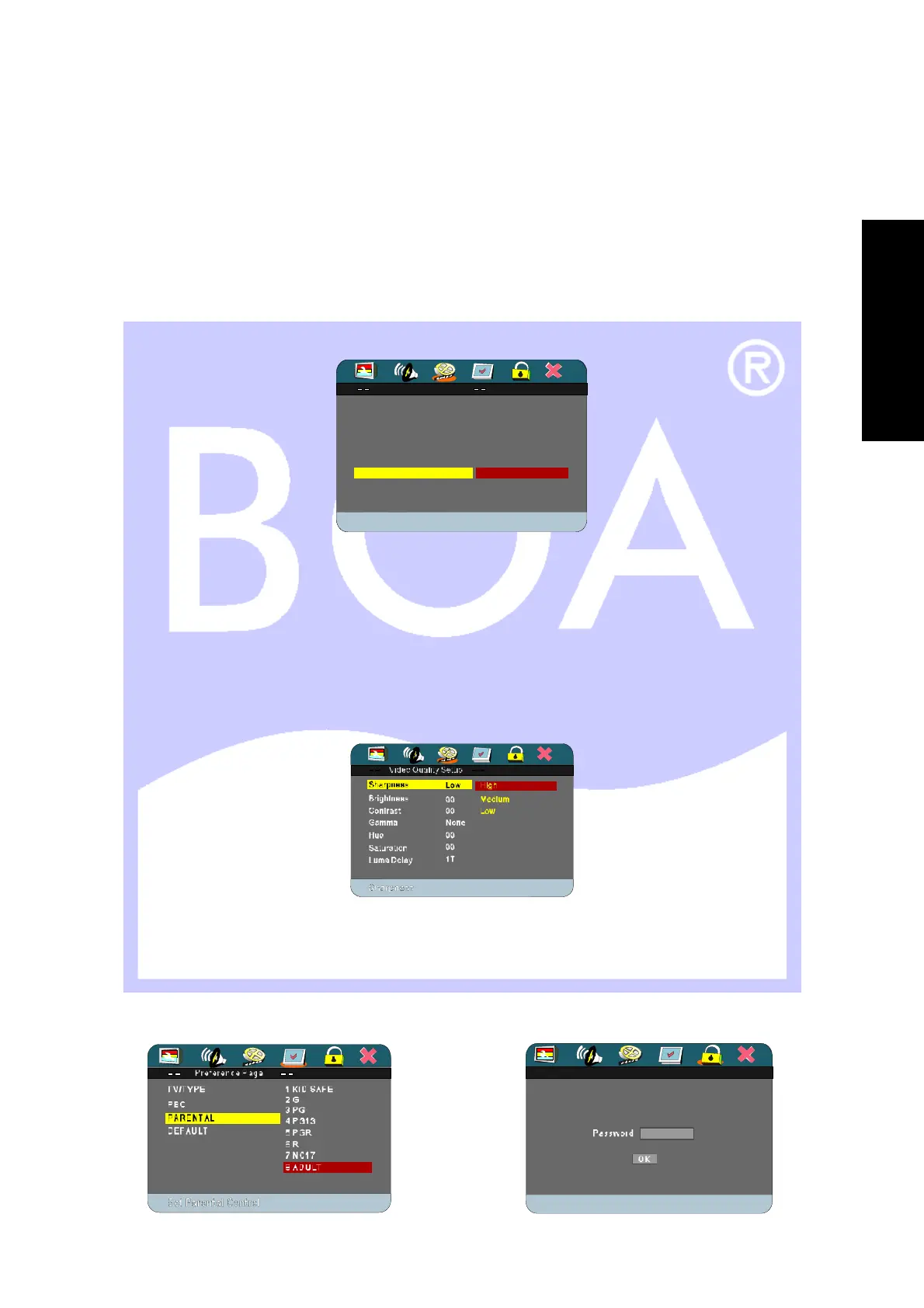
Brightness & Contrast
Press [SETUP] to access the menu. The screen will display the system setting menu. Navigate to the video
setup page and press [ENTER]. Use the [▼] button to move the yellow band to “Quality” item. Press [ENTER] to
confirm the screen will display as below:
Navigate the yellow band to the item you want to change. Press [ENTER] to select the sub-menu. Use the [▼]
button to highlight your change. Press [ENTER] to select.
Press [SETUP] to exit system setting. As of the items in this menu are altered, they will change the color setting
on the screen.
Parental control
Move the blue bar to Parental and press [ENTER], Use [►] to move the yellow bar to extended menu, a sub-
menu appears requesting password; factory default password (123456) and press [ENTER].
General Setup Page
On
Off
L AST M EM O R Y O N
Set Las t Memory F unc t ion
TV DISPLAY PS
ANGLE MARK ON
OSD LANGUAGE ENG
CAPTIONS OFF
SCREEN SAVER ON
General Setup Page
On
Off
L AST M EM O R Y O N
Set Las t Memory F unc t ion
TV DISPLAY PS
ANGLE MARK ON
OSD LANGUAGE ENG
CAPTIONS OFF
SCREEN SAVER ON
E
N
G
L
I
S
H


 To Next Page