14
SoundExpression
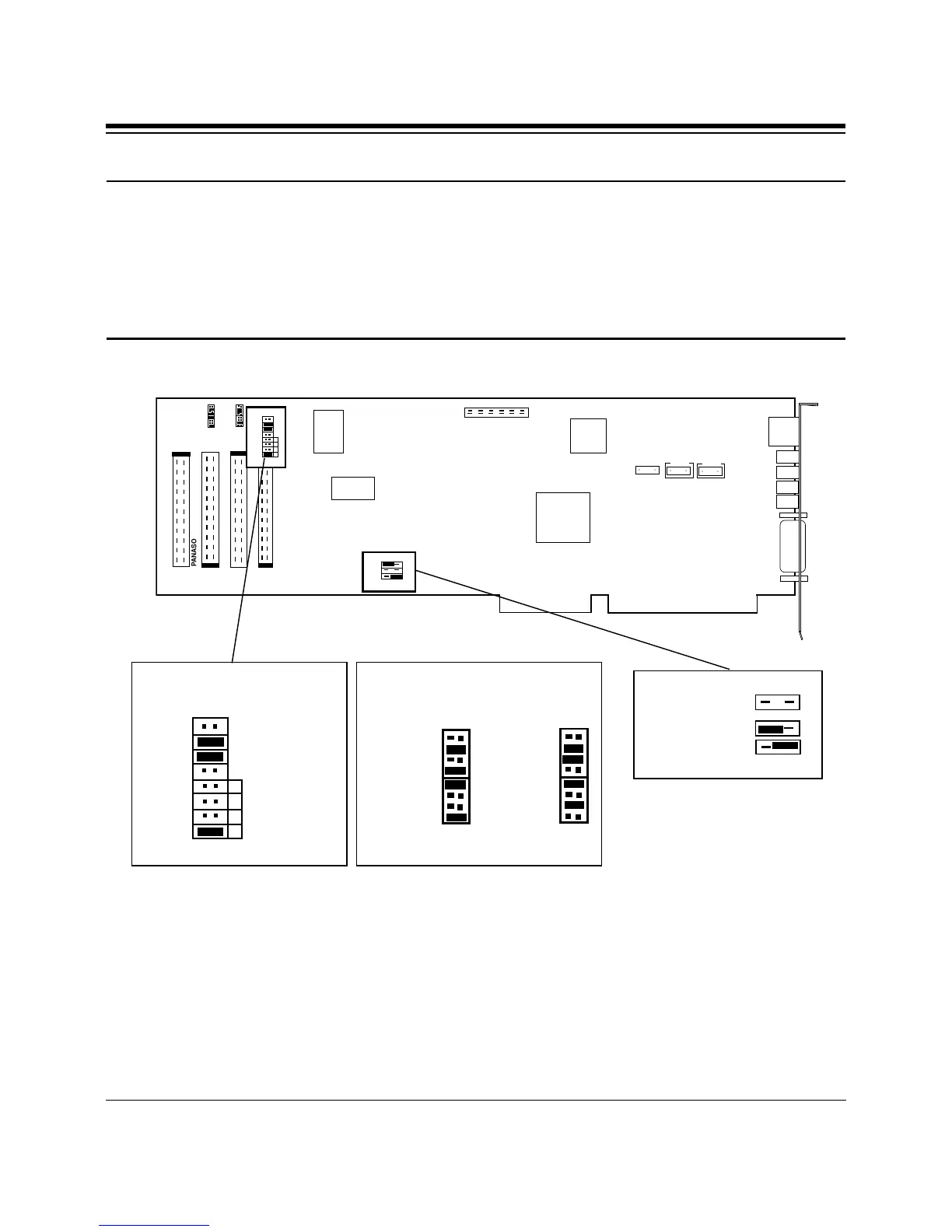
Note: The following diagram shows where the jumper settings are on the board.
Normally, you will not need to change these settings unless instructed to do so by
COMCHECK. A pair of pins is jumpered when the small plastic sleeve (often
blue or black) is fitted over both pins. Jumpers are changed or set by pulling the
plastic sleeve up and fitting it on a different pair of exposed pins in the same
jumper block.
6. Turn off your computer and disconnect any attached devices and power
cords. Remove the diskette. Remove the system cover and install the
CD-ROM drive (if you are using one) into your computer system. Refer
to the documentation which came with your CD-ROM drive. Otherwise,
skip to step 9.
○ ○
○ ○
○ ○
PANASONIC
IDE
MITSUMI
SONY
COM 2=
COM 4=
COM 1=
COM 3=
{
{
C
O
M
I
R
Q
7
5
4
3
ENABLE
DISABLE
IDE CD
COM 2=
Default
Configuration
COM2
IRQ3
J4
(default)
Other Possible
COM Settings



 To Next Page