41
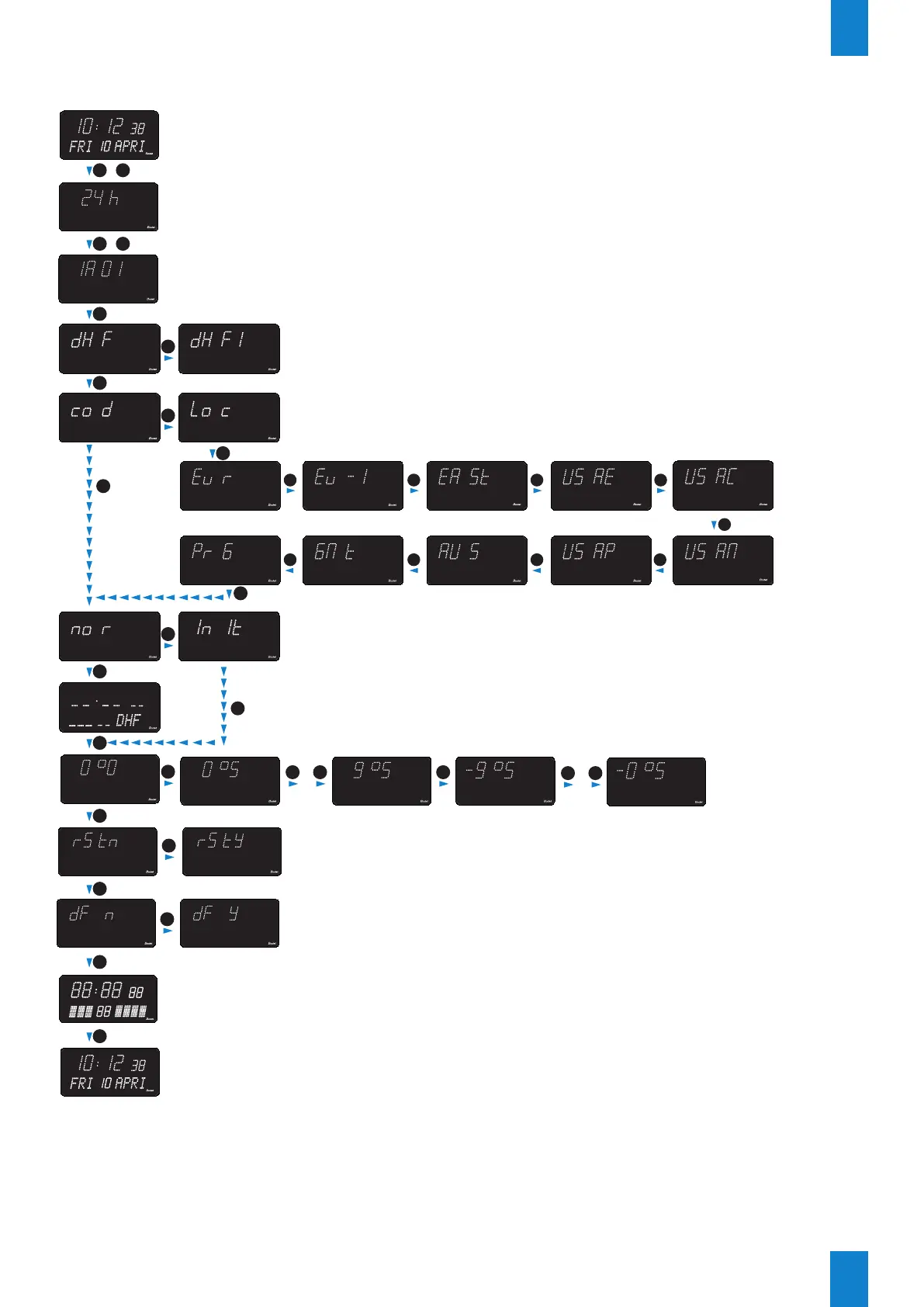
DHF synchronisation
EN
+
S
Hold down for 3 seconds
+
+
S
S
S
S
S
S
S
Hold down for 7 seconds
+
+
+
+
+
...
+ ++
...
+ +
Open configuration menu
Software version
Select DHF mode
DHF (defaut) or DHFi (the clock operates using its internal time base)
Resetting the clock (enabled when ‘rstY’ is selected)
Set the T°
offset
Restore to factory settings (enabled when ‘dF Y’ is selected)
Display test (tests for correct functionning of all LEDs)
End of menu
S
S
S
S
S
+
+
S
Select time zone: cod or loc (default cod)
Cod: the clock displays the time code data received, without modification
Loc: the clock calculates and displays local time using the time code data received
plus its summer/winter time changeover and time difference settings.
Display dynamic reception
+ + + +
+ + + +
+
Select time zone
(default Eur)


 To Next Page