Boonton 4540 Series RF Power Meter
Installation
6. On the front panel, press the Menu key followed by the More softkey, then on the softkeys, press System > Reports >
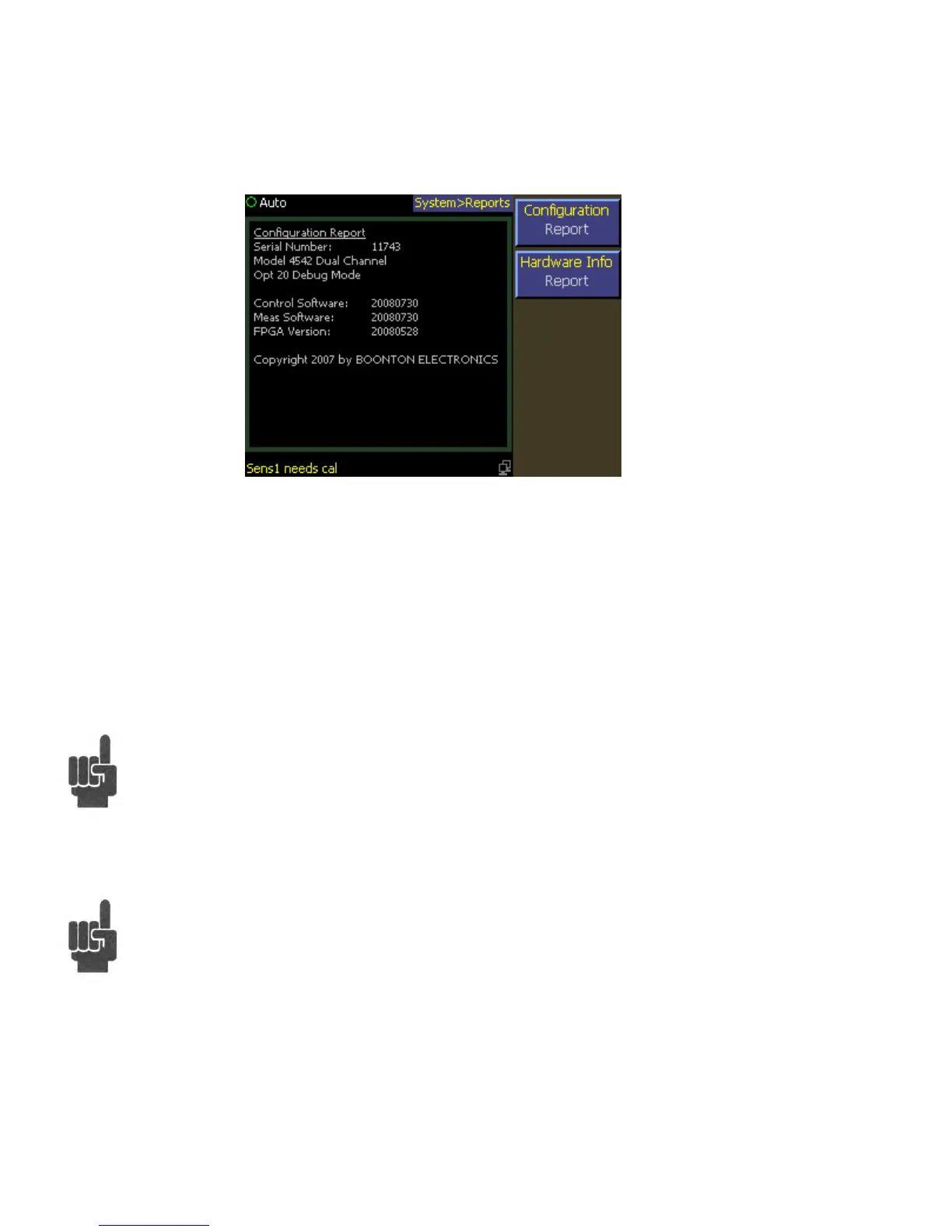
Configuration REPORT. A display similar to Figure 2-3 should appear.
7. Verify that the instrument serial number and model number shown are correct, and the correct number of channels
(single or dual) appears. If the channels are configured for non-standard length input cables, the expected sensor cable
length expected may also be appended. If any of this information appears incorrect, contact Boonton Electronics for
technical support.
8. Follow steps in Sections 3.4 and 3.5 to initialize and calibrate the instrument.
Note If the display does not appear or differs significantly from the illustrated display, try reinstalling the
instrument software as described in Section 7.5 "Software Upgrade". If this does not correct the problem,
contact Boonton Electronics for technical support.
Note You will not be able to perform measurements with the 4540 Series until an AutoCal procedure (see
Section 3.5) has been performed on the measurement channel. However, AutoCal data is saved when
power is removed, so AutoCal need not be repeated with each power-on.
Figure 2-3. System > Configuration Report Display


 To Next Page