71
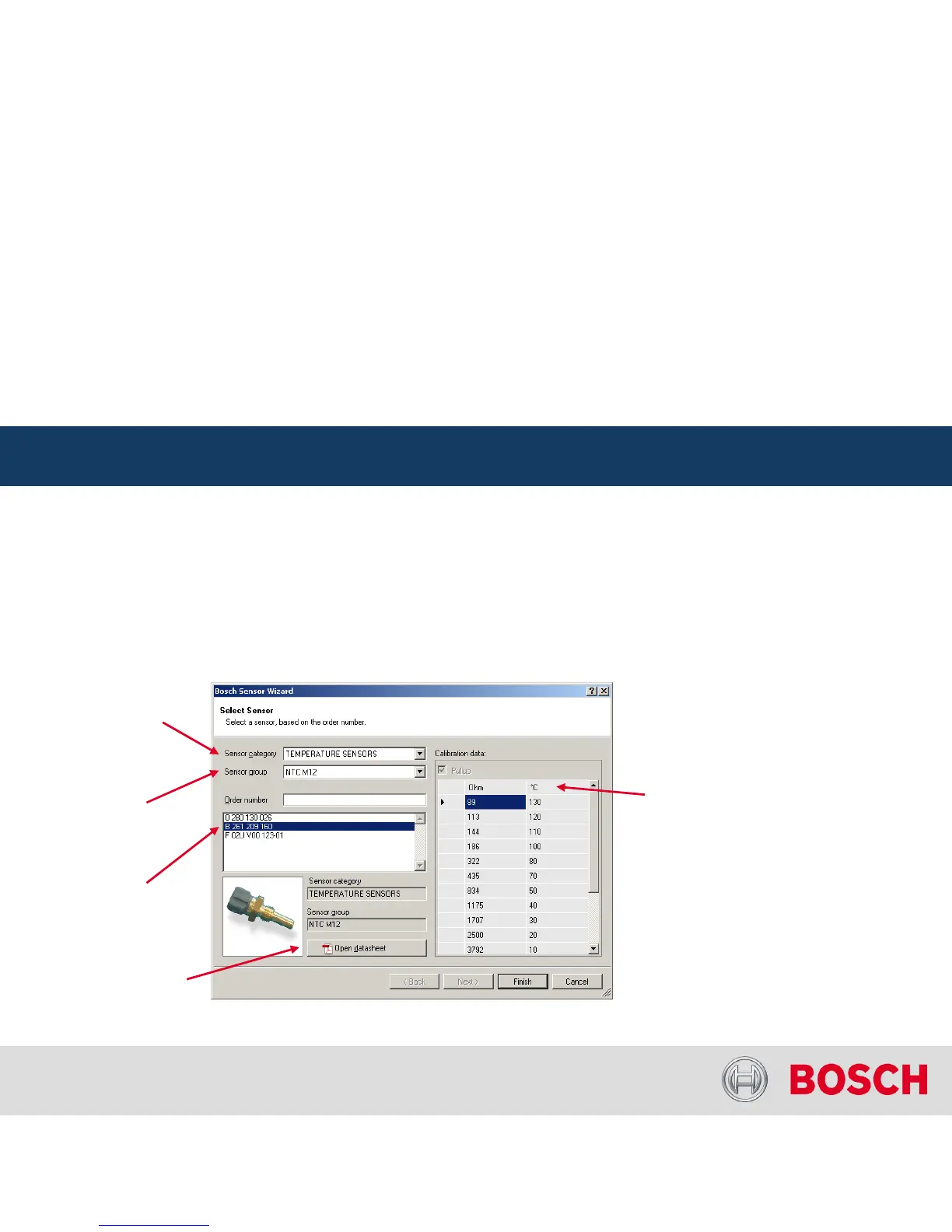
Configuring a predefined Bosch sensor with the ‘Bosch Sensor Wizard’
Drag the ‘Bosch Sensor Wizard’
from the Toolbox and drop it on the desired analog
input channel in the C 60 project tree
The ‘Bosch Sensor Wizard’
opens
Click ‘Finish’
when done
C 60 Analog and Frequency Inputs
Internal | BEG/EMS1 CsM
| 6/4/2010 | ©
Bosch Engineering GmbH 2009. All rights reserved, also regarding any disposal, exploitation,
reproduction, editing, distribution, as well as in the event of applications for industrial property rights.
Motorsport
Configuring Inputs –
Bosch Sensor Wizard
1
st
choose
the sensor’s
category here
2
nd
narrow your choice
by choosing a type here
3
rd
select the exact
type here
Opens sensor’s
datasheet
These calibration
values will be used




 To Next Page