88/108 Bosch Rexroth AG CS351 | 3609929B45/2014-09
Commissioning
Removing the front cover
You can remove the front cover to improve
access to the interfaces.
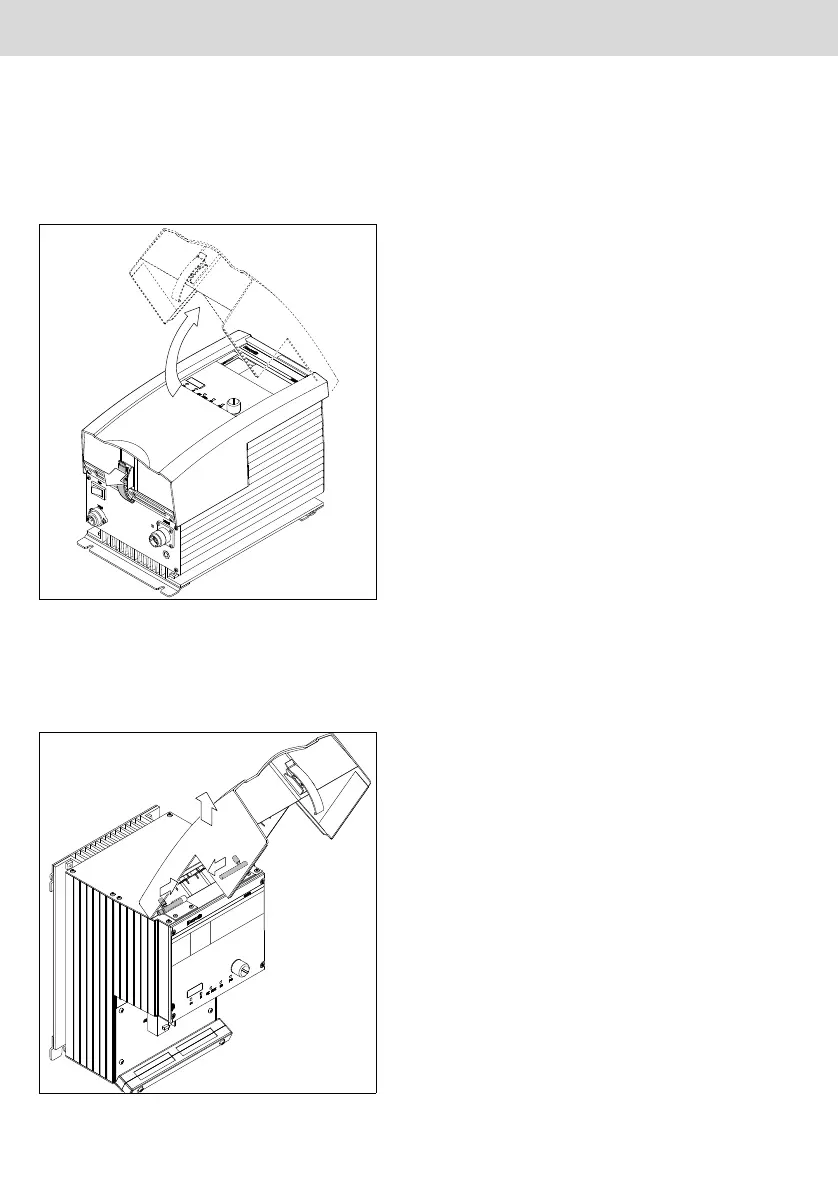
1. Release and open the front cover.
Fig. 28: Releasing and opening the front co-
ver
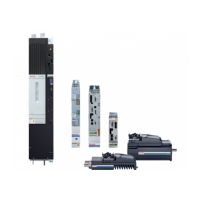
2. Slide the left and right axle pins in and
remove the front cover.
Fig. 29: Removing the front cover
Assembly:
1. Push the axle pins in and insert the front
cover.
2. Release the axle pins – both axle pins
must engage in the front cover.
Commissioning the Compact System
Proceed as follows to commission the
Compact System:
1. Install all of the required interface modu-
les
– Release and remove the front cover
(see page 88).
– Slide the respective module in.
– Secure the module.
2. To operate the integrated computer
unit, connect an USB mouse and key-
board (connectors X3U6 – X3U8) as
well as a monitor (XDVI 2) (optional).
Devices and connection cables are not
included in the delivery of the Compact
System.
3. Connect the Compact System to the
external peripherals (e.g. partner cont-
roller or external TFT display).
4. Connect the emergency OFF equip-
ment, if necessary.
5. Check whether all module slots are
closed by modules or dummy panels.
6. Lay all the connection cables through
the cable duct strip:
– Open both bolts and remove the front
part of the cable duct.
– Insert all of the cables connected in-
side the front cover in the cable duct.
– Assemble the front part of the cable
duct.
7. Assemble the front cover.
8. Close and lock the front cover.
CS351_zweispaltig - D.book Seite 88 Donnerstag, 2. Oktober 2014 8:36 08


 To Next Page