90/108 Bosch Rexroth AG CS351 | 3609929B45/2014-09
Commissioning
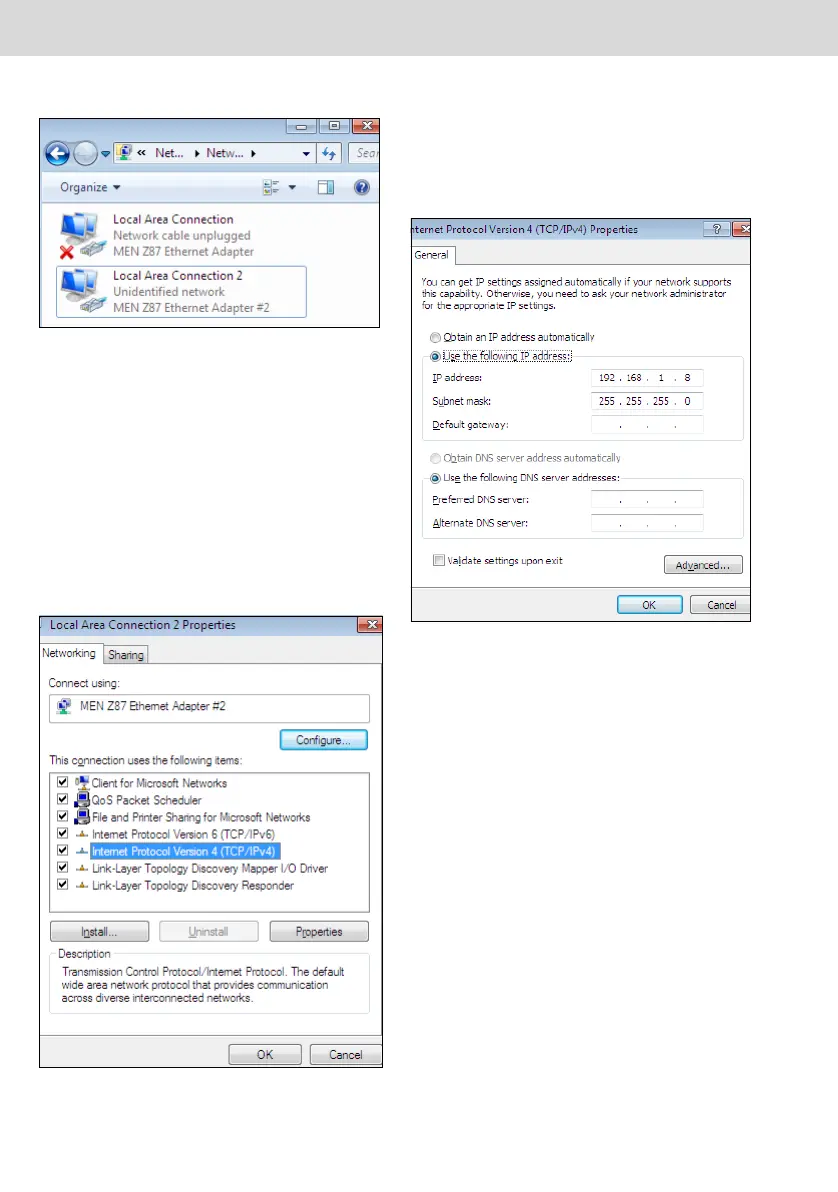
Fig. 30: "Change Adapter Settings" dialog
3. Double-click the LAN connection con-
necting the computer unit to the Com-
pact System (usually "Local Area
Connection 2").
Tip: If you do not assign the X7E4,
X7E5 Ethernet connections of the com-
puter unit prior to commissioning, the
connection without the red X is the
direct connection to the Compact Sys-
tem.
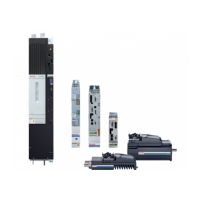
Fig. 31: "Local Area Connections Properties"
dialog
4. "MEN Z87 Ethernet Adapter #2" must
be set under "Connect using:".
5. Click "Internet Protocol Version 4 (TCP/
IPv4)" and then "Properties".
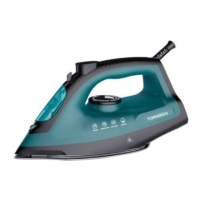
Fig. 32: "Internet Protocol Version4 Proper-
ties" dialog
6. Activate option "Use the following IP
address:" and enter the IP address and
the subnet mask for the computer unit
(e.g. 192.168.1.8 and 255.255.255.0).
The IP address must be within the same
address range as that of the Compact
System..
CS351_zweispaltig - D.book Seite 90 Donnerstag, 2. Oktober 2014 8:36 08


 To Next Page