CS351 | 3609929B45/2014-09 Bosch Rexroth AG 97/108
Maintenance and repair
ENGLISH
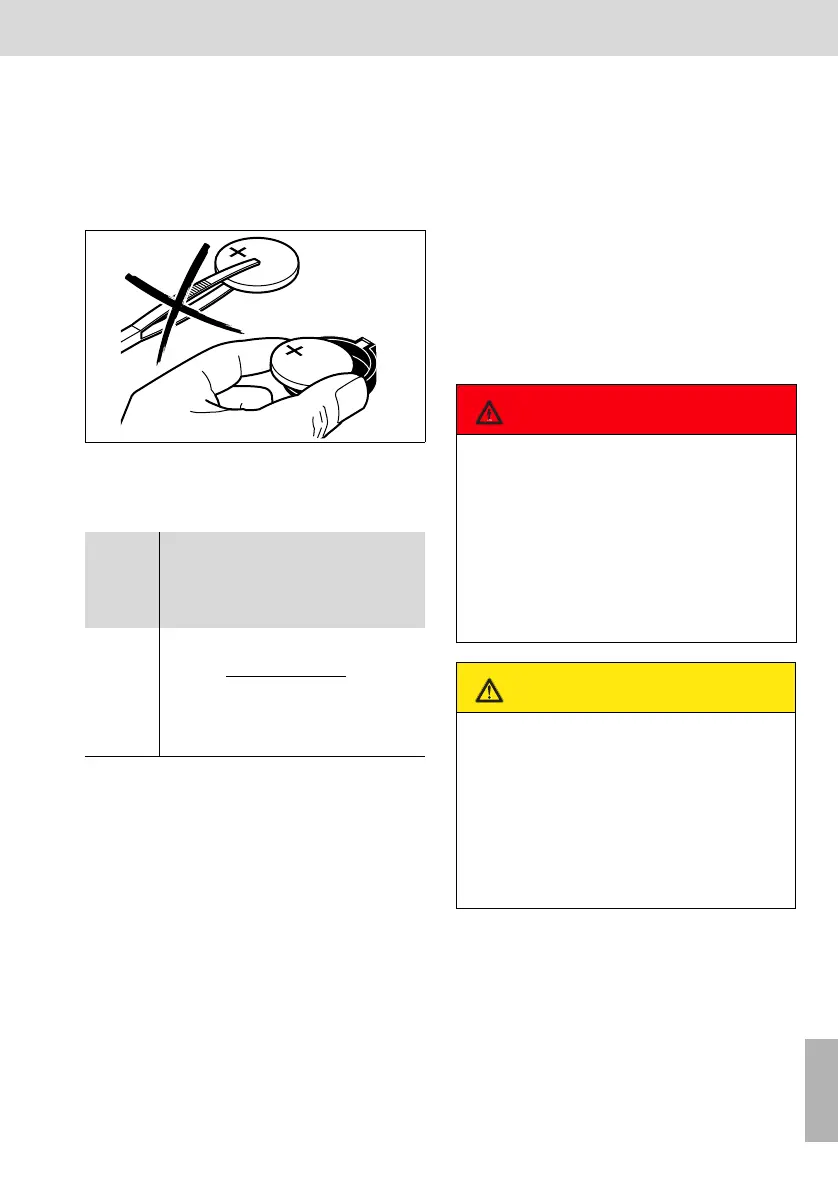
• Remove the dead battery. Under no cir-
cumstances should conductive tools (e.
g. tweezers) be used to remove batteries
- danger of short circuit. Remove the bat-
tery from the holder by hand.
Fig. 39: Exchanging the battery
• Insert the new battery. Positive pole at the
top. Press the battery into the holder until
it engages.
• Assemble the display unit. The tightening
torque for the bolts is 1.4 + 1 Nm.
• Set the date and time via the operating
program.
Please observe the battery disposal instruc-
tions in chapter 2, section " Disposal".
Variant with integrated computer unit:
Changing the battery of the computer
unit
The service life of the computer unit battery
is at least five years after manufacture. The
battery supplies the real-time clock of the
operating system with electric current.
The battery must be changed if the bios of
the computer unit loses its settings.
The replacement battery is a CR2032 but-
ton cell (3 V lithium).
Proceed as follows to exchange the battery:
• Open and remove the front cover.
• Remove the eight screws of the housing
cover (the hinges of the front cover are on
the housing cover). Lift off the cover.
• Move the ribbon cable a little to the side
without tensioning or disconnecting it.
Tab.19: Battery: Recommended types
Compo-
nent
Name
Manu-
factu-
rer/
Supplier
Type Remark
Lithium
cell 3 V
BT1 SONY CR
2450
Lithium
battery
3V,
Q ≥
560 mAh
24.5x5 mm
VARTA CR
2450
DANGER
Electrical voltages!
Electrocution
Open the housing only while the
Compact System is off and the power
plug is disconnected. Protect the sys-
tem from being switched on again.
Wait until the discharging time (at
least 90 seconds) has elapsed.
CAUTION
Risk of damage to persons and pro-
perty!
To protect the assembly and the sys-
tem components,
measures against damage caused by
electrostatic
discharge (ESD protection) must be
implemented for this assembly work.
CS351_zweispaltig - D.book Seite 97 Donnerstag, 2. Oktober 2014 8:36 08


 To Next Page