80/128 Commissioning
Bosch Rexroth AG, CytroBox, RE 51057-B/11.19
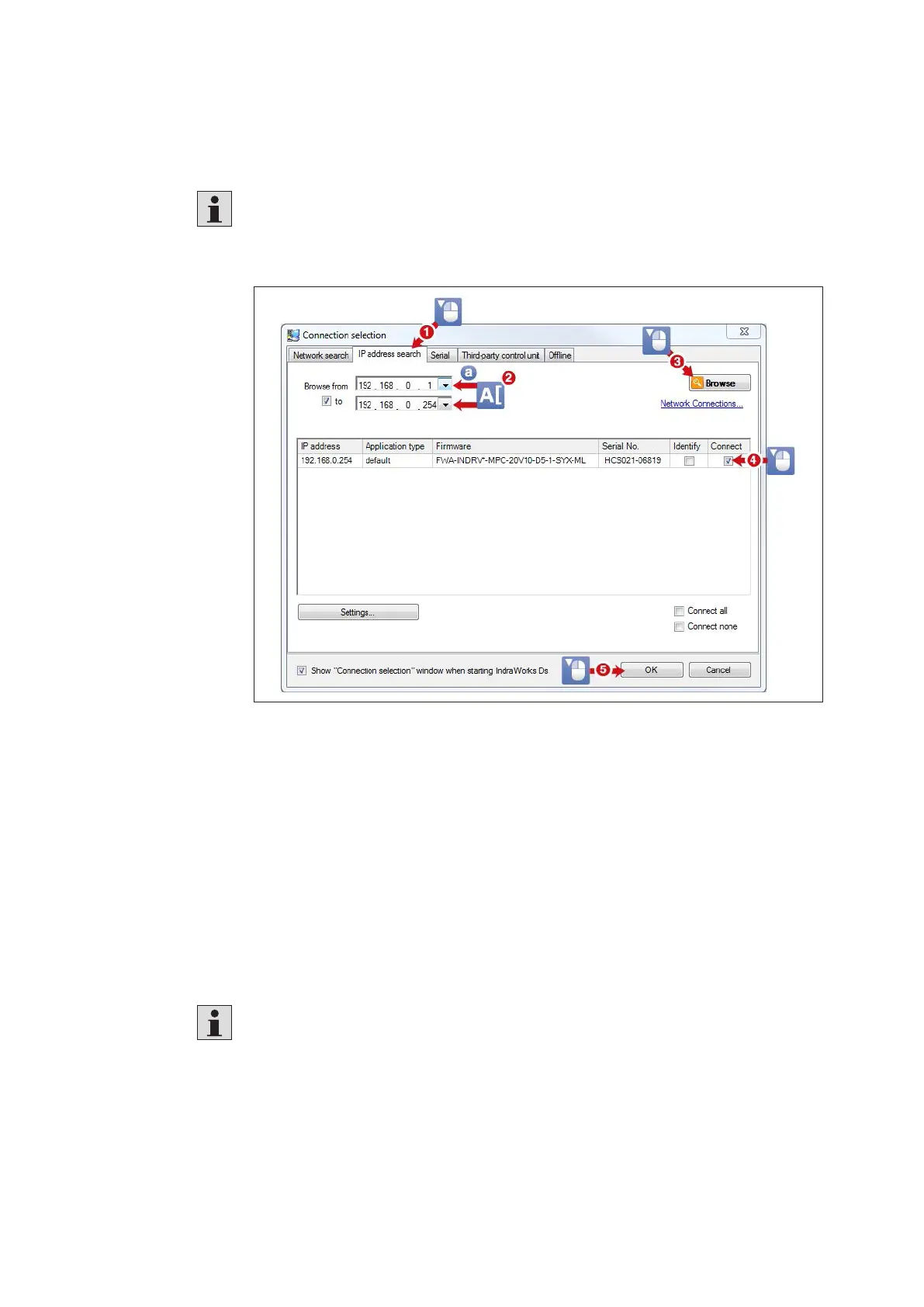
Another way to establish a TCP/IP connection is to specify the address range to be
searched in the connection selection dialog in the IP address search tab.
This method also works across network boundaries (router).
To this end, enter the address or the range in the following screen
"Connectionselection":
Fig. 26: Establishing a TCP/IP connection to the drive via an Ethernet interface
IP address range
The current IP settings of the drive can be read out from the operating unit.
For local networks, IP addresses in the following address range can be assigned:
• 10.0.0.0 to 10.255.255.255,
• 172.16.0.0 to 172.31.255.255 and
• 192.168.0.0 to 192.168.255.255
CytroBox default settings:
IPaddress: 192.168.0.10
Network mask: 255.255.255.0
Standard gateway: 0.0.0.0
Parameterization of the desired IP address, network mask and standard gateway
is only possible in parameterization mode.
The possibly necessary switching into parameterization mode via the operating
unit is described below.


 To Next Page