20
|
User Manual
Bosch Climate 5000 Series Remote Control (06.2022)
4.4 Advanced Settings
4.4.1 FOLLOW ME
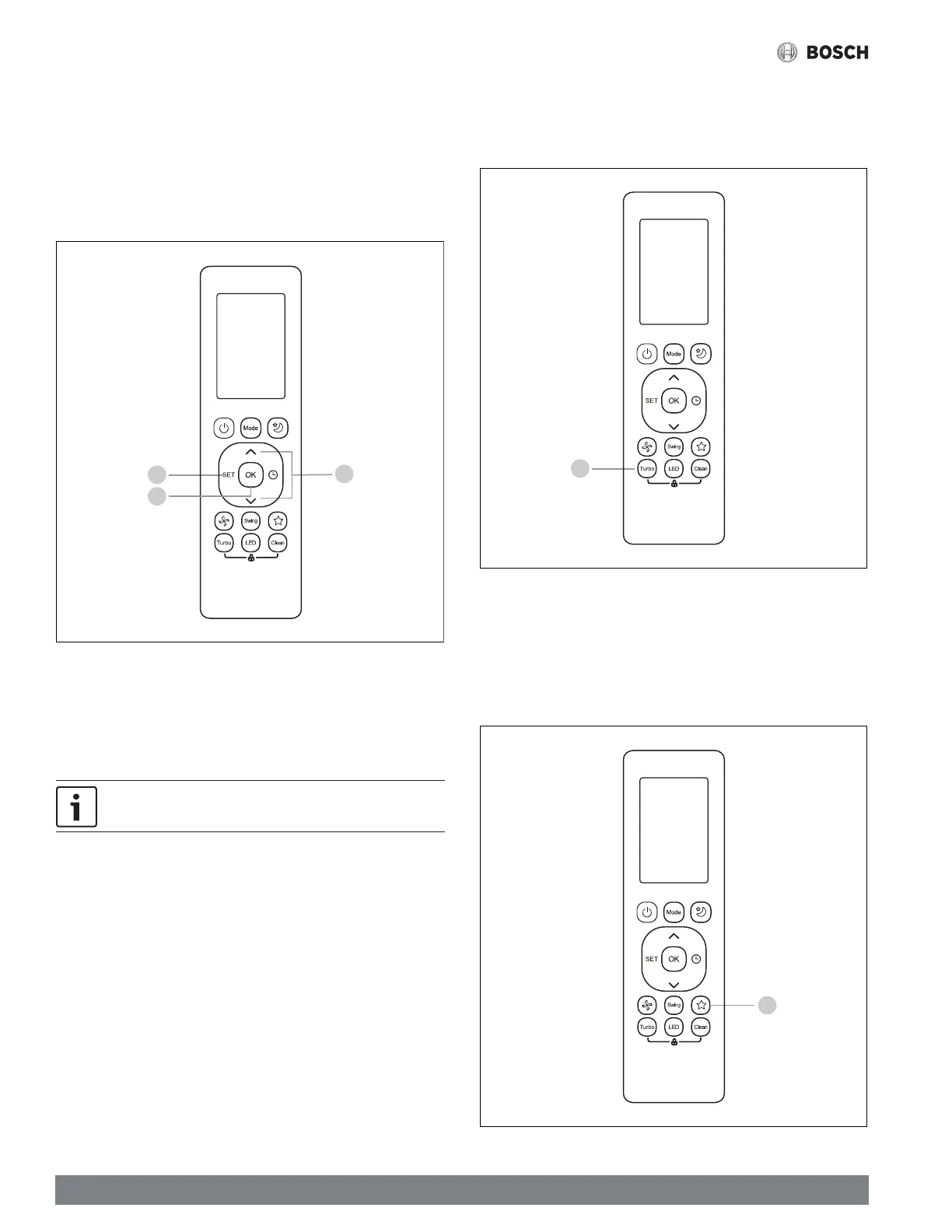
1. Press the SET button.
2. Use the TEMP UP/DOWN or the SET button until the FOLLOW ME icon
appears.
3. Press the OK button to confi rm.
Figure 29
2
3
1
In this mode, the ambient temperature will be measured from the remote controller
instead of the indoor unit itself, and adjust the system accordingly for maximum
comfort.
Press and hold the TURBO button for 7 seconds to activate the
FOLLOW ME memory feature.
4.4.2 TURBO
1. Press this button to activate TURBO mode, which puts the system in the
highest operation mode to reach the set temperature as quickly as possible.
Figure 30
1
4.4.3 SHORTCUT
1. Press this button to revert back to the system's previous setting including
operating mode, temperature and fan speed, as well as SLEEP if activated.
2. Press and hold the SHORTCUT button to restore the system settings before
activating the SHORTCUT feature.
Figure 31
1





 To Next Page