| 29
User Manual
Bosch Climate 5000 Series Remote Control (06.2022)
5.4 Advanced Settings
5.4.1 SET
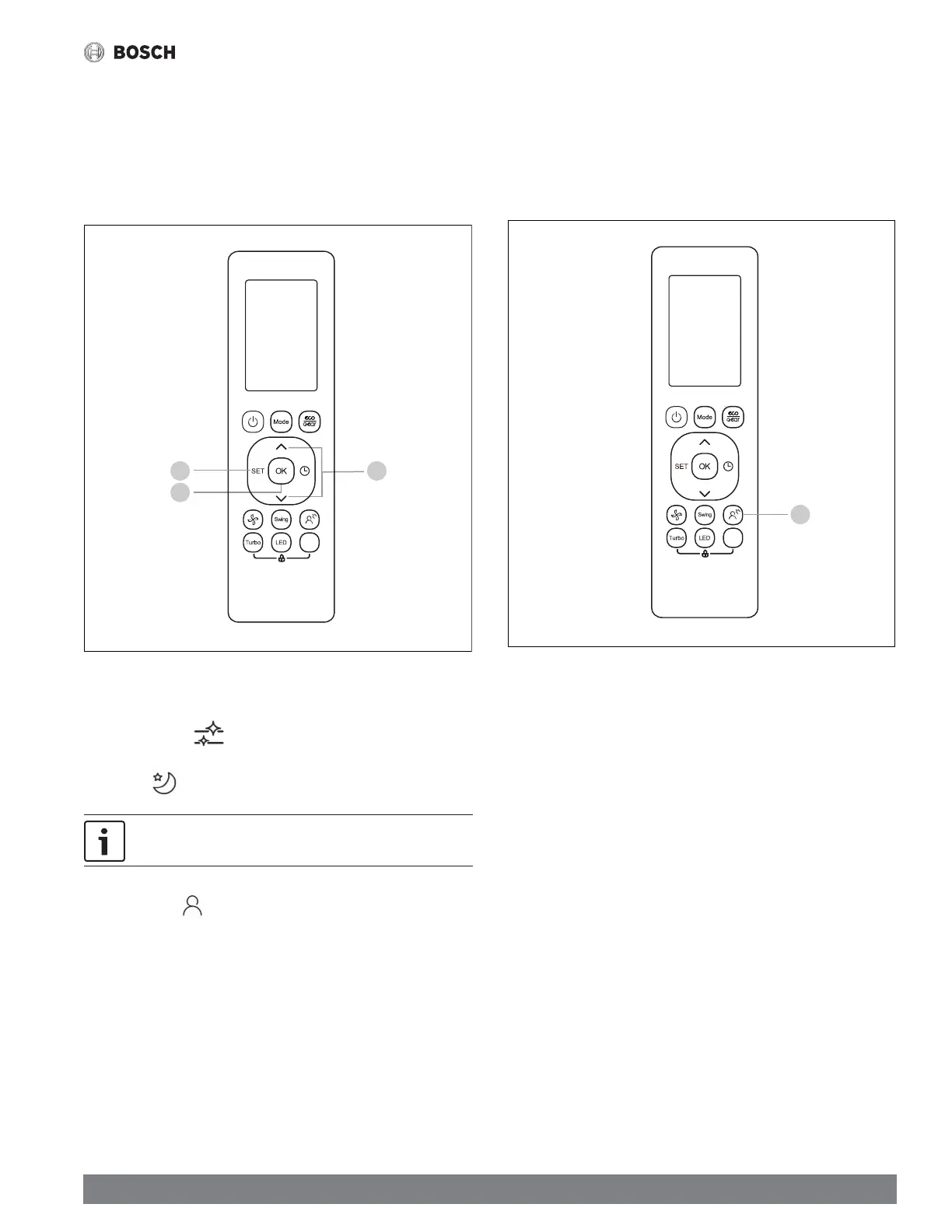
1. Press the SET button
2. Use the TEMP UP/DOWN or the SET button to select the desired function
3. Press the OK button to confi rm
Figure 47
2
3
Van e
1
The SET functions are as follows:
ACTIVE CLEAN ( ): This function automatically cleans the heat
exchanger by freezing and thawing the surface.
SLEEP ( ): This feature reduces energy usage while you sleep.
SLEEP mode is not available in FAN and DRY mode.
FOLLOW ME ( ): In this mode, the ambient temperature will be
measured from the remote controller instead of the indoor unit itself, and
adjust the system accordingly for maximum comfort.
5.4.2 BREEZE AWAY
This mode redirects airfl ow to avoid blowing air directly on a person for maximum
comfort.
While in COOL, FAN, or DRY mode:
1. Press the BREEZE AWAY button
Figure 48
Van e
1





 To Next Page