This document describes the Bose Music Amplifier, a versatile audio device designed to power speakers and integrate with various audio sources and smart home ecosystems.
Function Description:
The Bose Music Amplifier serves as a central hub for your audio system, capable of powering up to two pairs of speakers (4 or 8 ohm minimum each) and connecting to a Bose Bass Module for enhanced low-frequency performance. It supports both wired and wireless connections, allowing users to stream music from mobile devices via Bluetooth®, connect to a home network via Wi-Fi or Ethernet for streaming services, and integrate with voice assistants like Google Assistant and Amazon Alexa. The amplifier also supports Chromecast built-in and Apple AirPlay 2 for seamless audio streaming from compatible devices and apps. It can be configured as a Main amplifier or a Supplemental amplifier in a multi-amplifier setup, offering flexibility for various room sizes and audio configurations. The device includes a "Line Out" for connecting to a Supplemental amplifier or external audio equipment, a "Line In" for RCA audio input, and an "Optical In" for digital audio sources.
Important Technical Specifications:
- Dimensions (approximate): 8 ¼" wide x 8 ¼" deep x 2 ⅞" high (21 cm x 21 cm x 7.3 cm)
- Weight (amplifier only): 4.8 lbs (2186g)
- Power rating: 100-240V ~ 50/60 Hz, 240W
- Input sensitivity: RCA inputs: 2Vrms
- Signal to Noise ratio (S/N): >100 dB
- Output power (continuous average): 125W / channel minimum into 8 ohms, from 20 Hz to 20 kHz, with no more than 0.1% THD
- Temperature range: 32° F to 95° F (0° C to 35° C)
- Wireless connectivity: Wi-Fi (2.4GHz and 5GHz bands), Bluetooth®
- Wired connectivity: Ethernet, RCA audio in/out, Optical in, USB Type-C (Service port)
Usage Features:
- Speaker Connection: Connects to passive speakers via spring-clip terminals. Supports one or two pairs of speakers with specific impedance requirements (4 ohm minimum for one pair, 8 ohm minimum for two pairs). Speaker wire length recommendations are provided (e.g., 30 ft (9 m) for 18 gauge, 70 ft (21 m) for 14 gauge).
- Powering On/Off: Connects to an AC (mains) power outlet. The light on the back of the amplifier slowly blinks amber during network standby.
- Bose Music App Setup: Download the Bose Music app on a mobile device (iOS or Android) to set up and control the amplifier, stream music, add services, explore internet radio stations, set presets, and manage voice assistants.
- Multi-Amplifier Setup: Can be added to an existing Bose Music app account. Multiple Main amplifiers can be grouped for multi-room audio. Supplemental amplifiers can be connected via RCA audio cables to a Main amplifier.
- Network Connectivity: Connects to a different Wi-Fi network or via an Ethernet cable.
- Voice Assistant Integration: Compatible with Google Assistant and Amazon Alexa for voice control of music playback and other functions.
- Streaming Audio: Supports Chromecast built-in for streaming from supported apps and Apple AirPlay 2 for streaming from Apple devices.
- Preset Personalization: Users can personalize up to six presets for favorite streaming music services, stations, playlists, artists, albums, or songs from their music library. Presets can be accessed via the Bose Music app.
- Bluetooth® Connections: Connects to mobile devices via Bluetooth®. The Bluetooth® button on the front of the amplifier is used for pairing. The amplifier can store up to eight devices in its device list.
- Amplifier and Speaker Settings: Features "ADVANCED SETTING" switches to configure the amplifier's mode (Main, Supplemental, N/A, Stereo, Mono) and "Line out" volume (variable or fixed). "SPEAKER SETTING" switches allow for customized EQ settings for Bose 251 Environmental Speakers, Bose Virtually Invisible 791 speakers, or other speakers.
- Bose Bass Module Connection: Connects to Bose Bass Module 500 or 700 via a 3.5 mm stereo audio cable for enhanced bass.
- Bose SoundLink Bluetooth® Speaker/Headphone Connection (SimpleSync™): Connects to certain Bose SoundLink Bluetooth® speakers or Bose headphones to play audio in sync with the amplifier.
- External Source Connection: Connects to external analog or digital sources using an RCA audio cable or an optical cable.
- Overload Protection: Features an overload protection system that automatically reduces maximum power output to prevent damage from overheating.
Maintenance Features:
- Software Updates: The amplifier updates automatically when connected to the Bose Music app and a Wi-Fi network. The status of updates is indicated by the blinking white light on the back of the amplifier.
- Cleaning: Clean the surface of the amplifier with a soft, dry cloth. Use a brush attachment on a vacuum cleaner to clean hard-to-reach areas. Avoid using sprays, solvents, chemicals, or abrasives. Do not allow liquids to spill into any openings.
- Resetting the Amplifier: Pressing the RESET button on the back of the amplifier resets it without affecting ADVANCED SETTING or SPEAKER SETTING configurations.
- Restoring to Factory Default: Inserting a thin paperclip into the hole in the back of the amplifier and holding for 10 seconds until the light on the back blinks red 3 times restores the amplifier to factory settings, clearing all source, volume, and network settings.
- Troubleshooting: The manual provides a comprehensive troubleshooting section with symptoms and solutions for common issues related to network connectivity, audio quality, Bluetooth® connections, voice assistant response, and more.
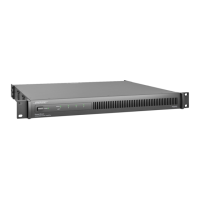
- Rack Mounting: The amplifier can be mounted on a rack using the provided mounting bracket, rack bracket, and hardware. Detailed instructions are included for connecting the brackets and attaching the amplifier to the rack.
- Wall Mounting: The amplifier can be mounted on a wall using the mounting bracket and hardware (not provided). Specifications for wood, wallboard, and masonry are provided, along with warnings about drilling and electrical/plumbing hazards. Detailed instructions are included for attaching the mounting bracket to the wall and then attaching the amplifier to the bracket.
- Limited Warranty: The amplifier is covered by a limited warranty. Users can visit the Bose website for details and to register their product.

 Need help?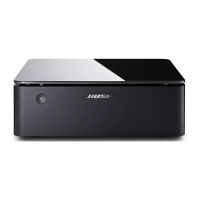

 To Next Page
 General