EasyManua.ls Logo

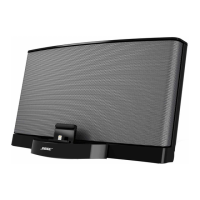
Bose SoundDock - User Manual

Bose SoundDock
17 pages
Print Icon
To Next Page IconTo Next Page
Loading...
DIGITAL
MUSIC
SYSTEM
PORTABLEM()D.EL
" "
Owner's
Guide
Brugervejledning
Bed
ienungsanleitung
Guia de
usa
rio
Kayttoohje
Notice
d'utilisation
Manuale
di
istruzioni
Gebruiksaanwijzing
Bruksanvisningen

Other manuals for Bose SoundDock

Questions and Answers

  • A
    Ashley RobertsonSep 6, 2025
    Why is my Bose SoundDock Docking Station not responding to the remote or volume buttons?
    • J
      Jeffrey CastroSep 6, 2025
      If your Bose SoundDock system isn't responding to remote commands or the volume buttons, unplug the power cable for 1 minute, then plug it back in to reset the system.
  • W
    wilsonbrandonAug 22, 2025
    Why is there no sound coming from my Bose SoundDock?
    • B
      Brian WalkerAug 22, 2025
      If you're not getting any sound from your Bose Docking Station, here are a few things to check: * Ensure the system volume is turned up. * Confirm that your iPod/iPhone is properly docked. * Verify the system is plugged in, your iPod/iPhone is on, and a music track is selected and playing. * Press the Play/Pause button on the remote. * Make sure your iPod/iPhone has the latest software updates.
  • D
    Dawn GarciaSep 3, 2025
    What to do if there is no sound after quickly undocking or docking my iPod/iPhone on my Bose Docking Station?
    • H
      Heidi SheltonSep 4, 2025
      If you experience a loss of sound after quickly undocking and docking your iPod/iPhone on your Bose Docking Station, remove your iPod/iPhone from the dock, wait five seconds, and then return it to the dock. Alternatively, unplug the power cable for one minute, then plug it back in to reset the system.
  • E
    Erik BoyerSep 2, 2025
    What to do if my Bose SoundDock system is not responding to the remote or volume buttons?
    • A
      Alan WebsterSep 2, 2025
      If your Bose SoundDock system isn't responding to remote commands or the volume buttons, try unplugging the power cable for one minute, then plugging it back in to reset the system. You can also remove your iPod/iPhone from the dock briefly, then reseat it, repeating this a few times if needed.
  • K
    Kim WilliamsAug 31, 2025
    How to properly dock my iPod/iPhone in the Bose SoundDock Docking Station?
    • M
      michelle25Sep 1, 2025
      To properly dock your iPod/iPhone, make sure the dock insert is the correct fit for your iPod/iPhone model. Also, remove your iPod/iPhone from the dock and check for any obstructions on the connectors, then reseat it.
  • G
    george98Aug 30, 2025
    What to do if my Bose SoundDock Docking Station has no sound after quickly undocking or docking my iPod/iPhone?
    • K
      Kenneth SanchezAug 30, 2025
      If you experience no sound after quickly undocking or docking your iPod/iPhone, remove your iPod/iPhone from the dock, wait 5 seconds, and then return it to the dock. If the issue persists, unplug the power cable for 1 minute, then plug it back in to reset the system.
  • S
    silvaginaAug 29, 2025
    Why doesn't my Bose SoundDock respond to the remote or volume buttons?
    • R
      Robert GrantAug 29, 2025
      If your SoundDock system isn't responding to remote commands or the volume buttons, try these steps: * Unplug the power cable for one minute, then plug it back in to reset the system. * Remove your iPod/iPhone from the dock, wait briefly, and then reseat it. You may need to do this a few times.
  • J
    Jeff SimsAug 27, 2025
    How to fix iPod/iPhone that does not dock properly with Bose Docking Station?
    • N
      Nicole DavisAug 28, 2025
      If your iPod/iPhone isn't docking correctly with your Bose Docking Station: * Take out your iPod/iPhone and inspect the connectors on both the dock and your device for any obstructions. Then, try docking it again. * Remove your iPod/iPhone, wait for about five seconds, and then firmly re-dock it. You might need to repeat this a couple of times. * Ensure that the insert provided by Apple with your iPod/iPhone is correctly placed in the dock. If you're missing this insert, get in touch with Apple for a replacement.
  • M
    Megan DayAug 27, 2025
    What to do if my iPod/iPhone does not respond to the Bose SoundDock remote control?
    • S
      stephanie71Aug 27, 2025
      If your iPod/iPhone isn't responding to the Bose SoundDock remote, try these steps: * Remove and reseat your iPod/iPhone in the dock, possibly a few times. * Try using the remote from a different spot in the room. Strong lighting or room conditions might be interfering. * Ensure nothing is blocking the infrared (IR) signal between the remote and the SoundDock system. Clean the small lens on the remote's front. * Check that the remote battery is correctly installed with the + side up. * Replace the remote battery. * Make sure your iPod/iPhone is running the latest software. * Confirm your iPod is a compatible model (one without four buttons above the click wheel).
  • L
    lopezvickiAug 25, 2025
    Why is my Bose SoundDock not charging my iPod/iPhone and there is no sound?
    • P
      Penny JimenezAug 25, 2025
      If your Bose Docking Station is not charging your iPod/iPhone and there's no sound, verify that the power cord is securely connected to a working wall outlet, matching the symbol on the connector to the one on the SoundDock® system's back. Also, make sure your iPod/iPhone is a compatible model and is firmly seated in the dock.

Summary

Important Safety Instructions

General Safety Warnings

Crucial warnings about fire, electric shock, and proper usage of the product.

Electrical Noise Information

Details on product compliance with FCC rules for digital devices and radio frequency interference.

Using Your SoundDock Portable System

iPod Connection and System Setup

Guide to connecting an iPod, unpacking, and initial system setup procedures.

Powering and Portability

Instructions on using AC power, battery charging, and taking the power supply along.

Battery Operation and Indicators

Information on system battery charging, usage, and interpreting indicator lights.

Docking and Remote Control

Instructions for docking an iPod and operating the system via the remote control.

Playing Audio Sources

How to play music from iPods, other connected devices, and understand system lights.

Other Care and Handling

System Maintenance & Cleaning

Guidelines for cleaning and general upkeep of the SoundDock system.

System Battery Replacement

Procedures for removing and installing the main system battery.

Remote Battery & Adapter Management

Instructions for replacing the remote control battery and removing the power supply adapter.

Troubleshooting Common Issues

Solutions for common operational problems encountered with the system.

Technical Information & Warranty

Key technical specifications, customer service contacts, and warranty details.

Bose SoundDock Specifications

General IconGeneral
CompatibilityiPod
Product colorBlack
Dimensions (WxDxH)302.6 x 168.9 x 164.7 mm
Weight and Dimensions IconWeight and Dimensions
Weight2070 g

Related product manuals