1312
CHRONOGRAPH MODELS
1/5-seconds Chronograph Models
with Retrograde Minutes Counter and 24-Hour Hand
CHRONOGRAPH MODELS
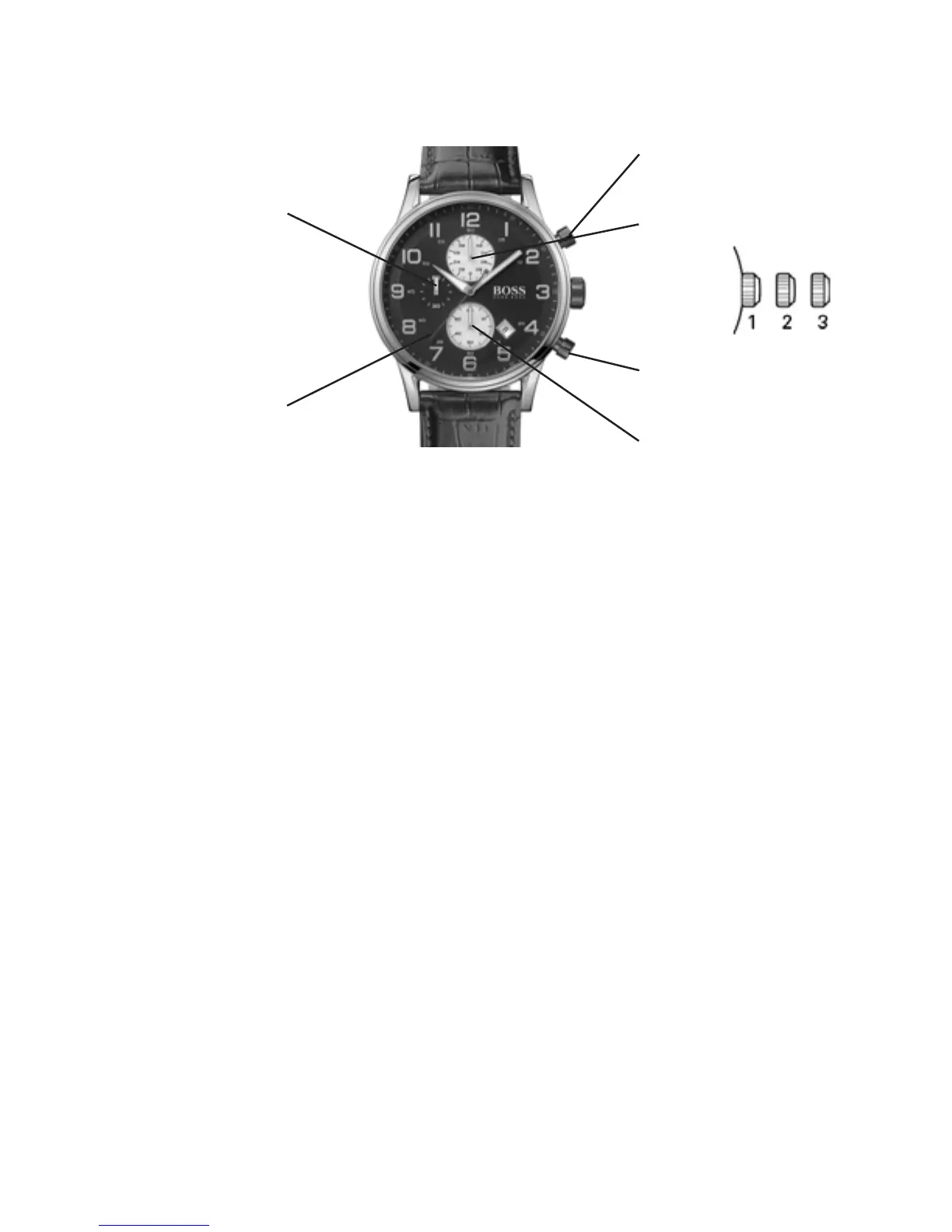
1/10 seconds Aviator Chronograph Models
Chronograph seconds hand
Chronograph 1/10 of second
counter hand
A: Start/Stop
B: Intermediate time /
Reset to zero
Seconds hand
Chronograph minutes
counter hand
Positions of the crown:
Position 1 - Normal position.
Crown pushed against the case.
Position 2 - Setting the DATE*:
Rotate the crown counterclockwise
to set the DATE.
Position 3 - Setting the TIME:
Rotate the crown in either direction.
*WARNING: Never set the date when the hands are
between 9:00 pm and 1:00 am to avoid damage to the
calendar mechanism.
NOTE: It will be necessary to adjust the DATE on the first day
of any month following one with fewer than 31 days.
Setting the time:
1. Pull crown to position 3 as soon as the small seconds
hand reaches the 60 seconds position.
The watch stops.
2. Rotate crown in either direction to move the hands
and set the time, making sure that the date changes at
midnight and not at noon.
3. Place the hands slightly ahead of the exact time, then
rotate the crown slowly counterclockwise to align the
minute hand with the correct minute marker.
4. Take an occurate time signal, from a radio station, for
example: as soon as the audible tone signals the exact
time, push crown back in to position 1; the watch will
restart, now set to the exact time.
Setting the date:
1. Pull crown to position 2.
2. Rotate crown in either direction to move the hands
and set the time making sure that the date changes at
midnight and not at noon.
Operating the chronograph:
Simple chronograph functions:
Measuring a single event without interruptions:
1. Press button A to start the chronograph.
2. Press button A a second time to stop the chronograph.
3. Press button B to reset the chronograph to zero.
Clocking total time of a series of events of short duration
(for example, the exact playing time of a soccer game which
is frequently interrupted):
1. Push button A to start the chronograph at the beginning
of the match.
2. Push button A to stop the timing when the match is
interrupted.
3. Press button A again when play resumes.
4. Repeat steps 2 and 3 until the end of the match.
5. Press button B to reset the chronograph to zero.
Synchronizing the chronograph hands:
After a battery change or in case of error, it may be necessary
to adjust the chronograph hands of the chronograph to align it
correctly to the zero position:
1. Pull crown out to position 2.
2. Press button A to adjust the stopwatch 1/10 seconds
hand. Press button B to adjust stopwatch seconds and
minute hands.
3. Once the hands are properly aligned, push the crown back
to position 1.


 To Next Page