98
WATCHES WITH MULTIPLE FUNCTIONS
Multi-eye Models with Day, Date and Moon phase Indicators
WATCHES WITH MULTIPLE FUNCTIONS
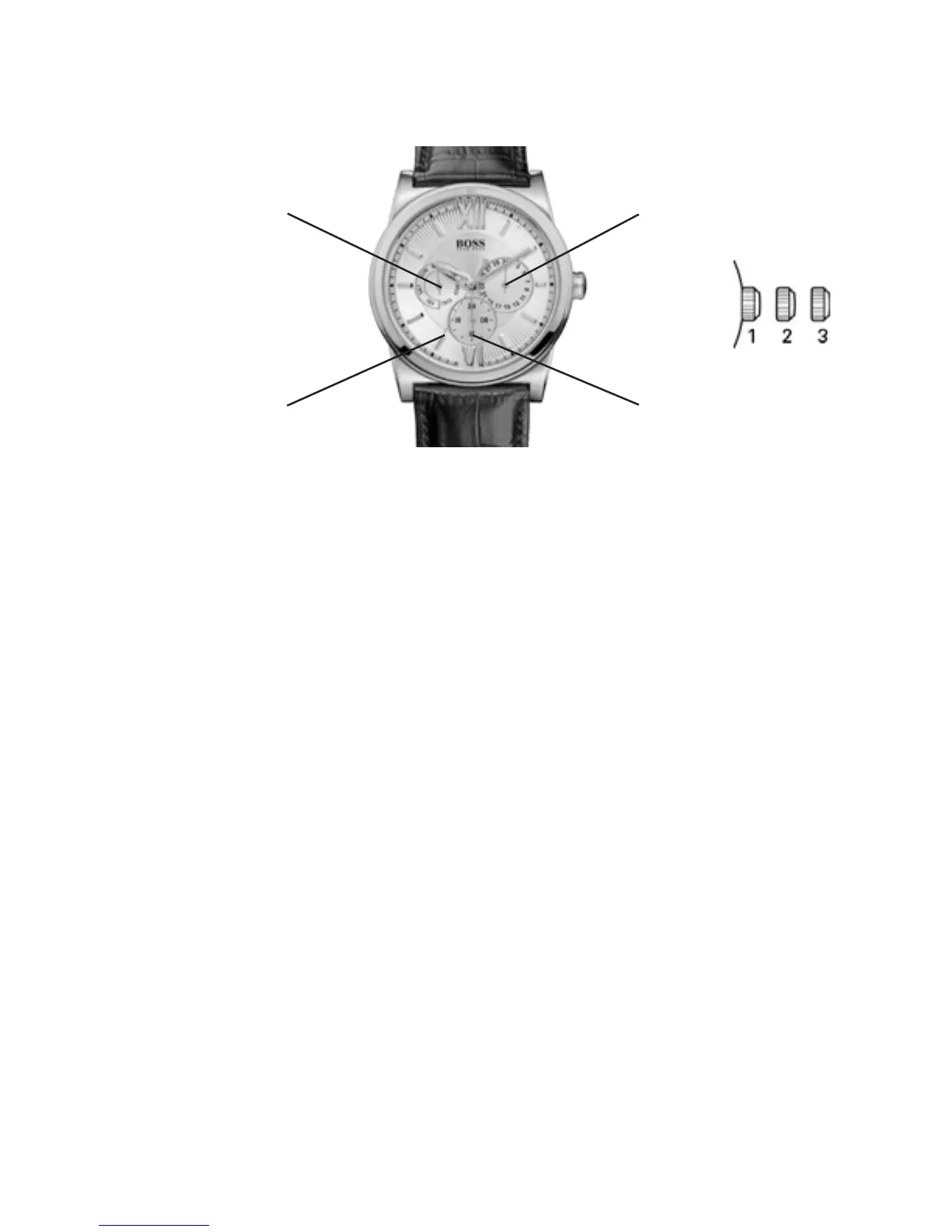
Multi-eye Models with Day, Date and 24-Hour Indicators
24-hour hand
Date hand
Direct-drive seconds
Day-of-the-week hand
Positions of the crown:
Position 1 - Normal position.
Crown pushed against the case.
Position 2 - Setting the DATE*:
Rotate the crown clockwise to advance DATE
indicator hand. Once hand points to desired date,
push the crown back to position 1.
Position 3 - Setting the TIME and DAY of week:
Rotate the crown clockwise until DAY hand
indicates desired day of week, then continue to
rotate the crown clockwise until hour, minute and
24-hour hands indicate desired TIME.
*WARNING: Never set the DATE when the hands are
between 9:00 pm and 1:00 am to avoid damage to the
calendar mechanism.
NOTE: It will be necessary to adjust the DATE on the first day
of any month following one with fewer than 31 days.


 To Next Page