1918
AUTOMATIC WATCHES
Standard 2-Hand and 3-Hand Models
CHRONOGRAPHS WITH COMPLEX FUNCTIONS
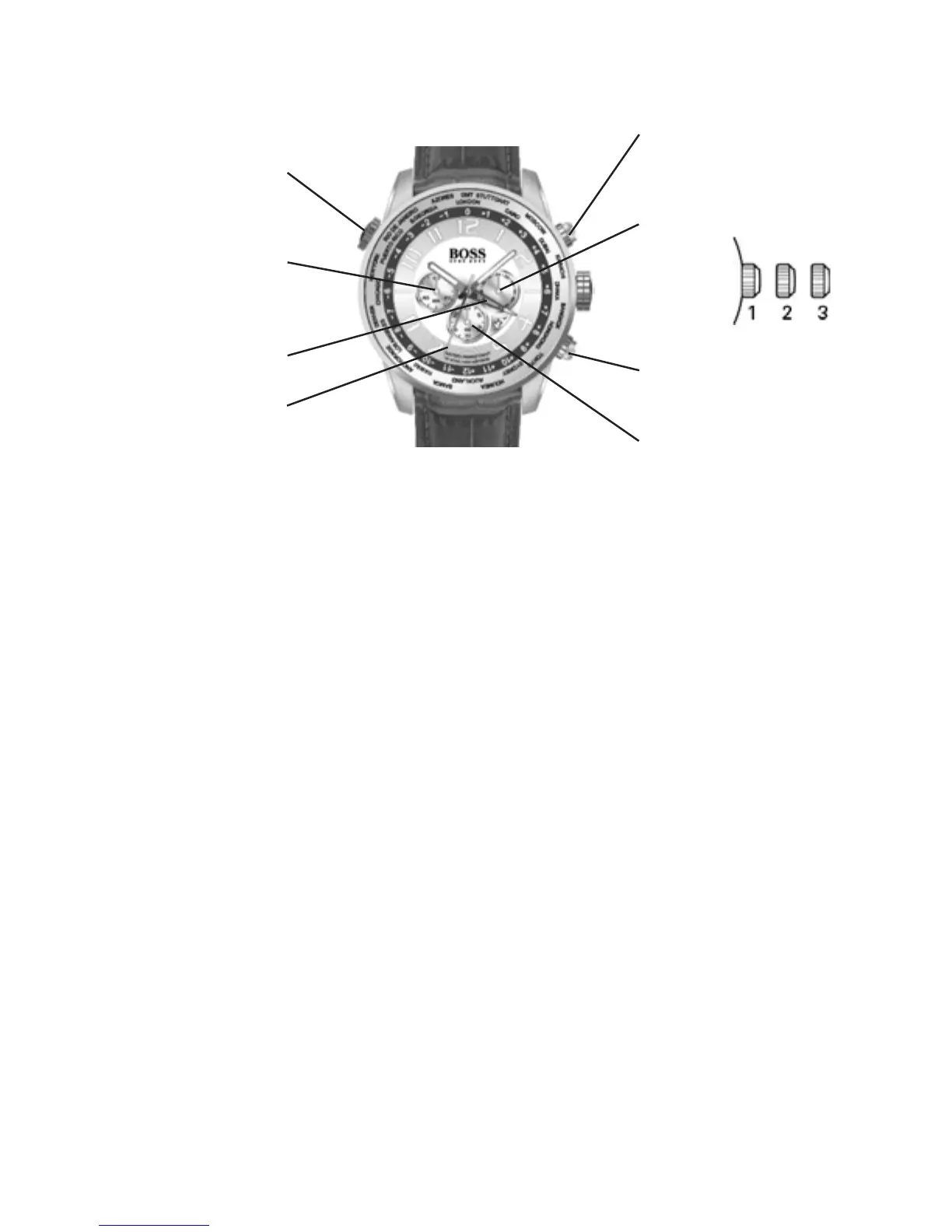
Worldtimer chronograph
Positions of the crown:
Position 1 - Normal position.
Crown pushed against the case.
Position 2 - Setting the DATE and HOUR*:
To set the DATE, turn the crown clockwise,
passing midnight, to advance the DATE.
To set ONLY the HOUR, turn the crown in either
direction.
Position 3 - To set the hour for both the local time and
in a second time zone, turn the crown in
either direction. The hour hand for the local
time and the hour hand for the second time
zone are connected to set the time for both.
*NOTE: If the date setting is performed between 9:00 pm
and 3:00 am when automatic calendar changes are
in progress, the date may not change automatically in time
zones.
Simple chronograph functions:
Measuring a single event without interruptions:
1. Press button A to start the chronograph.
2. Press button A a second time to stop
the chronograph.
3. Press button B to reset the chronograph to zero.
Clocking total time of a series of events of short duration (for
example, the exact playing time of a soccer game which is
frequently interrupted):
1. Push button A to start the chronograph at the
beginning of the game.
2. Push button A to stop the chronograph when the
game is interrupted.
3. Press button A when play resumes.
4. Repeat steps 2 and 3 until the end of the game.
5. Press button B to reset the chronograph to zero.
Synchronizing the chronograph hands:
After a battery change or in case of error, it may be necessary
to adjust the Chronograph seconds hand of the chronograph to
align it correctly at the zero position:
1. Pull the crown out to position 2.
2. Press button A to adjust the chronograph seconds hand:
Each press of button A will move the chronograph hand
forward one second.
Press and hold button A to advance the hand rapidly.
3. Once the hand is properly aligned, push the crown back to
position 1.
GMT functions:
The center-mounted red hand indicates the hour in a second
time zone.
To set the second time-zone, pull the crown to position 2 and
rotate counterclockwise until red hand points at major city in
desired second time zone on cities of the time ring.
Then push the crown back in to position 1.
Worldtimer functions:
The crown at 10 o’clock rotates a graduated ring set in the
watch dial. It is not necessary to pull the crown to rotate this
ring.
The user can instantly calculate the time in the
24 cities printed on the flange.
Simply align the numeral “0” with your current city.
Then add the number corresponding to each city
to the local time to calculate the time instantly.
So in the diagram below, it is 10:10 am in London.
It is therefore 10:10 + 2 hours = 12:10 pm in Cairo
10:10 + 4 hours = 14:10 (2:10 pm) in Dubai
10:10 – 6 hours = 4:10 am in Chicago
Small seconds hand
24 hours
A: Start/Stop
B: Intermediate time /
Reset to zero
Chronograph
seconds hand
Chronograph
minute hand
Worldtimer ring
adjustment crown
2nd time-zone
hour hand



 To Next Page