3.1 Connecting to TV & VCR
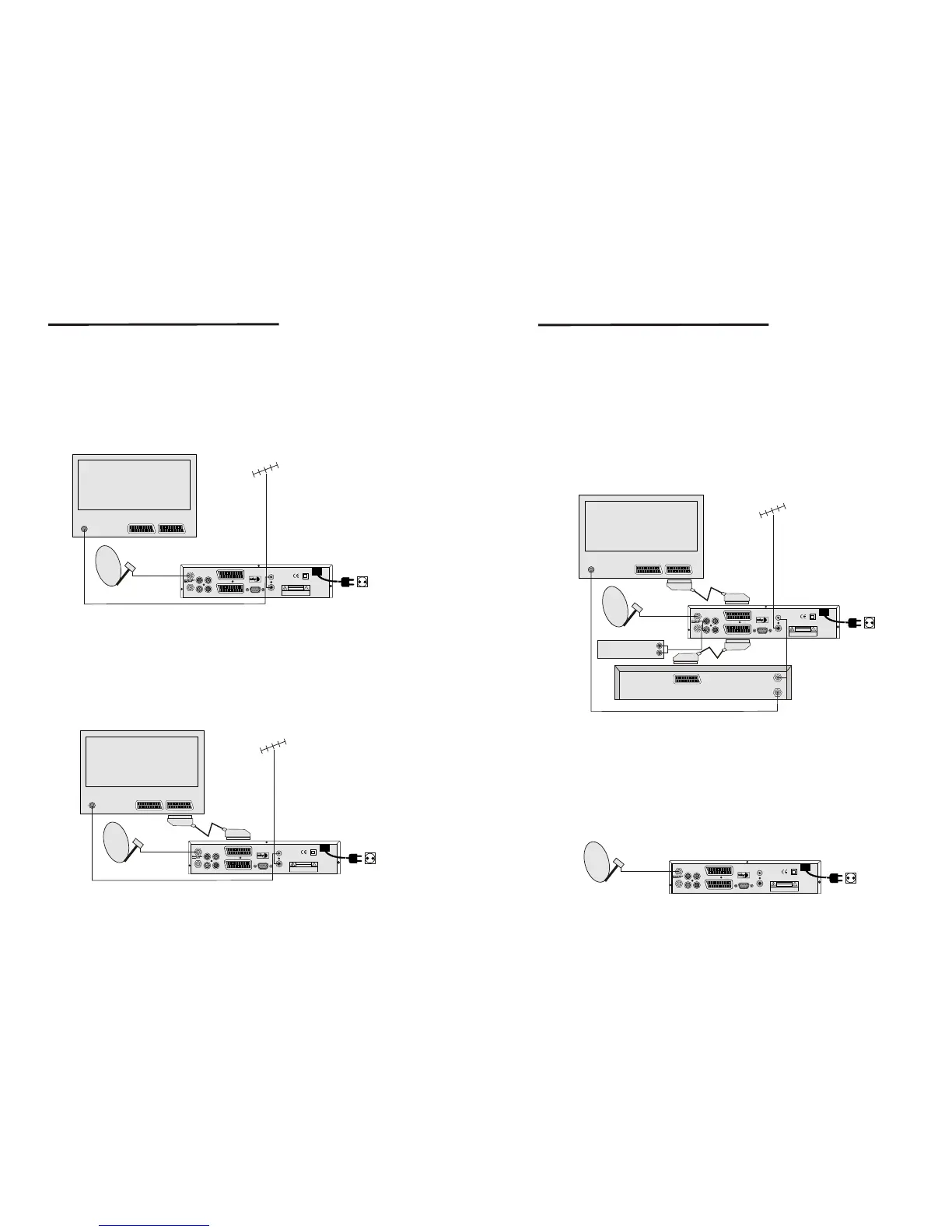
<Basic connection with a coax cable>
1. Connect the satellite signal from the LNB to the LNB IN connector.
2. Connect the TV/VCR connector at the back of the receiver to the coax IN connector
on your TV set.
3. Optional : connect an extra terrestrial or cable antenna to the ANT connector at the
back of the receiver.
Figure 4 Basic connection with a coax cable
IN
2
1
LOOP OUT
AUDIO R
VIDEO
AUDIO L
S/PDIF OUT
TV
VCR
ANT
TV/VCR
RS232
AC 90-240V ~
50/ 60Hz
Max. 30W
CAUTION
RISK OF ELECTRIC SHOCK
DO NOT OPEN
SHOCK HAZARD : DO NOT OPEN
RISQUE DE CHOC : NE PAS ENLEVER
Designed by L.A in U.S.A
Television
SATELLITE DISH
Terrestrial
Antenna
or
Cable TV
Connection to TV&VCR
LOOP OUT
AUDIO R
VIDEO
AUDIO L
S/PDIF OUT
TV
VCR
ANT
TV/VCR
RS232
AC 90-240V ~
50/ 60Hz
Max. 30W
CAUTION
RISK OF ELECTRIC SHOCK
DO NOT OPEN
SHOCK HAZARD : DO NOT OPEN
RISQUE DE CHOC : NE PAS ENLEVER
Designed by L.A in U.S.A
Terrestrial
Antenna
or
Cable TV
IN
2
1
Television
SATELLITE DISH
< Basic connection with a Scart cable >
1. Connect the satellite signal from the LNB to the LNB IN connector.
2. Connect the TV scart connector at the back of the receiver to the scart-in connector
on your TV set.
3. Optional: connect an extra terrestrial or cable antenna to the ANT connect at the
back of the receiver.
Figure 5. Basic connection with a Scart cable
LOOP OUT
AUDIO R
VIDEO
AUDIO L
S/PDIF OUT
TV
VCR
ANT
TV/VCR
RS232
AC 90-240V ~
50/ 60Hz
Max. 30W
CAUTION
RISK OF ELECTRIC SHOCK
DO NOT OPEN
SHOCK HAZARD : DO NOT OPEN
RISQUE DE CHOC : NE PAS ENLEVER
Designed by L.A in U.S.A
Terrestrial
Antenna
or
Cable TV
<Advanced connection of the receiver to the TV set, VCR and Audio amplifier>
IN
2
1
Television
AUDIO R
AUDIO L
Videorecorder
Audio Amplifer
SATELLITE DISH
IN
OUT
Connection to TV&VCR
Figure 6. Advanced connection of the receiver to the TV set, VCR and Audio amplifier
8
9
3.2 Connecting to Dish
Aiming a satellite dish and LNB to the correct longitude and Azimut (angle of
elevation) of a satellite is a specialist job, and can best be done by an official
botech dealer.
Make your choice of which satellite you want to receive your signals from, and have
your botech dealer aim your dish at the requested satellite. Connect a coax cable to
your LNB and the other end directly to the LNB IN connector of your receiver.
<Connecting a fixed satellite dish to your receiver>
LOOP OUT
AUDIO R
VIDEO
AUDIO L
S/PDIF OUT
TV
VCR
ANT
TV/VCR
RS232
AC 90-240V ~
50/ 60Hz
Max. 30W
CAUTION
RISK OF ELECTRIC SHOCK
DO NOT OPEN
SHOCK HAZARD : DO NOT OPEN
RISQUE DE CHOC : NE PAS ENLEVER
Designed by L.A in U.S.A
Fixed Satellite Dish
(f.i. pointed at Astra)
Figure 7. Connecting a fixed satellite dish to your receiver
1. Connect the satellite signal from the LNB to the LNB IN connector.
2. Connect the TV scart connector at the back of the receiver to the scart-in connector
on your TV set.
3. Connect the VCR scart connector at the back of the receiver to the scart-in connect
on your VCR set.
4. Connect an extra terrestrial or cable antenna to the ANT connector at the back of the
receiver.
5. Connect a coax cable to the TV/VCR connector at the back of the receiver.
Connect the other end of this coax cable to the coax-in connector of your VCR.
6. Connect the coax-out connector of your VCR to the video-in connector of your TV set
with a coax cable.
7. Optional: Connect the audio left and right RCA-plugs(Red and White) on the back of
your receiver to the left and right input of an Audio amplifier, so you can
enjoy the digital quality of the sound that is produced by your botech receiver.



 To Next Page
 Loading...