Connection to Dish
LOOP OUT
AUDIO R
VIDEO
AUDIO L
S/PDIF OUT
TV
VCR
ANT
TV/VCR
RS232
AC 90-240V ~
50/ 60Hz
Max. 30W
CAUTION
RISK OF ELECTRIC SHOCK
DO NOT OPEN
SHOCK HAZARD : DO NOT OPEN
RISQUE DE CHOC : NE PAS ENLEVER
Designed by L.A in U.S.A
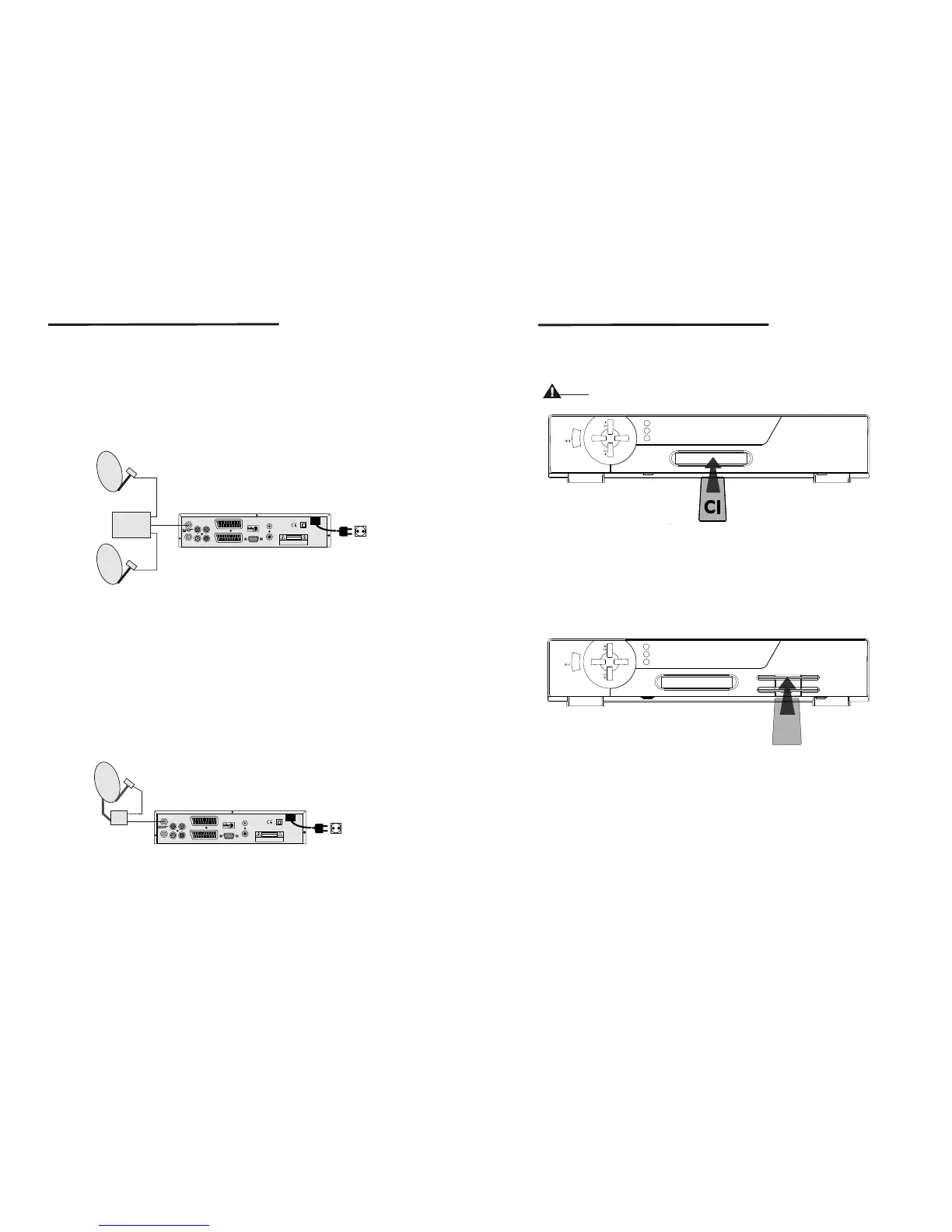
<Connecting multiple fixed dishes to your receiver using a DiSEqC 1.0
switch>
If you want to watch programms from more than satellites(For in instance from Astra
and from Hot Bird) it is advisable to use fixed dishes and a DiSEqC 1.0 switch. Have
your botech Dealer aim the dishes at the requested satellites and connect the LNB's
with coax cables to the IN connectors of the DiSEqC 1.0 switch. Connect the OUT
connector of the DiSEqC 1.0 switch to the LNB IN connector at the back of your receiver.
Fixed Satellite Dish 1
(f.i. pointed at Astra)
Fixed Satellite Dish 2
(f.i. pointed at Astra)
DiSEqC
Switch
IN
IN
OUT
Figure 8. Connecting multiple fixed dishes to your receiver using a
DiSEqC 1.0 switch
LOOP OUT
AUDIO R
VIDEO
AUDIO L
S/PDIF OUT
TV
VCR
ANT
TV/VCR
RS232
AC 90-240V ~
50/ 60Hz
Max. 30W
CAUTION
RISK OF ELECTRIC SHOCK
DO NOT OPEN
SHOCK HAZARD : DO NOT OPEN
RISQUE DE CHOC : NE PAS ENLEVER
Designed by L.A in U.S.A
<Connecting a dish on a motorized positioner to your receiver>
Satellite dish on
moterized Positioner
IN
OUT
Figure 9. Connecting a dish on a motorized positioner to your receiver
10
11
VOL+
VOL-
STAND BY
LOCK
MESSAGE
Figure 11. Connecting to SMART CARD
3.4 Connecting to SMART CARD (CAS Model Only)
Insert Smart Card into Smart Card slot for watching TV programmes from Service
Provider.
S
STAND BY
LOOK
MESSAGE
VOL +
VOL -
Figure 10. Connecting to CI Module
3.3 Connecting to CI Module(CI Model Only)
Connection to CI Module
Insert CI module into CI slot for watching TV programmes from Service Provider.
Do no plug in/out CI module when the receiver is powered on.
But you can insert smart card to CI module with power on.
Warning
An other posibility to watch programms from multiple satellites is by mounting a dish to
a motorized DiSEqC 1.2 positioner. Have your botech dealer mount the dish to the
positioner, set the correct azimut (angle of elevation) and let him set the center point
for your positioner. Connect the LNB with a coax cable to the LNB IN connector of
the positioner, and connect the OUT connector of the positioner to the LNB IN
connector at the back of your receiver.



 To Next Page