Setting and Operations
<Starting up for the First Time>
<Menu Information>
4.1 Before Settings
1. Turn on your TV and receiver.
2. If it is first time using a receiver, you should
set parameters for system configuration.
After displaying the login screen, press
the MENU button.
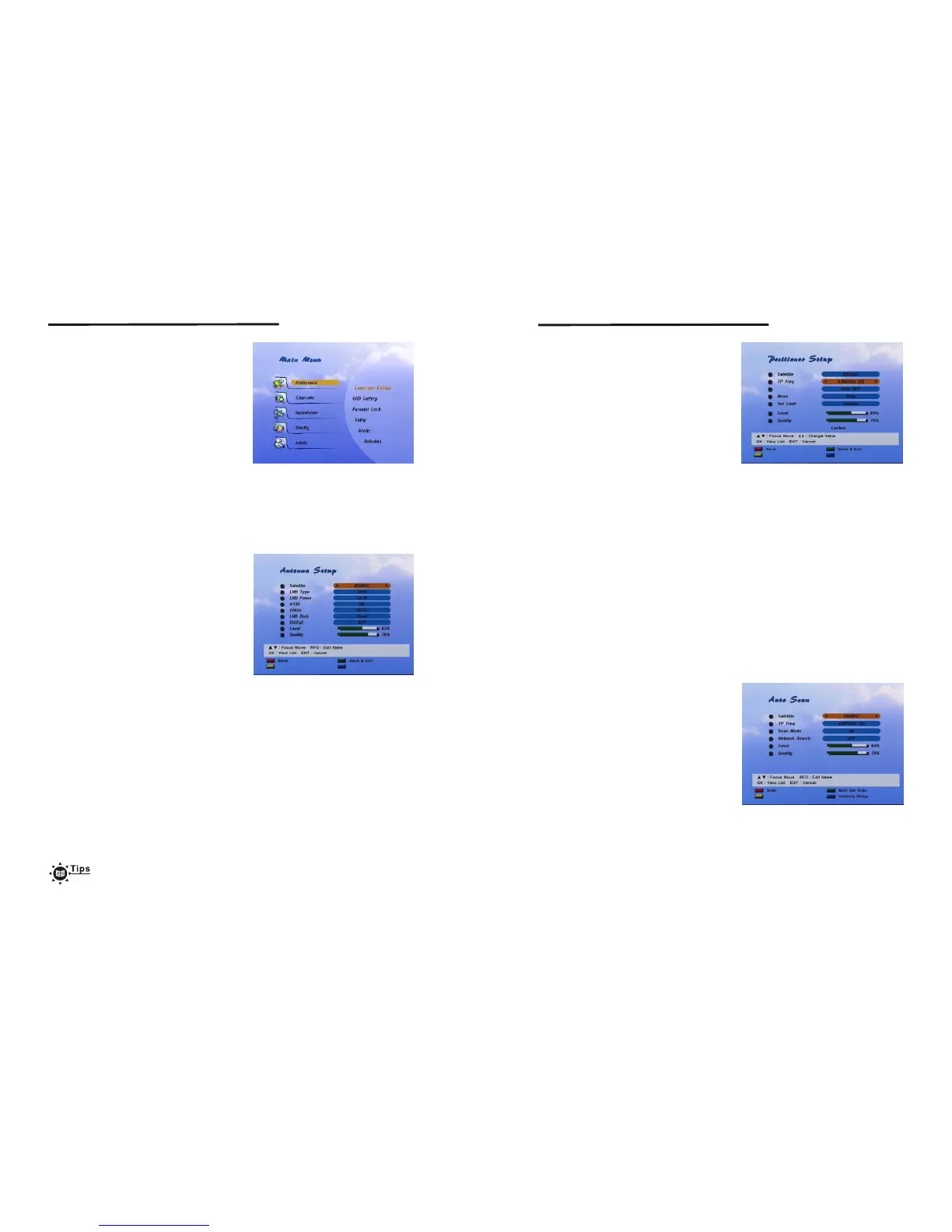
The <screen1> will be appeared.
The menu consists of main-menu and sub-menu, as you see in the <Screen 1>.
Main-menu has 4items(5 items for CI Model) and each main-item has its sub-menu
items.
<screen 1>
<Antenna Setup>
4.2 Basic Settings
With this menu, you can designate the
satellite to search channels.
There are up to 64 satellites available.
In this menu, you can edit the satellite name.
1. If you press OK in Antenna Setup of
Installation Menu, the <screen 2> will be
appeared.
2. Use the Up/Down button to select the item,
and set up the parameter with the Left/Right
button.
3.If you completed setting, use Red button
to Save, Green button to Save/Exit.
<screen 2>
Satellite : If you press OK in Stellite, the satellites list is displayed. Move the cursor
to a satellite and press OK to select the satellite and have the list disappeared,
or press EXIT on the remote controller to cancel the setting and have the list
disappeared. If you want to rename the satellite, press the INFO button on
the remote controller at the satellites list.(see 4.9 Name Edit)
LNB Type : You can select one the LNB type from Universal(9750~10600), 5150, 9750,
10000, 10050, 10600, 10750, 11200, 11475, or user defined type.
You should input LNB value directly in user defined (default value is 0).
LNB Power : You can select 13V or 18V for LNB. Select Off if you want to off LNB power.
0/12V : Setup the 0/12V switch option.
22KHz : Setup the 22KHz switch.
If you have connected to a dual LNB or two antennas connected to a 22KHz tone
switch box, set it to "ON".
LNB Dish : Use this option to use the Digital Positioner. The default is Fixed.
If you want to move the dish, set the LNB Dish field to Moved.
DiSEqC switch : The default is Off. To use the DiSEqC switch, set up DiSEqC.
If you had set LNB Type to Universal, LNB Power and 22KHz switch
options are disregarded. If you set LNB Dish to Moved, DiSEqC switch
is disappeared and positioner item is appeared. On the other hand, if you
set LNB Dish to Fixed, positioner item is disappeared and DiSEqC switch
is appeared. Universal LNB : 9750 ~ 10600MHz
12
13
Setting and Operations
<Positioner Setup>
If you use DiSEqC digital positioner you can
set dish position from Antenna Setup menu.
First, change "LNB Dish" value to Moved
then DiSEqC menu item is changed to
Positioner item. If you already set dish
position for current satellite item value is
displayed as "Setup(NOT SET)". To set dish
position press OK button. Positioner menu
will be displayed.
<screen 3>
Satellite : You can select other satellite to scan channels using Left/Right or satellite
list(If you press OK button, then satellite list will be displayed).
Tp Freq : Shows a TP value of the current satellite. If you want to see another TP value
press OK for TP list or press Left/Right to change TP.
Scan Mode : You can designate scanned channel type as FTA channel only or All
channels(FTA + Scrambled channel).
Network Search : Set this field to ON to perform Network TP Search.
If you press Red(Scan) button all transponders of current satellite are scanned.
<Auto Scan>
If you already set the Antenna set up you can
scan the satellite. In this menu, you can
edit the satellite name and select Tp Freq,
Scan Mode, Network search.
1. If you press OK in Auto Scan of Installation
Menu, the <screen 4> will be appeared.
2. Use the Up/Down button to select the item,
and set up the parameter with the Left/Right
button.
3. If you completed setting, use Red button
to Scan, Blue button to go to Antenna Set-up
menu.
<screen 4>
If dish position is moved to correct position to receive satellite signal, signal level
and quality color are changed(for example to Green), To save current dish position
use Red(Save) or Green(Save & Exit) button.
Satellite : Show the satellite name dish position is seted. If you want to change satellite
you should change satellite from Antenna Menu.
Tp Freq : Show TP of the designated satellite.
Signal level and quality is checked on the base of current TP value.
If you want to change to other TP use Left/Right button or OK button, then
TP list will be displayed.
Goto REF : You can use this item to move dish position to center.
If you press OK button dish position is moved to center position.
While position is moving to center, wait message is displayed.
Move : Use to move dish position to east or west direction.
Whenever Left button is pressed dish position is moved to east direction.
And moved to west direction when Right button is pressed.
Set Limit : Set dish position's east or west limit, disable limit value.
Change item with Left/Right button and press OK button to set/disable
limit value.



 To Next Page
 Loading...