EasyManua.ls Logo

Bowflex TreadClimber TC10 - Console and Controls

Bowflex TreadClimber TC10
52 pages
Print Icon
To Next Page IconTo Next Page
To Previous Page IconTo Previous Page
Loading...
10
Features
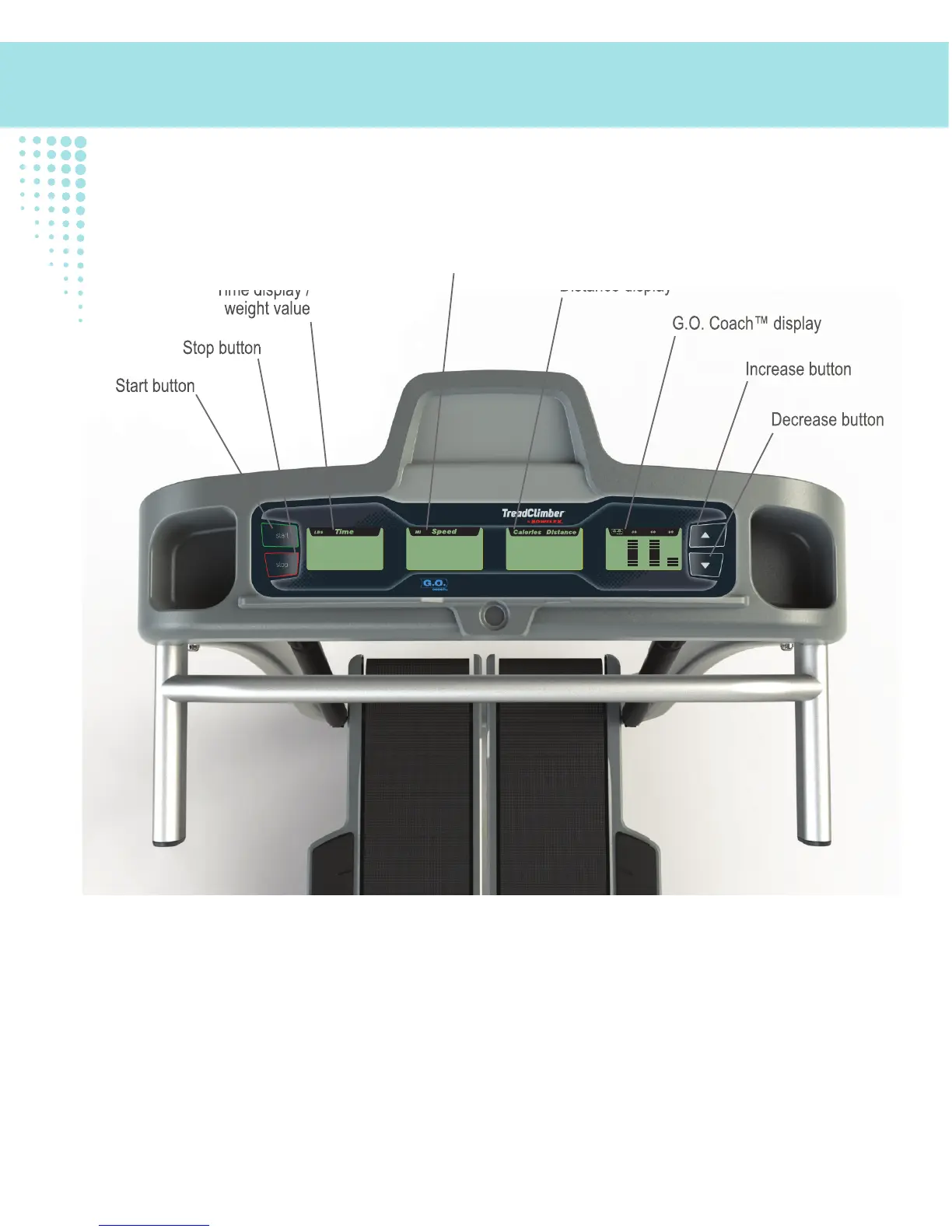
Start button
Stop button
Time display /
weight value
Speed display
Calorie /
Distance display
G.O. Coach™ display
Increase button
Decrease button
Start button
Stop button
Time display /
weight value
Distance display
G.O. Coach™ display
Increase button
Decrease button
Console
START button
Push to power up the Console, start a workout, resume a paused workout, or select an option. Push and hold for
2 seconds to shift between the G.O. Coach™ workout mode and the Manual workout mode.
Note: During the Manual TreadClimber
®
workout mode, the G.O. Coach
display will be blank.
STOP button

Other manuals for Bowflex TreadClimber TC10

Related product manuals