24
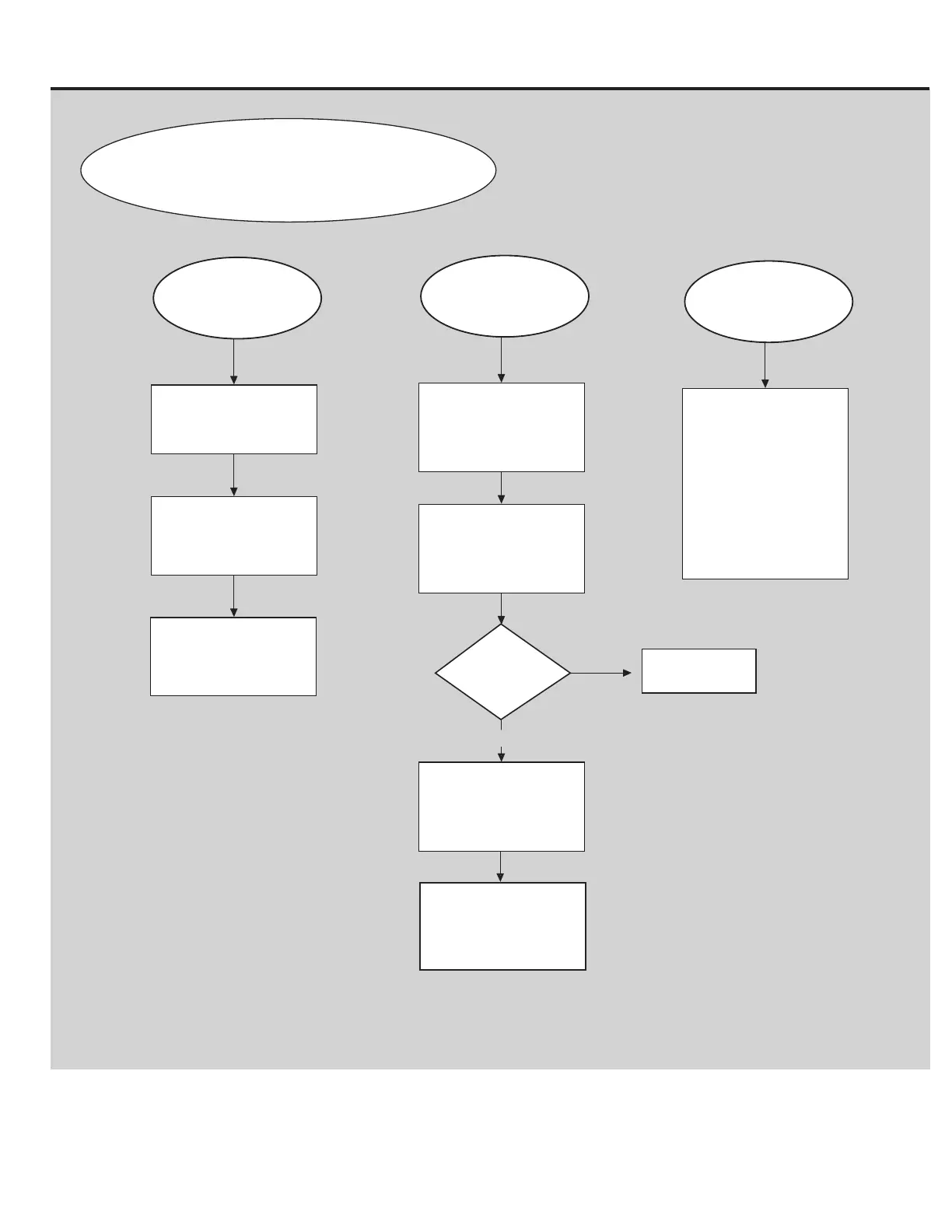
Replace Console if
blockage cannot be
removed or if fan still does
not turn off.
Unplug machine from
power source and remove
any blockages, then reset.
Console Issues (page 2 of 2)
BEGIN HERE:
Fan will not turn on or off.
Turn machine power off
for 5 minutes and retry.
Disconnect machine from
power for 1 minute, then
follow Service Mode
Procedure 3 to reset the
Console.
Speed is incorrect.
Ensure that the correct
units of measure are set.
To switch the units, go to
the Profile tab and update.
NO
Is the issue still
present?
YES
Issue resolved
Follow Service Mode
Procedure 2 to check
firmware version and error
codes.
Contact Customer Care
(if inside US/Canada)
or your local distributor
(if outside US/Canada).
If Console will not light up, follow
“Unit will not power on” Troubleshooting
Procedure.
If the units of measure are incorrect, follow the
Owner’s Manual instructions to correct the
setting before beginning these steps.
Console continuously
cycles through program
screens.
Console is in demonstra-
tion mode. Tap in the
upper-right corner of the
Console Display 10 times.
From the Advanced User
Actions menu, select the
“Demo Mode App”.
Then tap on the “De-acti-
vate Demo Moe” option.












 To Next Page