8
GENERAL INFORMATION
Maintenance and Use of the Terminal
Do not expose the LCD screen to direct sun light. Use only a dry soft cloth, or slightly moistened with water,
for cleaning. To avoid unwanted terminal activation use a cleaning rag approximately 5 mm. thick. Never
use any chemical product.
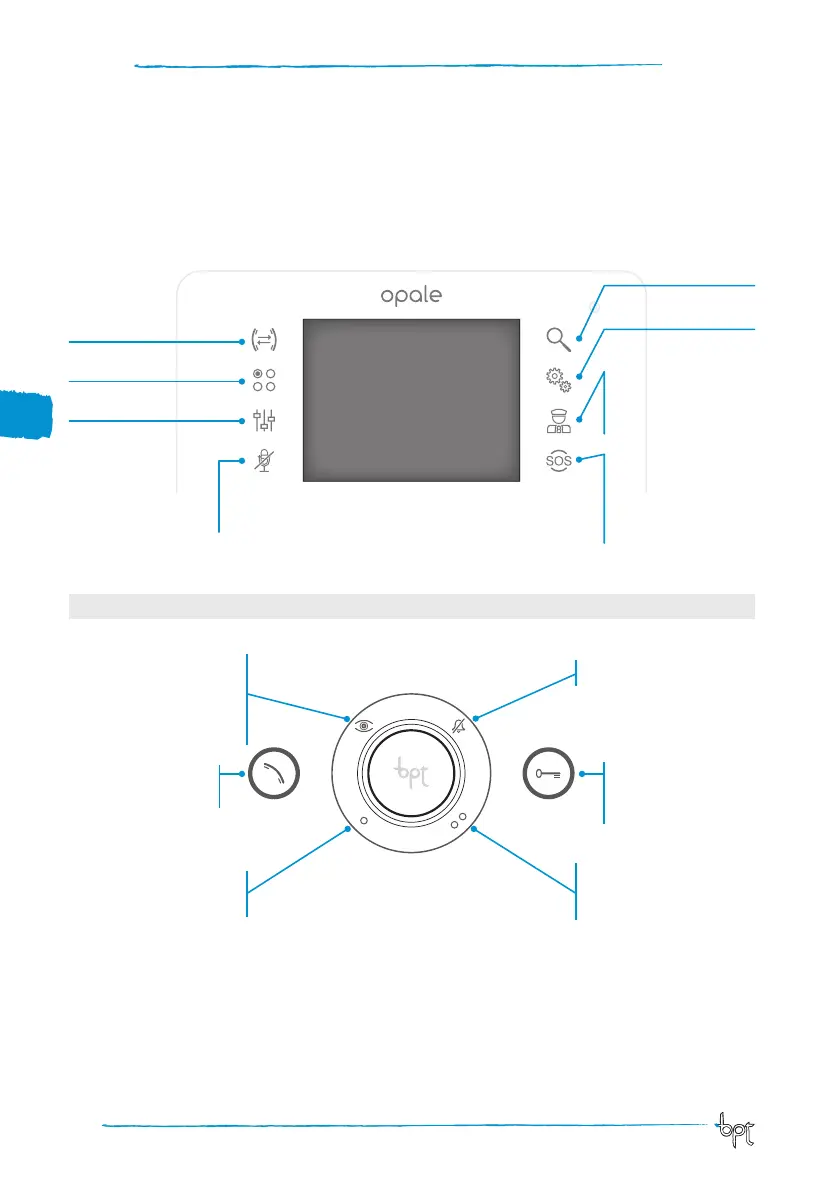
Main Button functions
The touch keys provide fast, intuitive access to the functions managed by the Opale terminal. They also
provide immediate feedback on events involving the system.
* Porter messages
The icon on (red) indicates
the presence of unread
messages
Access to intercom
functions
Access to additional
auxiliary commands
Access to video
adjustments
Close audio contact
to the caller (mute
function). The red icon
means the function is
active
Allows you to enlarge
the image displayed.
Door lock release
Opens the electric lock
connected to the entry
panel displayed
Responds to an
incoming call or ends
a current call
Display images from entry
panels
If planned in installation, repeat-
edly pressing the button displays
the connected entry panels in
sequence
Auxiliary command
•
Can be programmed to switch
on a light or open a door
Auxiliary command
••
Can be programmed to switch
on a light or open a door
(if present) to call the Porter
Call ringtones off
LED red = ringtones OFF
Device setup
(*) Button active only in presence of a porter switchboard.
* Panic Button
Hold it down for more than
2 seconds (icon on and red)
to send the switchboard a
“panic alarm” indicating the
calling receiver.
Opale UT EN 24805201 03-04-13



 To Next Page