9
STANDARD FUNCTIONS
1
3
2
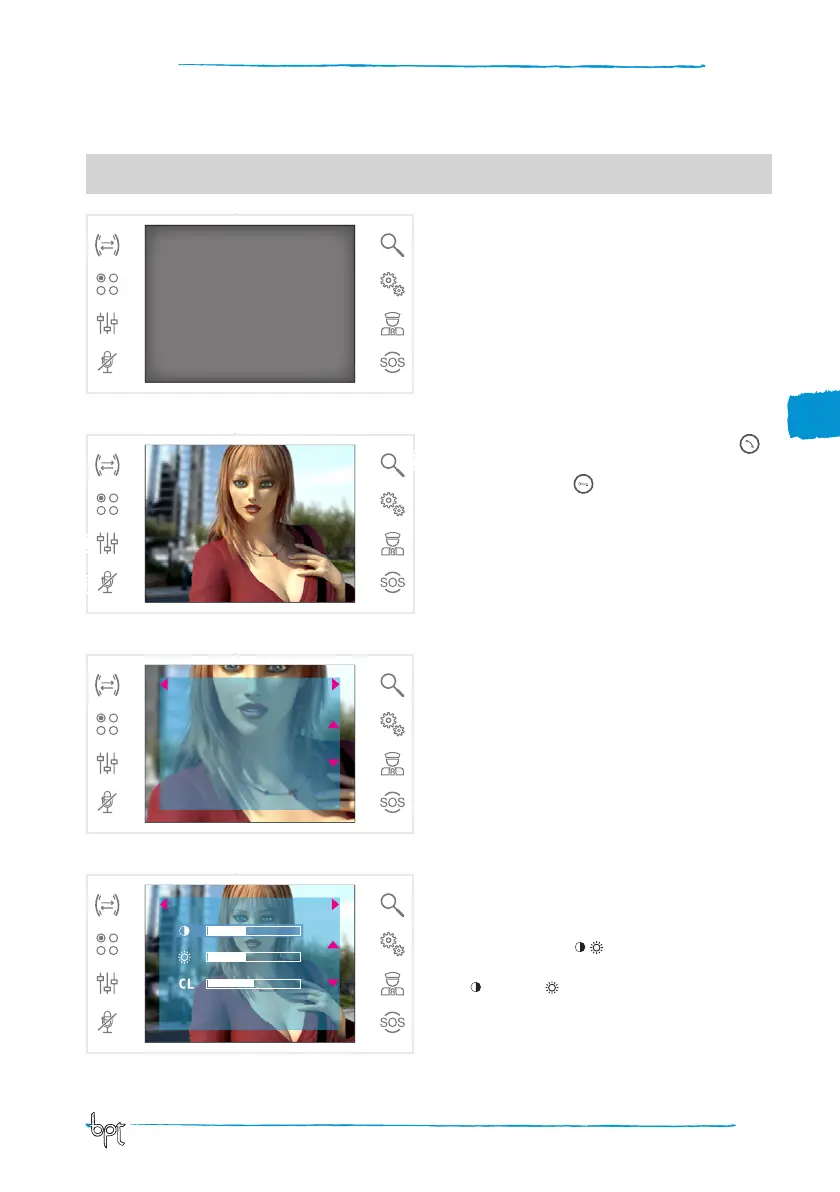
Answering a call
In the event of a call, the screen shows the image of
the caller filmed from the video entry control panel.
Reply to incoming call by pressing the button .
Open the door of the entry panel displayed by
pressing the button .
A
Close audio contact to the caller (mute function)
When you answer the call, the following controls
will be available.
Zoom
Button B allows the displayed image to be enlarged.
Press the icons beside arrow keys adws to achieve
the desired frame.
Button EXIT returns to previous frame and zoom
level.
Video settings
Button C gains access to video settings.
Select the function ( CL) by pressing the icons
beside arrows ws and use buttons a d to adjust
the: Contrast, Luminosity and CL Colour.
Press the SAVE button to confirm the settings made.
4
1
B
C
EXIT
WARNING! - The type of system layout determines whether various functions or screens shown in this manual
are present.
EXIT SAVE



 To Next Page