3
BMP®61 Quick Start Guide
Set the Language
To change the language of the printer display:
1. Press the setup key combination on the key pad
.
2. Tap Language.
3. Tap the desired language.
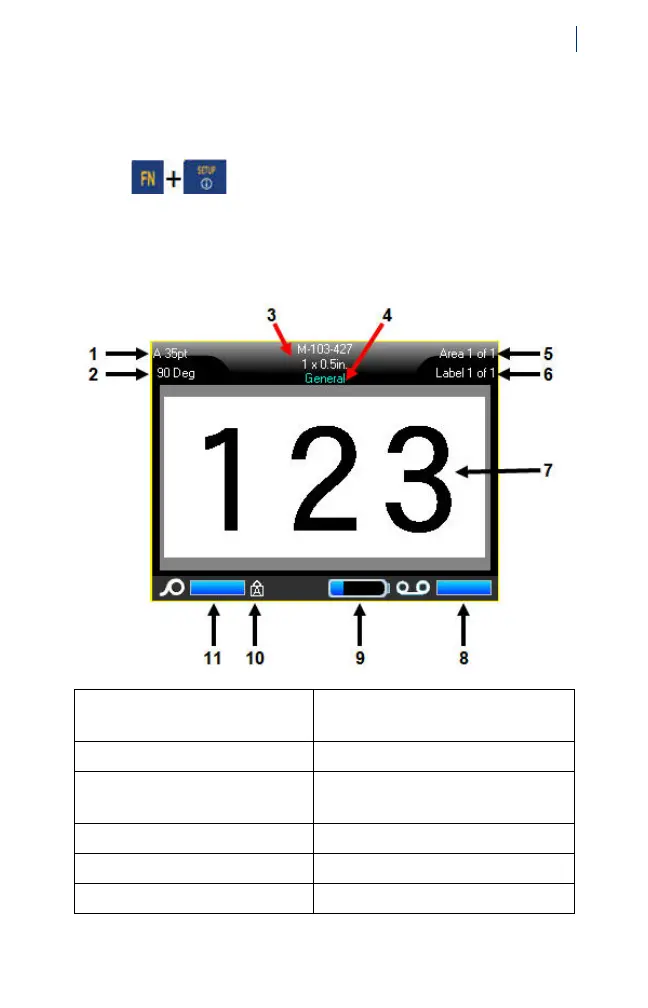
About the Touch Screen
1 Font size with Autosize
indicator
7 Label editor
2 Degree of rotation 8 Ribbon remaining
3 Label supply size 9 Battery charging or charge
remaining
4 Label supply type 10 Caps Lock on
5 Number of areas on label 11 Label supply remaining
6 Number of labels in file



 To Next Page