EasyManua.ls Logo

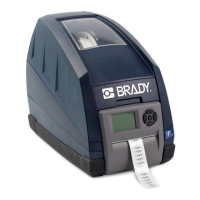
Brady BP-IP300 - User Manual

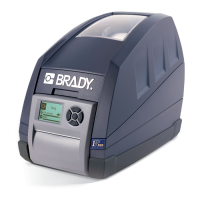
Brady BP-IP300
75 pages
Print Icon
To Next Page IconTo Next Page
Loading...
Configuration
Operator/
Manual
Edition 07/07

Table of Contents

Other manuals for Brady BP-IP300

Questions and Answers

  • S
    stacysinghAug 14, 2025
    What to do if print image has smears or voids on my Brady Printer?
    • L
      Laura FletcherAug 14, 2025
      If your Brady Printer prints images with smears or voids, it could be due to a few reasons. The printhead might be dirty, requiring cleaning as described on page 60. Alternatively, the temperature may be too high; try decreasing it via the software. It's also possible that the combination of labels and transfer ribbon is incorrect, in which case you should try using a different type of ribbon.
  • B
    bennettmarkAug 17, 2025
    Why does the transfer ribbon not move on my Brady BP-IP300 Printer?
    • M
      mwalkerAug 17, 2025
      If your Brady Printer is transporting label media but the transfer ribbon isn't moving, there are a couple of potential causes. First, check that the transfer ribbon is correctly inserted, paying attention to the ribbon web and the label orientation. If that's not the issue, the combination of labels and transfer ribbon might be incorrect; try using a different type of ribbon.
  • M
    Marc BarnesAug 21, 2025
    How to fix vertical white lines in print image on Brady BP-IP300 Printer?
    • C
      Carly JensenAug 21, 2025
      If you notice vertical white lines appearing in the print image from your Brady Printer, this could be because the printhead is dirty; refer to Cleaning the Printhead and Media Feed Rollers on page 60. Alternatively, the printhead may be defective (heat element failure), which requires service by a qualified technician.
  • J
    Jenna GrantAug 25, 2025
    Why does my Brady BP-IP300 not stop when the transfer ribbon runs out?
    • C
      Charles BarkerAug 25, 2025
      If your Brady Printer continues printing even after the transfer ribbon runs out, it's likely that thermal printing is selected in the software. To resolve this, change the setting to thermal transfer printing.
  • J
    Jacob WoodsAug 27, 2025
    What to do if print image is irregular on Brady BP-IP300 Printer?
    • N
      Nicholas RobinsonAug 27, 2025
      If the print image from your Brady Printer is irregular, with one side appearing lighter than the other, the printhead may be dirty. Refer to Cleaning the Printhead and Media Feed Rollers on page 60.
  • R
    robertchanAug 30, 2025
    Why is my Brady Printer printing a sequence of characters?
    • J
      Jose NelsonAug 30, 2025
      If your Brady Printer is printing a sequence of characters instead of the label format, it indicates that the printer is in ASCII Dump mode. To fix this, cancel the ASCII Dump mode.
  • G
    gkennedySep 2, 2025
    Why does my Brady BP-IP300 Printer only print every second label?
    • S
      Samuel ThomasSep 3, 2025
      If your Brady Printer only prints every second label, the size setting in the software is likely too large. To correct this, change the size setting in the software.
  • A
    ashleewilsonSep 6, 2025
    How to prevent transfer ribbon creases on Brady BP-IP300?
    • J
      Jimmy StaffordSep 6, 2025
      If the transfer ribbon creases in your Brady Printer, it's likely because the transfer ribbon is too wide. Use a transfer ribbon slightly wider than the width of the label.
  • B
    Benjamin Larsen PhDSep 9, 2025
    Why are there horizontal white lines in print image on Brady BP-IP300 Printer?
    • K
      Kimberly KirkSep 10, 2025
      If horizontal white lines appear in the print image of your Brady Printer, it's because the printer is used with backfeed > smart in the Tear-off or Peel-off mode. Always set backfeed > in the setup menu. Refer to Setup Menu on page 47.

Summary

Safety and Environmental Information

Intended Use of the Printer

Outlines the proper and intended usage of the Brady IP Printer.

Printer Safety Precautions

Unpacking and Initial Setup

Connecting the Printer

Power Supply

Explains how to connect the printer to a power source and its voltage compatibility.

Printer Interface Options

Software Installation Steps

Printer Selection and Port Configuration

Completing Printer Driver Installation

Installing Brady Software

Media and Ribbon Setup

Brady Mode

Describes the features and advantages of Brady mode for hassle-free operation.

Brady IP Printer Modes

Peel-Off Mode Operation

Tear-Off Mode Operation

Loading the Printer Ribbon

Loading the Label Material

Feeding Labels in Peel-Off Mode

Feeding Labels in Tear-Off Mode

Control Panel Functions

Control Panel Key Functions

LCD Menu Configuration

Discusses printer configuration via the LCD display and menu options.

Printer Test Functions

Configuring Printer Settings

Machine Parameter Adjustments

Print Parameter Settings

Interface Configuration

Firmware Management

Firmware Update via Interface

Step-by-step guide for updating firmware from a connected computer.

Firmware Update from Memory Card

Instructions for updating firmware using a memory card.

Material Calibration and Settings

Heat Settings for Print Darkness

Guides on adjusting heat settings for optimal print darkness.

Printer Cleaning Procedures

Cleaning the Printhead and Media Feed Rollers

Details the critical process for cleaning the printhead and rollers.

Printhead and Roller Cleaning Steps

Troubleshooting Common Issues

Error Message Resolution

Troubleshooting Specific Errors

Resolving Ribbon and Paper Issues

Addressing Protocol and Voltage Errors

Getting Additional Support

Technical Support Numbers;Online Help

Lists websites for regional Brady Tech Support offices.

Brady BP-IP300 Specifications

General IconGeneral
Printer TypeIndustrial Label Printer
Print TechnologyThermal Transfer
Print Resolution300 dpi
ConnectivityUSB, Ethernet
Maximum Print Width101.60 mm (4 in)
CutterYes
Supported Media TypesBlack mark labels

Related product manuals