INSTRUCTIONS
DAY/ TIME
TheInstallerSettingsmustbeproperlyconguredinorderforthisthermostattooperatecorrectly.TheInstaller
Settingsaremenudriven.Theportionofthesesettingsthatdonotapplytoyoursetupwillbeskipped.These
settingsareindicatedbelowwithcomments.Moredetailoneachsettingfollowsthistable.
Installer Guide 10
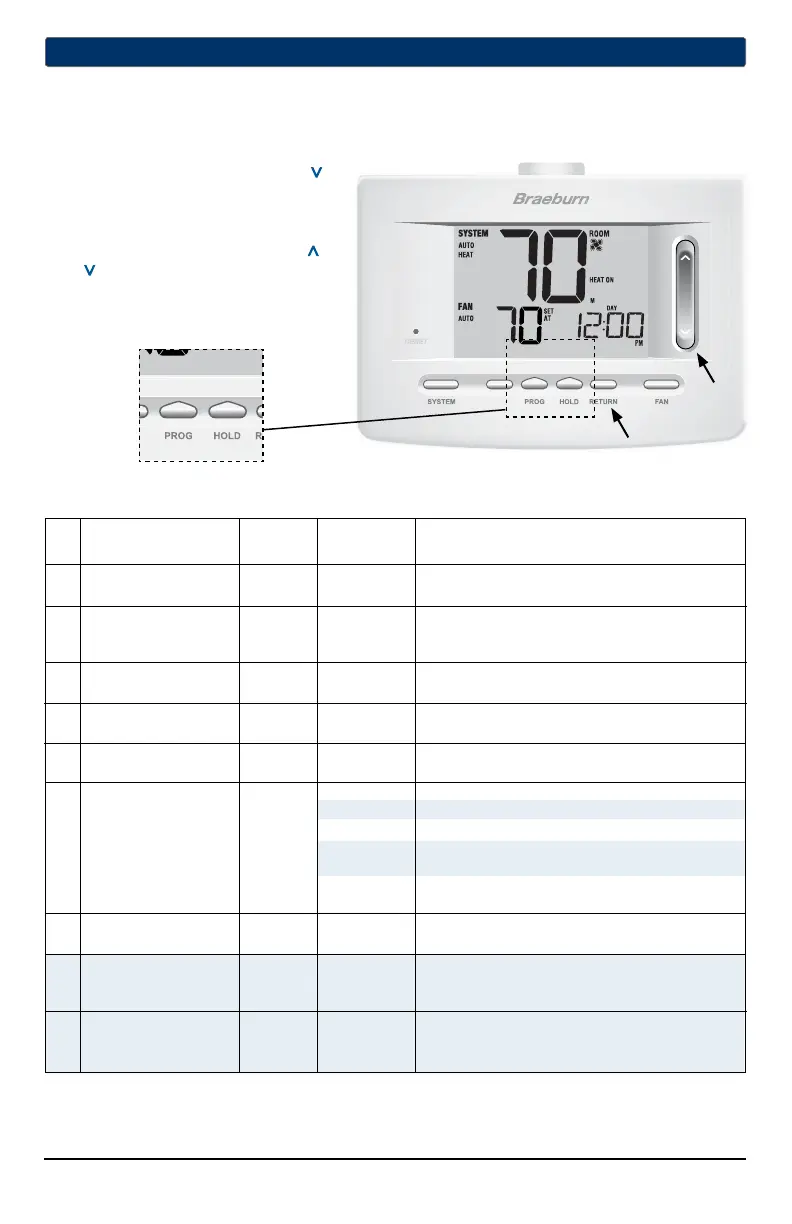
1. PressandholddowntheRETURNand
buttonsfor3seconds.
2. Releasebothbuttonsandtherstinstaller
settingwillbedisplayed.
3. Changesettingsasrequiredusingthe
orportionoftheSpeedBar
®
.
4. PressNEXT (HOLD)orBACK (PROG)to
movetothenextorprevioussetting,
pressRETURNtoexit.
No. Installer Setting Factory Setting Comments
(Notes follow this table) Default Options (More information follows this table)
1 Residentialor RES RES SelectforResidentialprole
orCommercialProle COMM SelectforCommercialprole
2 ProgrammingMode 7 PROG 7 PROG Selectfor7dayprogrammingmode
[note 1] 52 PROG Selectfor5-2dayprogrammingmode
NO PROG Selectfornon-programmablemode
3 ClockFormat 12 HR 12 HR Selectfor12hourclock
24 HR Selectfor24hourclock
4 TemperatureScale F DEG F DEG SelectforFahrenheitdisplay
C DEG SelectforCelsiusdisplay
5 AutoChangeover oF AUTO oF AUTO DisablesAutoChangeovermode
ON AUTO EnablesAutoChangeovermode
11CONV Selectfor1H/1CConventionalsystem
22CONV Selectfor2H/2CConventionalsystem
6 SystemType 11CONV 11HP Selectfor1H/1CHeatPumpsystem
22HP Selectfor2H/2CHeatPumpsystem
32HP Selectfor3H/2CHeatPumpsystem
1HD SelectforHeatOnlyHydronicsystem
11HD SelectforHydronicHeat/1Csystem
7 1stStageDifferential 0.5 DIF1 0.5, 1.0or Selecta1ststagetemperaturedifferentialof.5°,
2.0 DIF1 1°or2°F(.25°,.5°or2°C)
8 2ndStageDifferential 2.0 DIF2 1.0, 2.0, 3.0, Selecta2ndstagetemperaturedifferentialof1°,
[note 2] 4.0, 5.0or 2°,3°,4°,5°or6°F(.5°,1°,1.5°,2°,2.5°or3°C)
6.0 DIF2
9 3rdStageDifferential 2.0 DIF3 1.0, 2.0, 3.0, Selecta3rdstagetemperaturedifferentialof1°,2°,
[note 2] 4.0, 5.0or 3°,4°,5°or6°F(.5°,1°,1.5°,2°,2.5°or3°C)
6.0 DIF3
4
Installer Settings
NOTE: Shaded areas below do not apply to the 5020.
BACK NEXT



 To Next Page
 Loading...