34
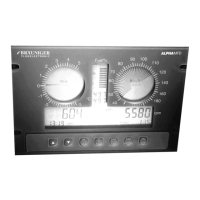
When the ALPHA
ALPHAALPHA
ALPHAMFD is switched on, "AAAAA" is displayed where every "A" must be
replaced by the correct digit/letter by pressing the >ARROW< keys and scrolling
through the alphabet. After entering each letter/digit confirm by pressing
>ENTER/MEMO< and the instrument will jump to the next character.
WARNING! A forgotten password can only be obtained from the manufacturer.
Proof of ownership (invoice) must be produced without exception. This Service
is not free and you must expect to be billed!
The password function can be disabled in Set-Mode 30 (OFF), but the correct
password must be entered prior to deactivation!
7.3 Selection of Units
In order to be able to use the ALPHAMFD internationally, the units of all numerically
displayed values, such as temperatures, air pressure, fuel and fuel consumption, and
altitude can be changed.
Engine temperature and cabin/instrument
temperature:
°C Celsius or °F Fahrenheit
Air pressure: hPa or inHg
Oil pressure: Bar or PSI
Altitude Meter or Feet
Fuel and fuel consumption Litres and litres/h or US-gallon and US-
gallon/h
7.4 Software Update
The internal software of the ALPHAMFD is continuously being improved. Because the
ALPHAMFD works with modern processors and flash-memory technology, it can be
upgraded to the latest software version at any time. You merely have to send the
instrument back to the manufacturer. Because of the possibility for software upgrades,
every ALPHAMFD is a safe long-term investment.
8 SET-Mode
In order to use the many functions of the ALPHAMFD and to be able to adjust it to
one's personal needs and preferences, some functions can be individually adjusted.
The SET-Mode is activated by pressing the >FUNC/SET< key for several seconds.
Once the SET-Mode is activated, a >SET< icon appears in the display With the
>ARROW< keys you can scroll through the SET-menus. A SET-Mode number is
displayed, so it is easier to get oriented.


 To Next Page