Operation Manual IQ-BASIC-GPS 5
Bräuniger GmbH
1.3 Keypad
1.4 Operation philosophy
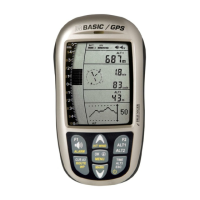
The IQ-BASIC-GPS instrument is very easy to handle and intuitive. Just try it a few times, and you
will discover that one can get along very rapidly with the simple menu structure. However, please
note some essential instructions regarding the various functions.
- White key lettering: display screen shifts such as for ex. ALT1 / ALT2, Vario- acoustic settings,
F1 / F2 key commands and the (i) information retrieval, can be performed speedily during the flight
by short pressure on the key.
- Yellow key lettering: by long pressure of 3 sec. important functions may be called up directly
during the flight and may also be edited. The selected function is switched-off after approx.
8 seconds in case of non-use!
- Main menu: all instrument settings, but also Waypoints-, Routes- and flight memory, can be
set prior to the flight via the Main menu (MENU key). It is possible to select within the menu
submenus by use of the up-/down keys and to enter adjustments. The main menu is quitted
automatically at 30 seconds after the last entry.
Tip: all instrument settings of the Main menu can be set comfortably by use of the freebie PC-
Software Flychart on the PC and be transferred via USB-interface onto the instrument.
1.4.1 Function related keys F1 and F2
Both keys F1 and F2 alter their setting possibility according to selected function or readout
screen. The meaning of the related key is indicated on the display screen.
Example: in setmode ALT 1 the function of F1 is "accept GPS altitude" and the function of F2
is to set the altimeter to „FL 1013mB pressure“!


 To Next Page