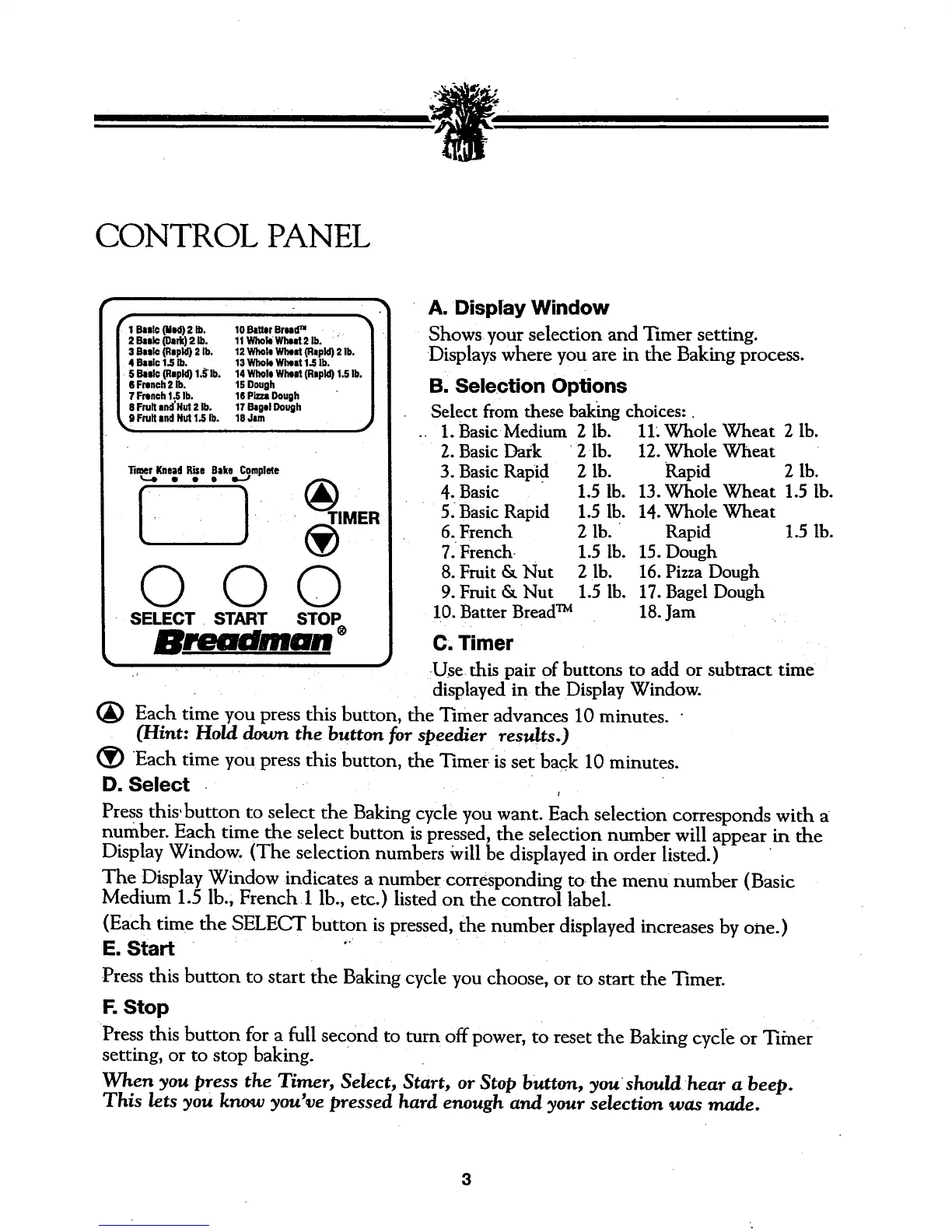
CONTROL PANEL
I Bealc(Mid) 2 Ib, 10 BatterBroao"m
keic (Dark)2 lb. 11WhobWhnt 2 lb.
Basic(Rapid)2 lb. 12 WhohiWIz4mt(Rapid)2 lb.
kBlc 1.5 lb. 13 WholeWhut 1.5lb.
Bmslc(Rnpld)1,_'lb. 14 WholeWh_d (Rapid)1.5 lb.
French2 lb. 15 Dough
French1.5lb. 16 PizzaDough
Fruitand'Hut 2 lb. 17 BagelDough
Fruitand Hut 1.5lb. 18 Jim
000
SELECT• START STOP
•,n.m _wBI,B#BIMBB
A. Display Window
Shows your selection and Timer setting.
Displays where you are in the Baking process.
B. Selection Options
Select from these baking choices:
1. Basic Medium 2 lb.
2. Basic Dark 2 lb.
3. Basic Rapi d 2 lb.
4. Basic 1.5 lb.
5. Basic Rapid 1.5 lb.
6. French 2 lb.
7. French 1,5 lb.
8. Fruit & Nut 2 lb.
9. Fruit & Nut 1.5 lb.
10. Batter Bread TM
C, Timer
11. Whole Wheat 2 lb.
12. Whole Wheat
Rapid 2 lb.
13. Whole Wheat 1.5 lb.
14. Whole Wheat
Rapid 1.5 lb.
15. Dough
16. Pizza Dough
17. Bagel Dough
18. Jam ..
:Use this pair of buttons to add or subtract time
displayed in the Display Window.
(_) Each time you press this button, the Timer advances 10 minutes.
(Hint: Hold down the button for speedier results.)
(_ Each time you press this button, the Timeris set back 10 minutes.
D. Select .
t
Press this.button to select the Baking cycle you want. Each selection corresponds with a
number. Each time the select button is pressed, the selection number will appear in the
Display Window. (The selection numbers Will be displayed in order listed.)
The Display Window indicates a number corresponding to the menu number (Basic
Medium 1.5 lb., French•l lb., etc.) listed on the control label.
(Each time the SELECT button is pressed, the number displayed increases by one.)
E. Start '
Press this button to start the Baking cycle you choose, or to start the Timer.
F. Stop
Press this button for a full second to turn off power, to reset the Baking cycle or Tiiner
setting, or to stop baking.
When you press the Timer, Select, Start, or Stop button, you shouldhear a beep.
This lets you know you've pressed hard enough and your selection was made.
3




 To Next Page