18
Doc. HD40-0007-02 En-Eu L-4
Z-Breathe
™
Algorithm Selection
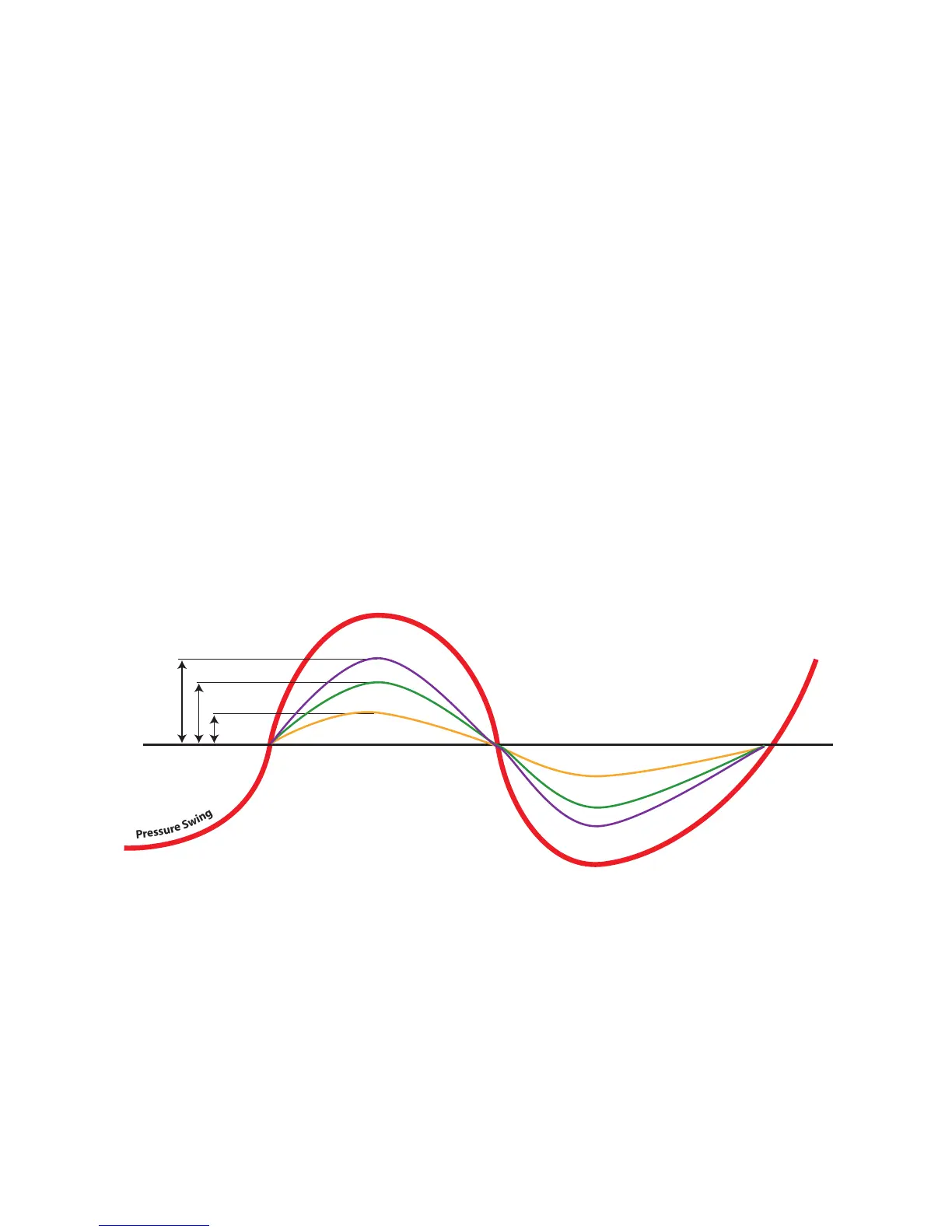
Z-Breathe is a proprietary algorithm engineered in the Z1 to smooth out the breathing cycle while
enjoying the benets of CPAP therapy. Typically users experience pressure swings while breathing
on a xed pressure CPAP device. Pressure swings occur as a spike in pressure during exhalation
and a drop in pressure during inhalation. Z-Breathe is designed to eliminate the spikes and drops
while keeping the pressure constant, thereby delivering more comfortable therapy.
Pressure swings can vary between users and this is due to the lung capacity of the person
breathing on the machine. Larger individuals will typically have greater lung capacity that will
require a more aggressive setting and for this reason we have created 3 levels of Z-Breathe:
— CPAP 1 oers mild pressure swing relief
— CPAP 2 is the Default Setting and oers moderate pressure swing relief
— CPAP 3 is the most aggressive setting for pressure swing relief
You can change the setting of the Z-Breathe Algorithm when your Z1 unit is in Standby Mode
(pressure of “0.0” indicated on the display). To change the setting, hold down both the Up and
Down Arrow Buttons at the same time until you see “CPAP – 1”, “CPAP – 2” or “CPAP – 3” ashing
on the display. Press the Up or Down Arrow Buttons until you observe your desired setting on the
display. To lock-in the setting, hold down the Start/Stop Button until the “CPAP – X” indicator no
longer ashes on the display.
The Z-Breathe settings in relation to the xed pressure are illustrated in the graph below. We
encourage you to experiment with the settings to achieve maximum comfort.
P
r
e
s
s
u
r
e
S
w
i
n
g
10 cmH
2
O
Z-Breathe 1
Z-Breathe 2
Z-Breathe 3



 To Next Page