16
Doc. HD40-0007-02 En-Eu L-4
Starting and Stopping Treatment
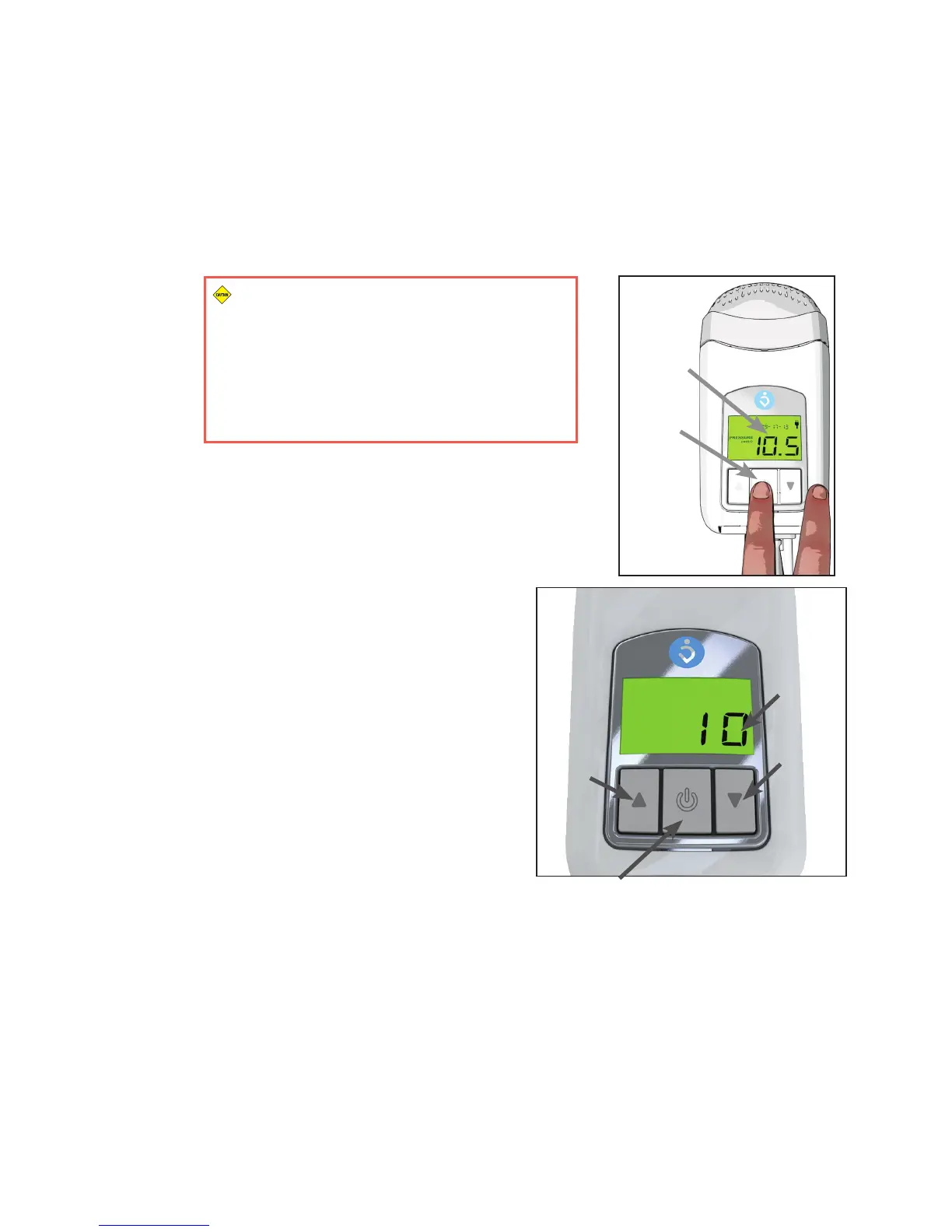
1. Press the Start/Stop Button on the Z1 to initiate treatment using the programmed
treatment setting. The Treatment Pressure Display will show the actual pressure
being delivered at all times. If the Ramp Mode has been programmed, the Ramp start
pressure will be displayed upon pressing the Start/Stop Button and the indicated
pressure will rise as the Z1 Ramps up to prescribed treatment pressure. If the incorrect
pressure is displayed, contact your health care provider before commencing CPAP
therapy. (Figure 10)
CAUTION (When using the PowerShell Only):
Make sure your Battery is fully charged before
commencing CPAP therapy using the PowerShell.
The battery life of a fully charged battery in the
PowerShell is typically 8 hours or longer and
treatment will terminate when the charge is
expended.
2. Press the Start/Stop Button a second time to stop
treatment.
Programming Treatment Pressure
When the Z1 is in standby mode, press and hold the
Start/Stop Button for 3seconds until the pressure
value ashes. While it is ashing, repeatedly press
either the Up or Down Arrow Buttons to increase or
decrease the pressure (Figure 11). When you have
reached the prescribed pressure, press and hold the
Start/Stop Button for approximately 3seconds to save
the treatment pressure setting (this setting will be
saved even when the Z1 is not powered). The Z1 will
return to standby mode. To return to standby mode
without saving the new setting, press and release the
Start/Stop Button momentarily instead of holding it
down.
Current
Treatment
Pressure
Start/Stop
Button
Figure 10
Up
Arrow
Button
Down
Arrow
Button
Start/Stop
Button
Treatment
Pressure
Figure 11



 To Next Page