19
Doc. HD40-0007-02 En-Eu L-4
Charging the Battery (PowerShell Only)
WARNING: Only charge the Battery with
the supplied Z1 PowerShell and the supplied
Z1 Power Supply. Do not use any other battery
charger, AC adapter, or other device to charge
the Battery.
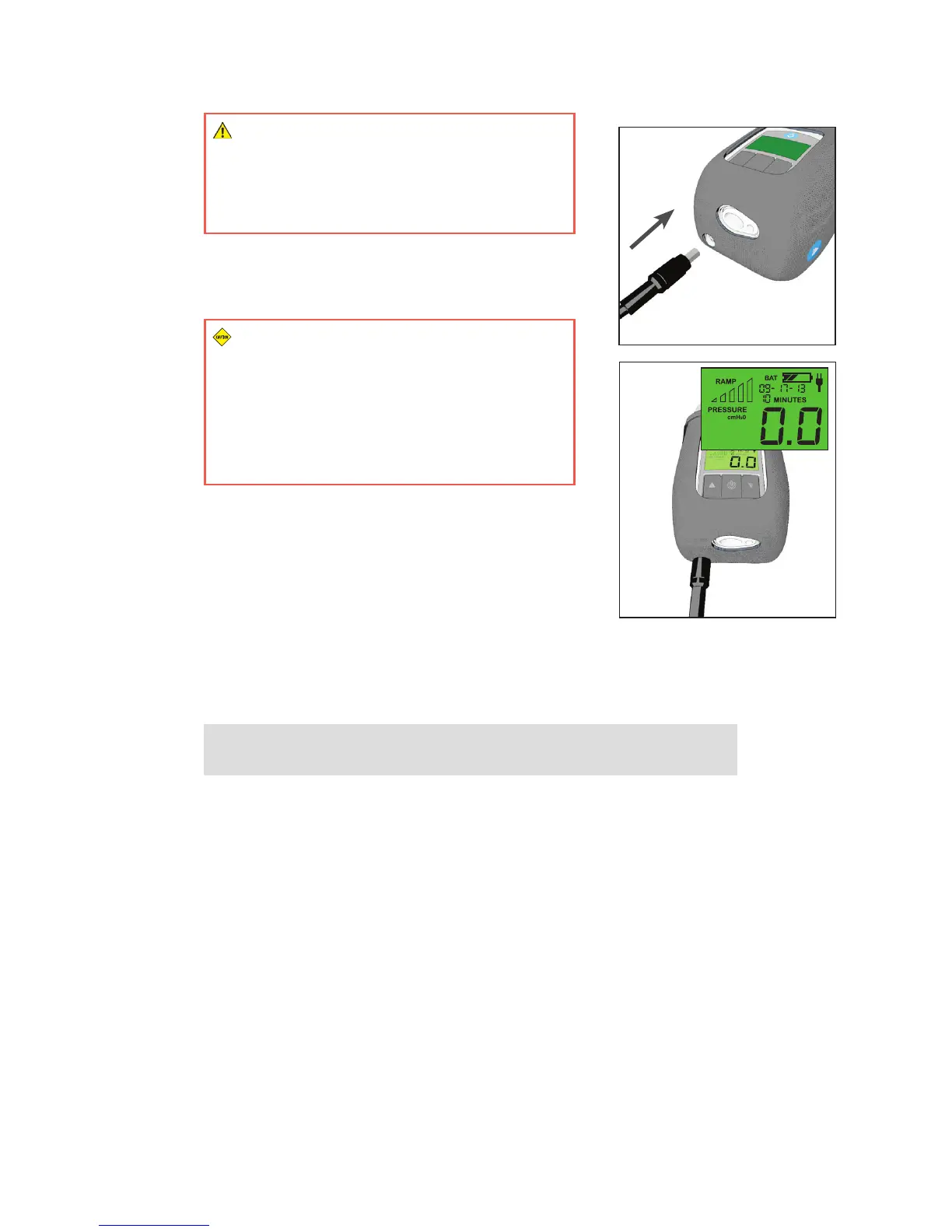
With both the Z1 and the Battery fully inserted into the
PowerShell, plug the Power Supply into the PowerShell as
shown and into a power outlet. (Figure 13)
CAUTION: Make sure your Battery is fully
charged before commencing CPAP therapy
using the PowerShell. The battery life of a fully
charged battery in the PowerShell is typically
8hours or longer, after which treatment will
terminate. To recharge the Battery, see “Charging
the Battery”
Ensure the Z1 is in standby mode (display reads 0.0). The Battery
will not charge unless the Z1 is in standby mode. The Battery
status indicator on the Z1 will ash when the Battery is charging.
The number of solid bars indicates the current level of charge.
(Figure 14)
The battery status indicator will stop ashing when the battery
is fully charged. Typically it will take 8hours to fully charge the
battery. After a few minutes, the back lit display will turn turn o.
This is to conserve power. It does not indicate that the battery is
fully charged.
NOTE: The battery will not charge if you are using the device at the
same time.
Care
The Z1 System needs periodic care. It is the user’s responsibility to be aware of the following items
for care:
• Inspections
• Cleaning
• Filter Replacement
• CPAP Tube Replacement
• Reminders and Fault Conditions
Inspections
Before each use carefully inspect the Z1, CPAP Tube, Filter, and mask for signs of wear, damage or
discoloration. For replacement parts visit www.breas.com.
Figure 13
Figure 14



 To Next Page