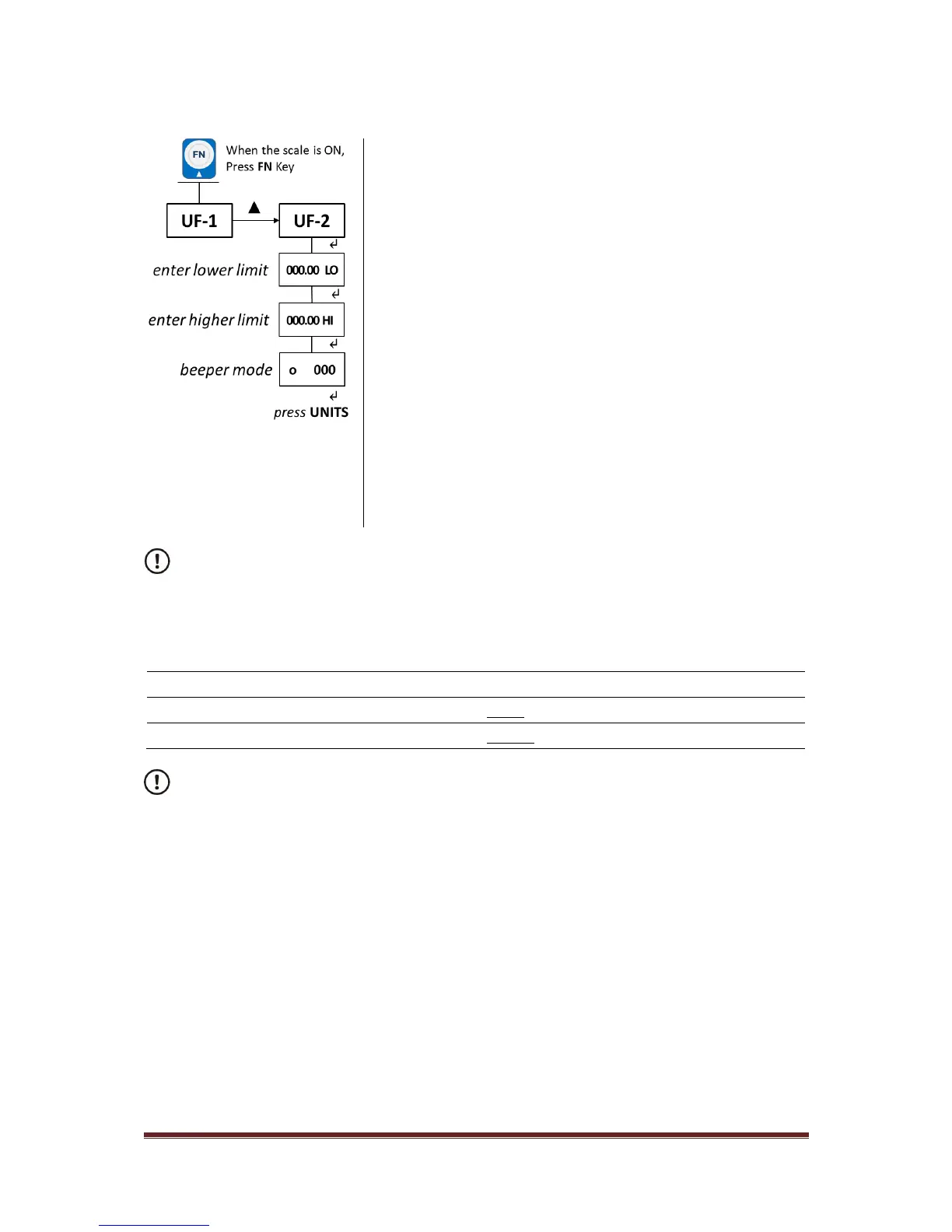
i. When the scale is ON, press FN (▲) key;
UF-1 will be displayed.
ii. Press FN (▲) key;
UF-2 will be displayed.
iii. Press ON/ZERO/TARE (↵) key;
iv. To enter or edit the LO limit value, scroll through the
displayed digits by using the ON/ZERO/TARE (↵)
key. Press the FN (▲) key to increase the value of
the flashing digit.
v. Press ON/ZERO/TARE (↵) key to confirm;
vi. Repeat points iv. and v. for the HI limit;
vii. Choose the beeper mode [000; 001; 002]
navigating the decimal position by pressing
ON/ZERO/TARE (↵) key. Press the FN (▲) key to
increase the value of the flashing digit.
viii. Press ON/ZERO/TARE (↵) key to complete and
leave the procedure;
ix. Press UNITS (ESC) key to exit the User Menu.
To disable the checkweighing feature, set the Hi and Lo limits to 0 in the User Menu [UF-
2].
The LO and HI annunciators will be turned off.
3.4. Changing Units of Measure
1. With the scale turned on press the UNITS key to select the required unit of measure you want the
scale to work in from kg – grams –lb.



 To Next Page