AWT35-501815 Issue AB C3236_u_en_501815.docx Page 12
4. Menus
There are three menus that allow to configure, enable or execute specific functions or options.
• Supervisor Menu LF 1 ~ 8
• Quick Calibration Menu ECF – 1 ~ 3
4.1. User Menu
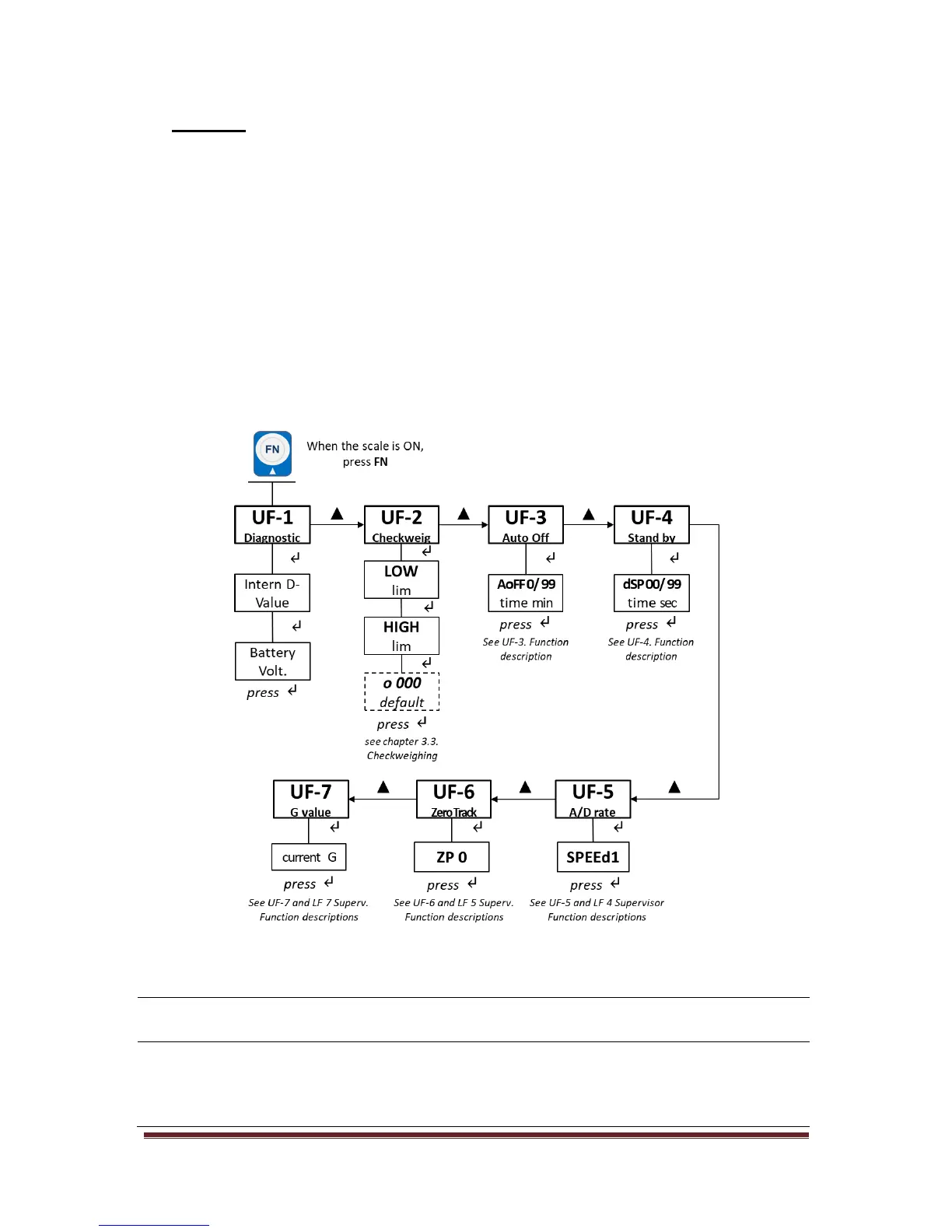
In the User Menu there are various submenus available to configure specific sections of the scale
operating modes, including a diagnostic feature.
4.1.1. User Menu Levels [UF]
Navigate the menus and increase a numeric value by pressing FN (▲) key. Use ON/ZERO/TARE (↵)
key to confirm and/or move to the next option or numeric value position. Press UNITS (ESC) key to exit
the option or the menu.
4.1.2. User Functions Descriptions [UF]
There are 11 Setup Functions.
Diagnostic: use this menu to check or verify the performance of the indicator. The
diagnostic tests are: Internal A/D Value and Battery Voltage.
Checkweighing: the acceptable weight is any weight which falls between the upper and
lower limits. Enter this option to set the items relating to Checkweighing:
• LOW / HIGH limits. Valid beeper modes: o 000; o 001; o 002.
See chapter 3.3. on page 10.



 To Next Page