8
GB
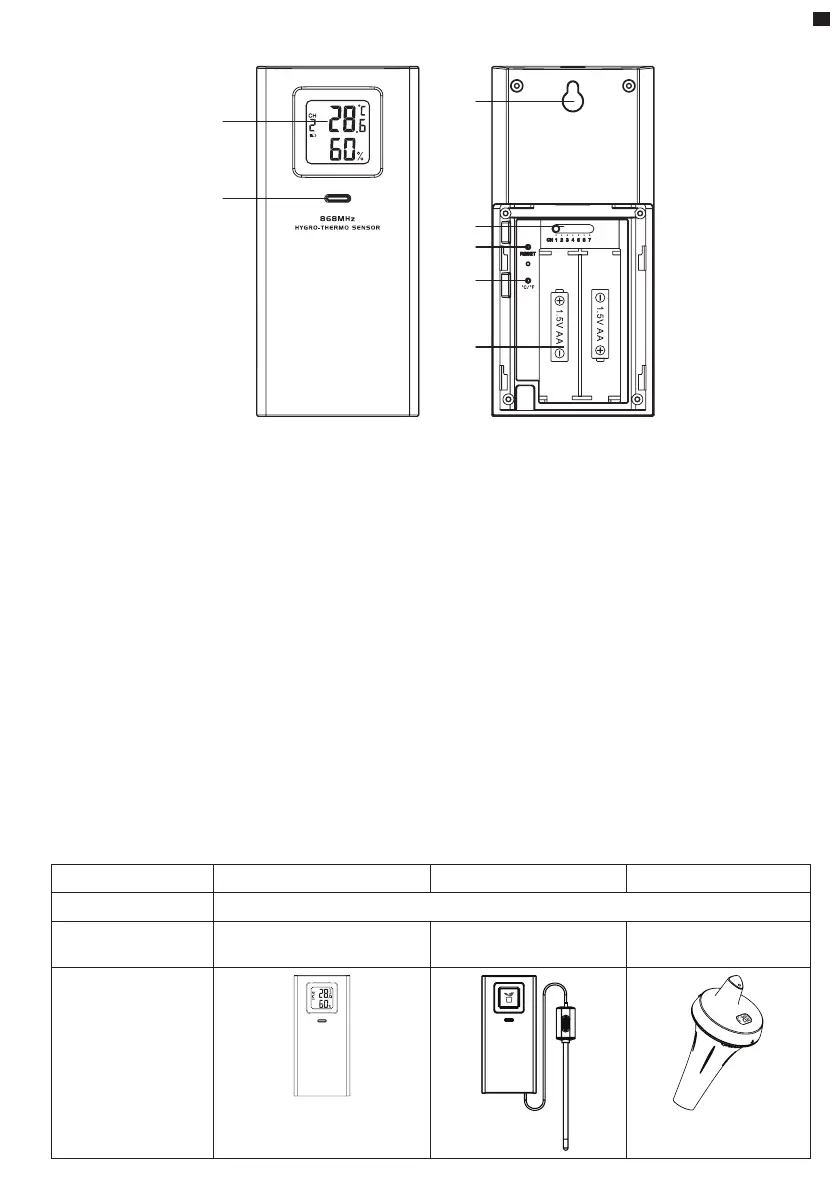
1.1 WIRELESS HYGRO-THERMO SENSOR
2
5
6
4
7
1
3
1. LCD display
2. Transmission status LED
3. Wall mounting holder
4. [ CHANNEL ] slide switch
5. [ RESET ]
6. [ °C / °F ]
7. Battery compartment
1.1.1 INSTALL WIRELESS INDOOR THERMO-HYGROSENSOR
1. Remove the battery door of the sensor.
2. Use the channel slide switch to set the channel number for the sensor (e.g. Channel 1)
3. Insert 2 x AA size batteries into the battery compartment according to the polarity
information marked on the battery compartment and close the battery door.
4. The sensor is in synchronization mode, and can be registered to the console within the next
few minutes. The transmission status LED is blinking.
NOTE:
- If you need to re-assign the sensor channel, slide the channel slide switch to the new channel
position. For the new channel number to be eective, press [ RESET ]
on the sensor.
- Avoid placing this sensor in direct sunlight, rain or snow.
1.2 OPTIONAL SENSOR
The weather station works with following optional sensors:
MODEL 7009971 7009972 7009973
NO OF CHANNEL 7
DESCRIPTION Thermo-Hygrometer sensor Soil Moisture and
Temperature Sensor
Spa and Pool
Thermometer
IMAGE
868MHZ
THERMO-HYGRO SENSOR
868MHZ
SOIL SENSOR






 To Next Page