11
2. Select "S' in hemisphere section of the setup UI setup page. (Please refer to SETUP THE
WEATHER SERVER CONNECTION section for setup details)
3. Press
Apply
icon to conrm and exit.
NOTE:
Changing the hemisphere setting will automatically switch the direction of the moon phase on the display.
CREATE WEATHER SERVER ACCOUNT & SETUP WI-FI CONNECTION
The console can upload weather data to WUnderground and / or Weathercloud through WI-FI
router, you can follow the step below to setup your device.
NOTE:
The Weather Underground and Weathercloud website are subjected to change without notice.
CREATE WEATHER UNDERGROUND ACCOUNT
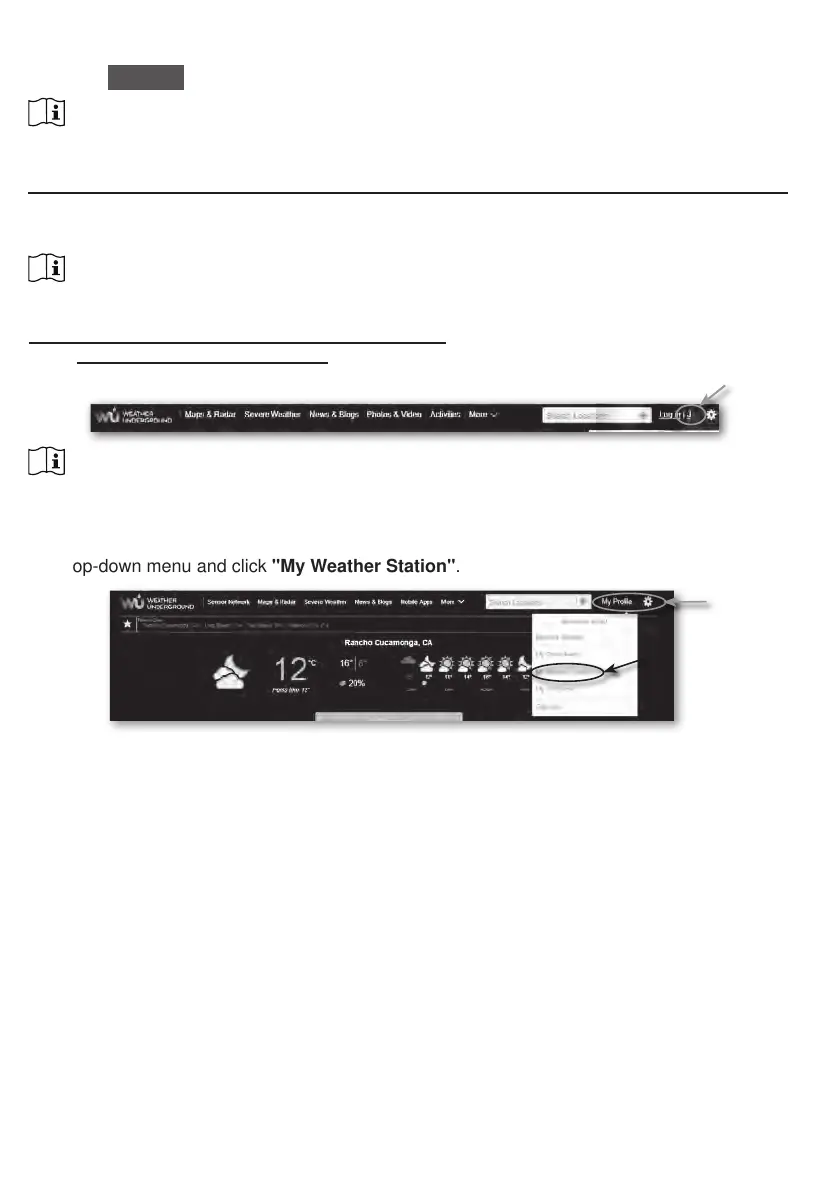
1. In https://www.wunderground.com click the "Join" on the top right corner to open the
registration page. Follow the instructions to create your account.
NOTE:
Use the valid email address to register your account.
2. After you have created your account and completed the Email validation, please go back to
the WUndergound web page to login. Then, click “My Prole” button on the top to open the
drop-down menu and click "My Weather Station"
.
3. In "My Weather Station" page, press the "Add New Device" button to add your device.






 To Next Page