28
GB
WIRELESS 7-IN-1 SENSOR MAINTENANCE
.
,
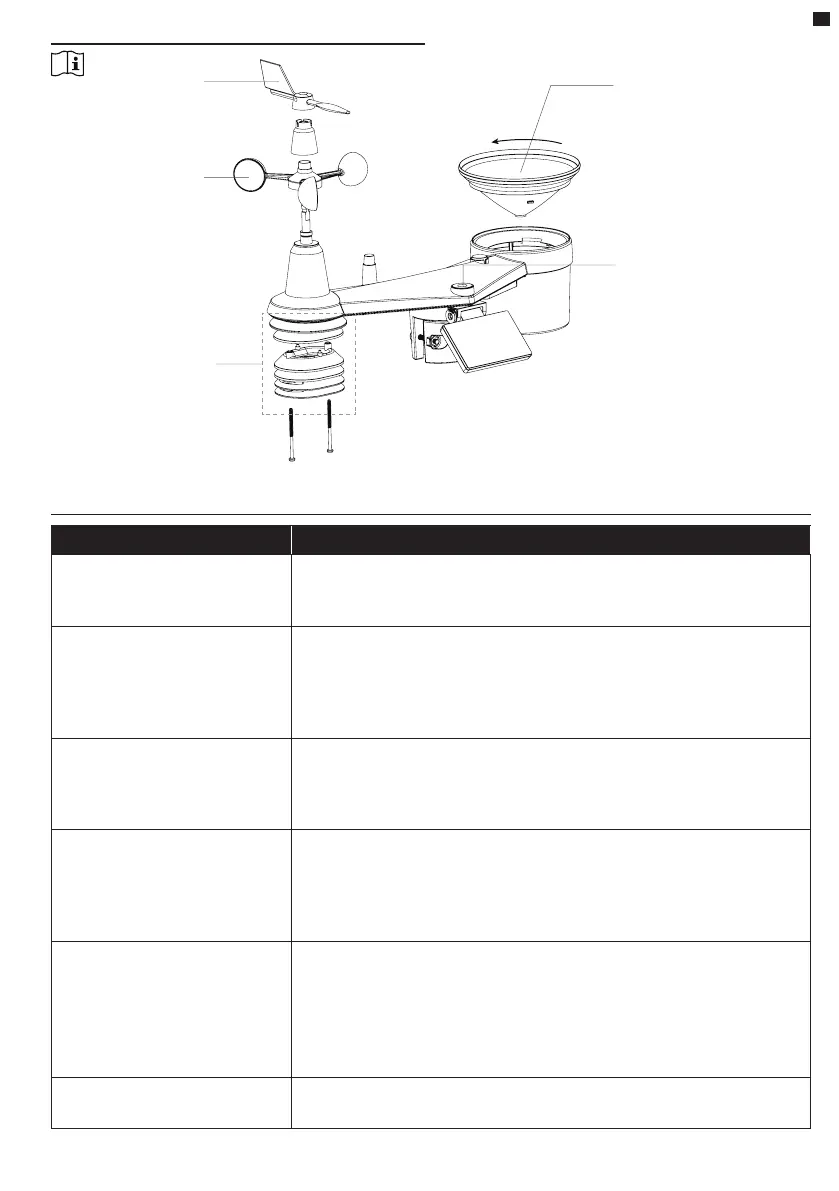
REPLACE THE WIND VANE
Unscrew and remove the wind
vane for replacement
REPLACE THE WIND CUPS
1. Unscrew and remove the
top cap.
2. Remove the wind cups for
replacement.
CLEANING THERMO-HYGRO-
SENSOR
1. Remove the 2 screws at the
bottom of the radiation shield.
2. Gently pull out the shield.
3. Carefully remove any dirt or
insects on the sensor (do not
let the sensors inside get wet).
4. Clean the shield with water to
remove any dirt or insects.
5. Install all the parts back when
they are clean and fully dried.
CLEANING THE RAIN COLLECTOR
1. Rotate the rain collector by turning it
30° anti-clockwise.
2. Gently remove the rain collector.
3. Clean and remove any debrits or
insects.
4. Install the collector when it is clean
and fully dried.
CLEANING THE UV SENSOR
• For precision UV measurement,
gently clean the UV sensor cover
lens with damp micro-bre cloth.
TROUBLESHOOT
Problems Solution
7-in-1 wireless sensor
is intermittent or no
connection
1. Make sure the sensor is within the transmission range
2. If it still not work, reset the sensor and resynchronize with
console.
Indoor wireless sensor
is intermittent or no
connection
1. Make sure the sensor is within the transmission range
2. Make sure the channel displayed match to the channel
selection on sensor
3. If it still not work, reset the sensor and resynchronize with
console.
No WiFi connection 1. Check for WiFi symbol on the display, it should be alway
on.
2. Make sure you connect to 2.4G band but not 5G band of
your WiFi router.
Data not reporting to
Wunderground.com or
weathercloud.net
1. Ensure your Station ID and Station Key are correct.
2. Ensure the date and time is correct on the tablet . If
incorrect, you may be reporting old data, not real time data.
3. Ensure your time zone is set properly. If incorrect, you may
be reporting old data, not real time data.
Wunderground Precip.
Accum. Total graph oset
1 hour reset time, during
summer daylight saving
time
1. Ensure the time zone of the device on Wunderground set
correctly
2. Ensure the time zone and DST on your console are correct.
3. If you located your station out of US time zone region in
Wunderground, the DST will be invalid. To solve this issue,
please turn o the DST function in console.
Rainfall is not correct
1. Please keep the rain collector clean
2. Make sure the tipping bucket inside can work smoothly






 To Next Page