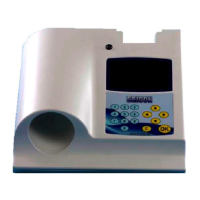
To Delete : Select the „Delete‟ icon and confirm with <OK>
and all clockings will be erased.
NB: The clockings of active races or unclosed races will not
be deleted.
Clocking : Select the „clocking‟ icon and confirm with <OK>
and Speedy will return to clocking mode for training flights.
SPEEDY 13
3.3. Input/Edit Fancier.
There are two ways to enter a fancier(s) into the Speedy :
- Through the Bricon Club-Master with the club-software ‟BRICON CLUB EDITOR‟.
(this enables you to enter the name, loft number and address).
- or directly onto the Speedy clock as explained below.
Move to „Input/edit fancier‟ and press <OK> to confirm.
With the buttons <PREVIOUS> and <NEXT> you can scroll
through the fancier list. Press <OK> to confirm if you want to
modify or change the name of the fancier.
An empty field of 20 characters appears. Using <PREVIOUS>
and <NEXT> a letter can be found. Continue pressing until you
find the correct letter and confirm with <OK>. The cursor
moves to the right and you can repeat the action for the next
letter. (NB : A space character can be found after the letter Z).
On the second line you can add your official loft number.
On completion of the details, Speedy will request confirmation
by pressing <OK> or cancelling the action with <C>.
3.4. Clocking.
Speedy detects for itself in which mode it should start-up. This
will take a few seconds to initiate after power-up.
When no loft antennas are connected, the main menu will
appear after start-up.
If Speedy detects that an antenna is connected it will start in
clocking-mode with the display reading „Clocking with xx Ant.‟
unless previous clockings remain on the clock, in which case it
will show the last bird recorded.
For security reasons if there is an active race on the Speedy
then it is impossible to leave clocking-mode.
When there are no active races on the Speedy, pressing <C>
deactivates „clocking-mode‟ and the main menu will appear.
The orange buttons <PREVIOUS> and <NEXT> can then be
used to scroll through the menu. Position the required icon in
the centre of the display and confirm with <OK>.
To record birds from a training flight, it is necessary to first
delete the clockings of the previous training flight.



 To Next Page