22 BRIGGSandSTRATTON.COM
Fuel Conversion
The engine of your generator system is factory calibrated to
run on natural gas (NG) or on liquefied propane (LP) vapor.
To convert to either fuel, follow these steps:
NOTICE Units are set to NG at the factory.
1. Insert key into lock of front panel. Gently push down on
roof above the lock to aid in turning the key. Turn key
one quarter turn clockwise.
2. Lift roof to the open position.
3. Press the control board OFF button.
4. Remove 15 Amp fuse from control panel.
5. Remove the rear panel.
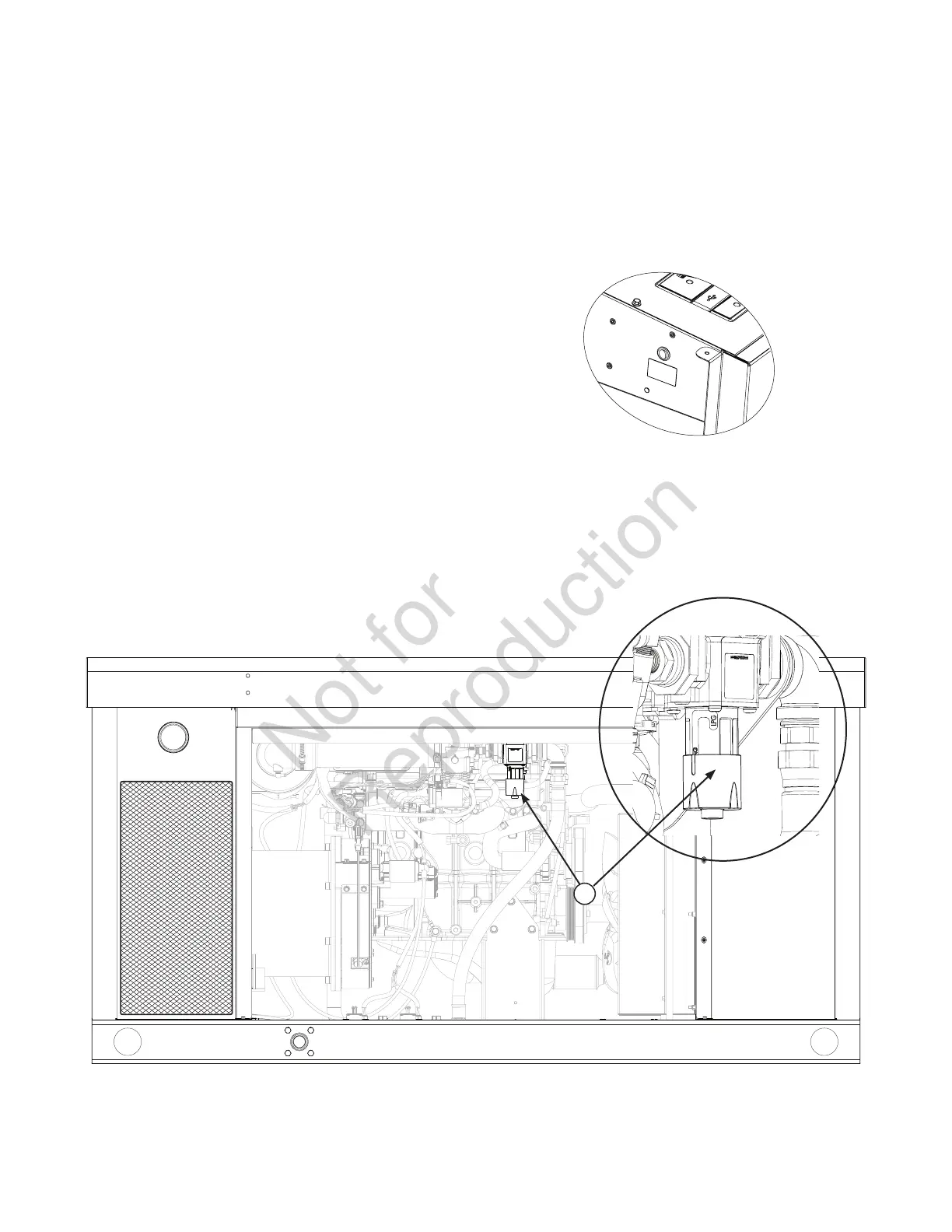
6. Locate the fuel selector collar on bottom of fuel
regulator (A).
7. Carefully push up on fuel selector collar, twist either
right or left and slide through the groove of the
appropriate fuel type (NG or LP).
• Pull down lightly to ensure fuel selector collar is
seated.
• Lift service panel.
• Locate fuel selector switch on side of circuit breaker
enclosure.
• Set switch to appropriate fuel type.
8. Reinstall the rear panel.
9. Reinstall service panel.
10. Reinstall 15 Amp fuse in control panel.
11. Press the control board AUTO button.
A



 To Next Page
 Loading...