BrightDrop Zevo 600 Owner Manual (GMNA-Localizing-U.S./Canada-
16569273) - 2023 - CRC - 11/3/22
16 Keys, Doors, and Windows
Doors
Sliding Door (Bulkhead Door)
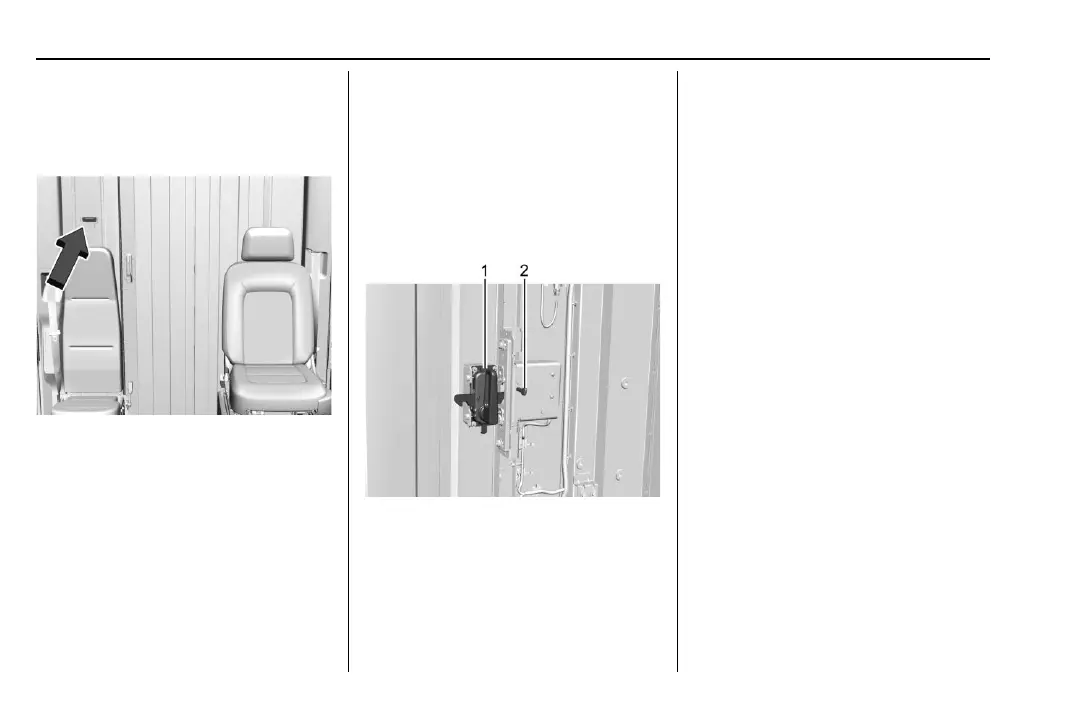
Cab Area Access
To open, unlock using the touchpad, then
pull the handle and slide the door to the
side until it latches.
Auto Open to the Cargo Area
If equipped with an auto open bulkhead
door, the bulkhead door will open
automatically if the vehicle is on and you do
one of the following:
.
Press the touchpad on the wall next to
the bulkhead door while the remote key
is inside the vehicle.
.
Press the lower button on the back of the
drivers side of the steering wheel.
.
Shift into P (Park) while the vehicle is in
Delivery Mode.
To close, pull the handle again and slide it
closed until it latches. The bulkhead door
will automatically lock upon closing.
Cargo Area Access
1. Handle
2. Unlock Lever
If the door is unlocked:
To open, pull the handle and slide the door
to the side.
To close, pull the handle again and slide it
closed until it latches.
If the door is locked:
To open, either:
.
Push the unlock lever to the right and
hold it while pulling the handle.
.
Use the remote key to unlock the vehicle
and then pull the handle
Auto Open to Cab Area
If equipped with an auto open bulkhead
door, and the bulkhead door is unlocked,
pull the handle until the door unlatches and
then release the handle to open the door.
If the bulkhead door is locked, push the
unlock lever to the right and hold it while
pulling the handle. Once the handle
unlatches, release the handle to open
the door.
To close, pull the handle again and slide it
closed until it latches. The bulkhead door
will automatically lock upon closing.


 To Next Page