BrightDrop Zevo 600 Owner Manual (GMNA-Localizing-U.S./Canada-
16569273) - 2023 - CRC - 11/3/22
28 Seats and Restraints
3. Push and pull on the seatback to make
sure it is locked.
To return the seatback to the upright
position:
1. Lift the lever fully without applying
pressure to the seatback, and the
seatback will return to the upright
position.
2. Push and pull on the seatback to make
sure it is locked.
Heated Front Seats
{
Warning
If temperature change or pain to the skin
cannot be felt, the seat heater may cause
burns. To reduce the risk of burns, use
care when using the seat heater,
especially for long periods of time. Do
not place anything on the seat that
insulates against heat, such as a blanket,
cushion, cover, or similar item. This may
cause the seat heater to overheat. An
overheated seat heater may cause a burn
or may damage the seat.
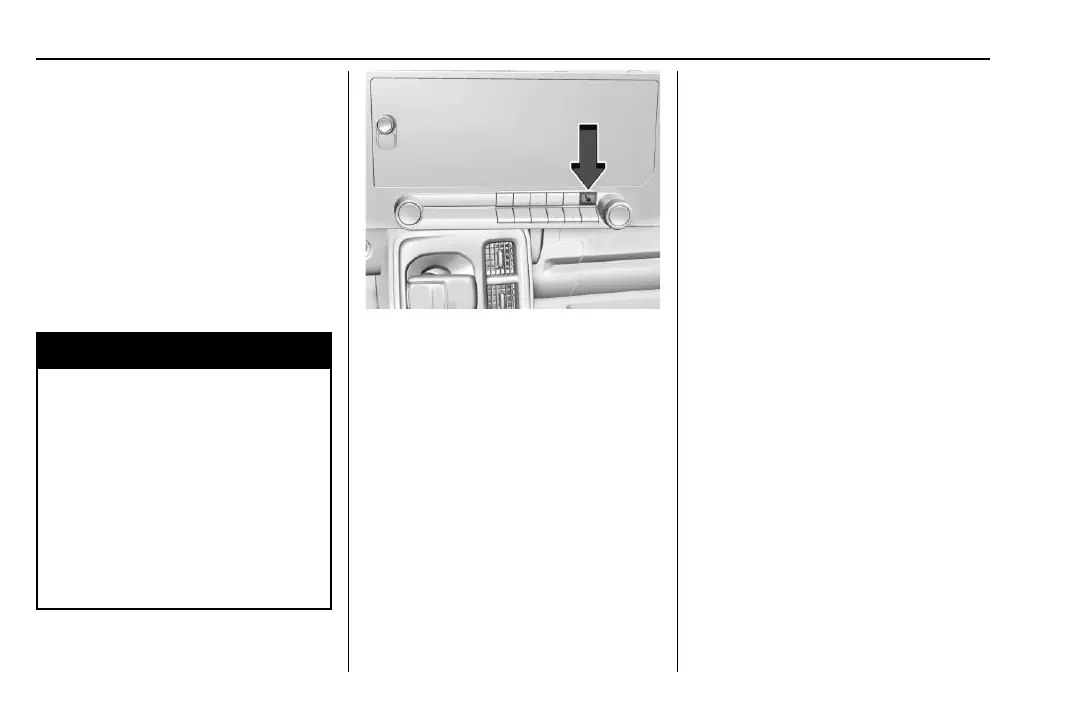
If equipped, the button is on the center
stack. To operate, the vehicle must be on.
Press
M to heat the cushion and seatback.
The indicator light comes on when this
feature is on.
Press the button once for the highest
setting. With each press of the button, the
seat will change to the next lower setting,
and then to the off setting. The indicator
lights next to the button indicate three for
the highest setting and one for the lowest.
If the heated seat is on high, the level may
automatically be lowered after
approximately 30 minutes.
Auto Heated Seats
When the vehicle is on, this feature,
if equipped, will automatically activate the
heated seats and heated steering wheel,
if equipped, at the level required by the
vehicle's interior temperature.
The active high, medium, low, or off heated
seat level will be indicated by the manual
heated seat button on the center stack. Use
the manual heated seat button on the
center stack to turn auto heated seats off.
The auto heated seats and steering wheel
can also be turned off using the heated
steering wheel button. To enable or disable
auto heated seats, select Settings >
Vehicle > Climate and Air Quality > Auto
Heated Seats > ON or OFF.
Remote Start Heated Seats
During a remote start, the heated seat can
be turned on automatically. When it is cold
outside, the heated seat turns on. The
heated seat may be canceled when the
vehicle is turned on. If necessary, press the
heated seat button to use the heated seat
after the vehicle is turned on.
The heated seat indicator light may turn on
during a remote start.


 To Next Page