BrightDrop Zevo 600 Owner Manual (GMNA-Localizing-U.S./Canada-
16569273) - 2023 - CRC - 11/3/22
Instruments and Controls 51
Controls
Steering Wheel Adjustment
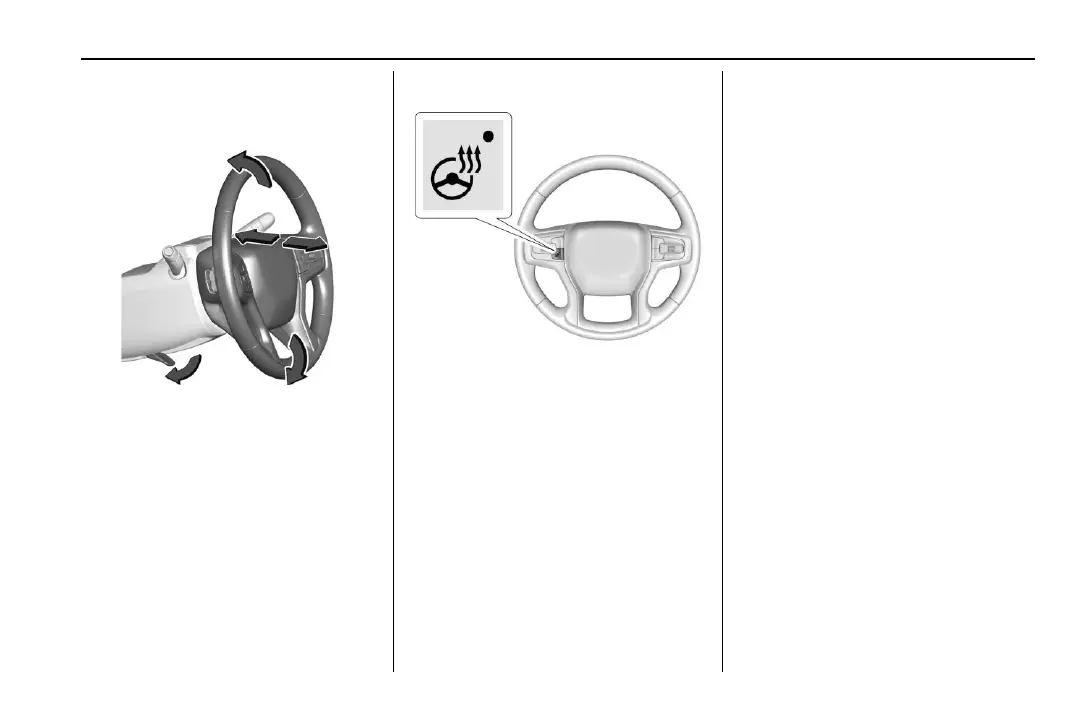
To adjust the steering wheel:
1. Pull the lever down.
2. Move the steering wheel up or down.
3. Pull or push the steering wheel closer or
away from you.
4. Pull the lever up to lock the steering
wheel in place.
Do not adjust the steering wheel while
driving.
Heated Steering Wheel
( : Press to turn the heated steering wheel
on or off. An indicator next to the button is
lit when the feature is turned on.
The steering wheel takes about
three minutes to start heating.
Automatic Heated Steering Wheel
The heated steering wheel may turn on
during a remote start along with the heated
seats when it is cold outside. The heated
steering wheel indicator may come on in
remote start.
The heated steering wheel will turn on
when the auto heated seat is activated. The
heated steering wheel indicator will display
the state of the steering wheel heat.
See Heated Front Seats 0 28.
To turn this feature on or off, select Settings
> Vehicle > Comfort and Convenience >
Heated Steering Wheel > Select ON or OFF.
Horn
Press a on the steering wheel pad to
sound the horn.
Pedestrian Safety Signal
The vehicle is equipped with automatic
sound generation.
The automatic sound is generated to
indicate the vehicle presence to pedestrians.
The sound changes if the vehicle is speeding
up or slowing down. It is activated when the
vehicle is shifted into a forward gear,
N (Neutral), or R (Reverse), up to 35 km/h
(22 mph).



 To Next Page