BrightDrop Zevo 600 Owner Manual (GMNA-Localizing-U.S./Canada-
16569273) - 2023 - CRC - 11/3/22
56 Instruments and Controls
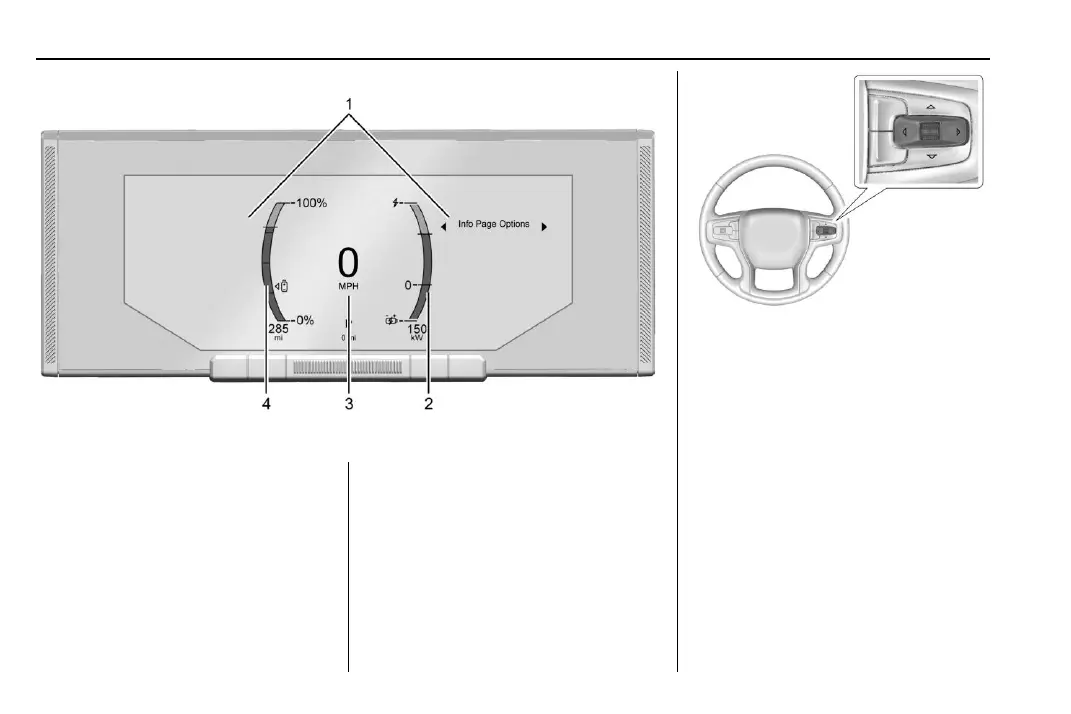
English Cluster Shown, Metric Similar
1. Driver Information Center (DIC) 0 72
2. Power Indicator Gauge 0 59
3. Speedometer 0 58
4. Battery Gauge (High Voltage) 0 58
Cluster Menu
There is interactive display areas in the
instrument cluster. Locations may vary by
the selected display layout.
Use the right steering wheel control to open
and scroll through the different items and
displays.
Press
S or T to access the cluster
applications. Use the thumbwheel to scroll
through the list of available features within
the applications. Not all applications or
features will be available on all vehicles.
.
Left Side Info
.
Vehicle info. This is where the Driver
Information Center (DIC) displays can be
viewed. See Driver Information Center
(DIC) 0 72.


 To Next Page