BrightDrop Zevo 600 Owner Manual (GMNA-Localizing-U.S./Canada-
16569273) - 2023 - CRC - 11/3/22
Instruments and Controls 67
Energy App
The Energy app gives you access to features
that will help you better understand and
control how the vehicle manages energy.
Along with providing a central location to
determine and review your charging
preferences, the Energy app offers live
information on how the vehicle is using
energy.
To launch the Energy app from the
infotainment home screen, touch the Energy
icon. There are four selections to choose
from: Charging, Schedule, Energy Usage, and
Settings. When you launch Energy for the
first time, the Charging screen will display.
Charging
To view the current charging status in the
infotainment display, touch Charging.
On the Charging screen, there is a range
of information associated with the next
Charging session, as well as the ability to
specify when you would like to charge the
vehicle. The choices available to charge are
Charge Now or Charge Later.
To create a charge schedule see “Creating a
Charge Schedule” under “Schedule” below.
The Charging screen shows and allows you
to determine how the vehicle charges the
next time it is plugged in.
Charge Now
Charge Now is the default charging mode
for your vehicle. The vehicle begins charging
immediately when it is plugged in and
authenticated at the charging location.
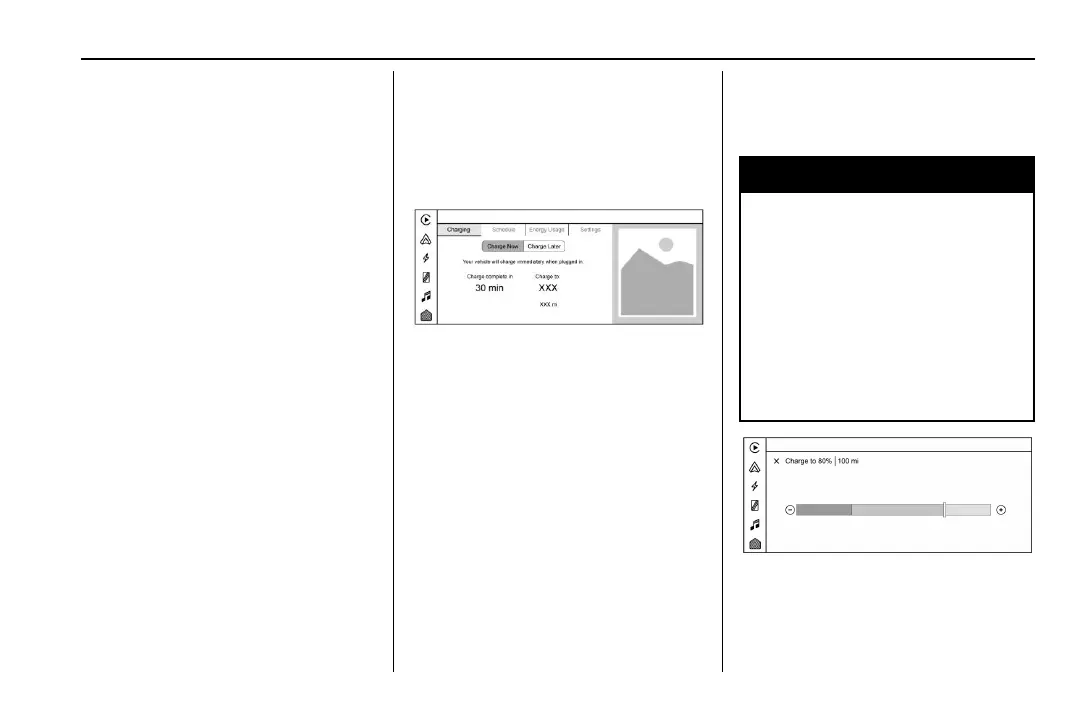
With Charge Now selected, the Charging
screen displays:
.
Text explaining that the vehicle will
charge immediately when plugged in.
.
Charge Level: The percentage to which
you would like the vehicle to charge.
.
Charge Complete by/in: The estimated
time at which the vehicle will reach the
desired Charge Level.
.
An estimate of the vehicle’s range upon
completing the charging session.
The default charge level is 100% when
plugged in. To set a different charge level,
touch the percentage shown under Charge
Level to display the Charge Level dialog.
{
Warning
Do not charge your vehicle’s battery
above an 80% charge if you are going to
drive down long, steep grades such as
mountain passes. This provides room in
the battery for regenerative braking to
supplement your conventional brakes
during the descent.
See Hill and Mountain Roads 0 115 for
important information about driving on
grades.
The Charge Level dialog displays:
.
The Charge Level Gauge with a color-filled
portion displaying the vehicle’s current
charge level. Use
1 and 0 or drag the
marker to adjust the desired Charge Level.



 To Next Page