Brillcam Inc. Copyright 2020-2021 Page 41 , Total 83
• Language: it allow the user to slect the system working language from the list.The device will reboot to
apply the changes.
• Resolution: it allow the user to select the system output video resolution from the list by the HDMI or
VGA, the device will reboot to apply the changes.
• Number: it allow the user to set the device number.
• Transparence: it allow the user to set the GUI background transparence from the list 0% to 75%.
• Device name: it allow the user to set the device name.
• Standby time: it allow the user to set the standby time of the device, after this time, the account will be
log out automatically.
• Record: it allow the user to set the record method from full or stop when full. Full means the records will
overwirte after full, stop to record after full.
• Startup Wizard: it allow the user to enable or disable the startup wizard after the system reboot.
• Disk Full Alert: it allow the user to enable or disable the alarm when the disk installed full.
• Apply: it allows the user to apply the settings.
• Cancel: it allows the user to cancel the settings.
3.1.2 Time settings
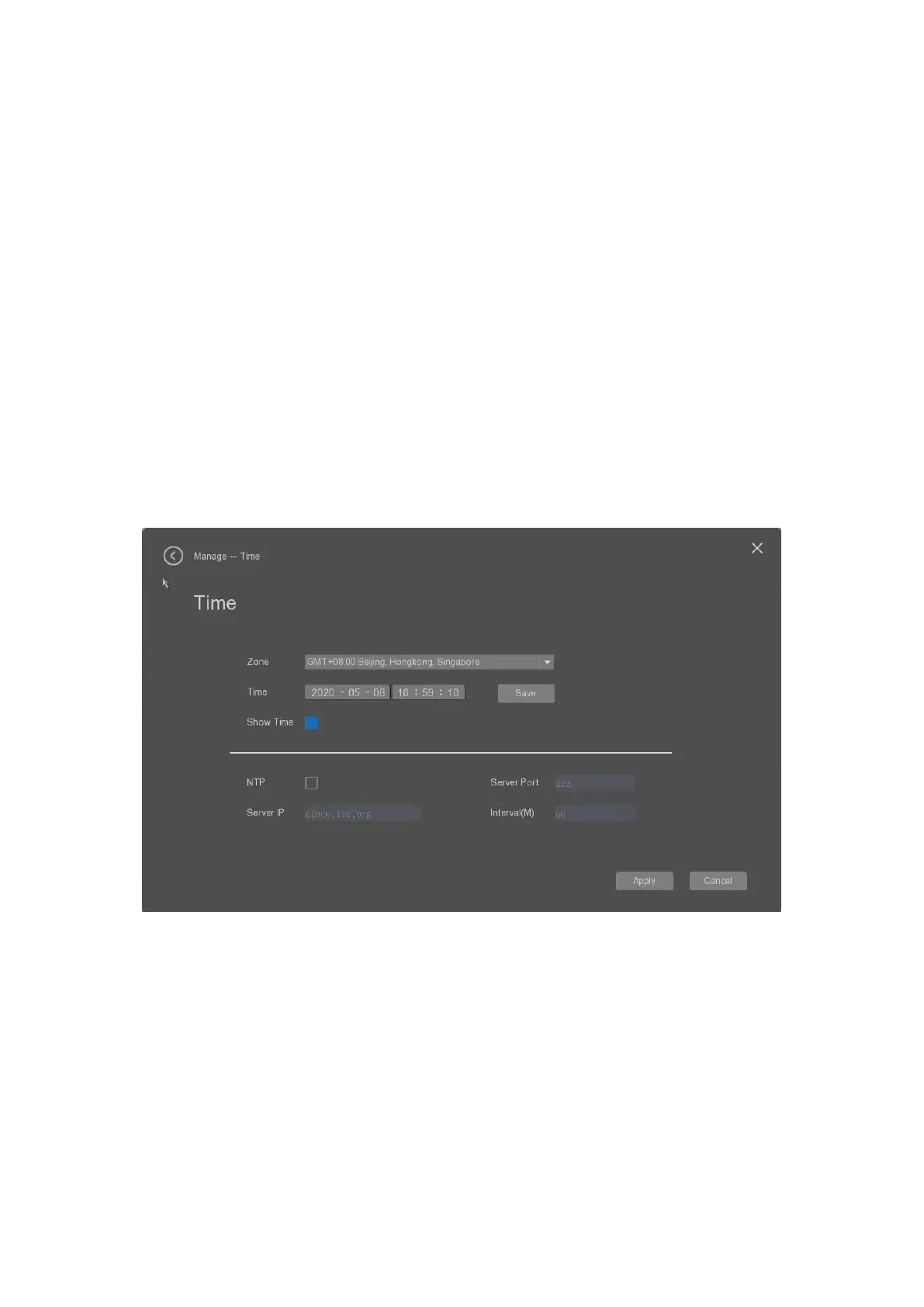
The user can select the “Time” tab to set the device time settings as below.
• Zone: it allow the user to slect the working time zone from the list.The device will reboot to apply the
changes.
• Time: it allow the user to manually set the device’s time, and click “Save” to save the time.
• Show time: it allow the user to enable or disable to show the time in the display.
• NTP: it allow the user to enable or disable to use the NTP server’s time.
• Server Port: it allow the user to set the NTP server’s port number.
• Server IP: it allow the user to set the NTP server’s IP address.
• Interval(M): it allow the user to set the time synchronised interval time.
• Apply: it allows the user to apply the settings.
• Cancel: it allows the user to cancel the settings.


 To Next Page