Brillcam Inc. Copyright 2020-2021 Page 63 , Total 83
3.5.3 Alarm input
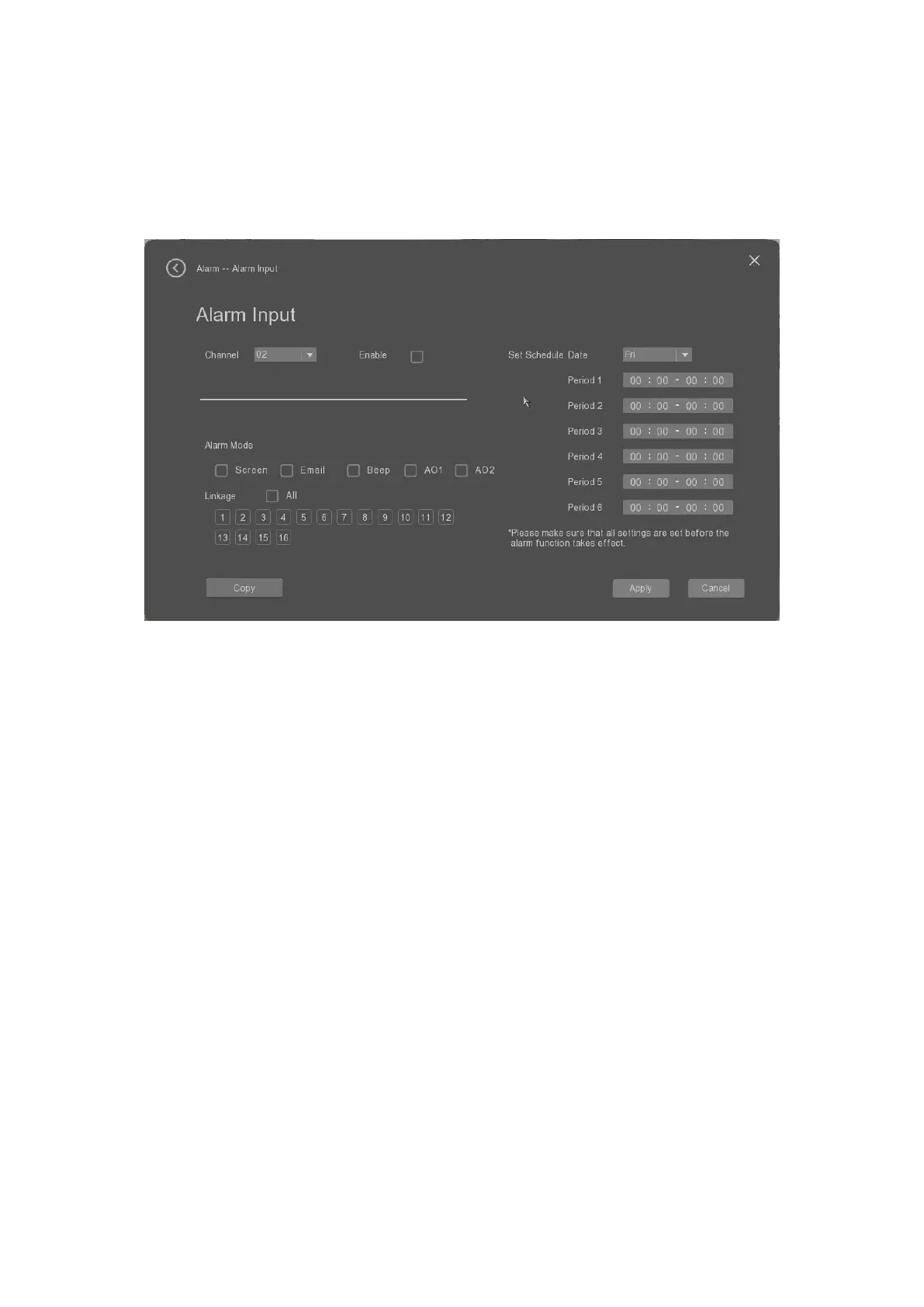
The user can select the “Alarm input” tab to set the parameters of the alarm input of the device. When the
NVR obtains the alarm signal from the connected external alarm device, what’s actions to do for
responding to the input alarm.
• Channel: it allows the user to select the channel to set the motion detection parameters.
• Enable.: it allows the user to enable or disable the motion detection.
• Alarm mode: it allows the user to selec the alarm triggerd action mode from full screen, email or beep
when there is motion detected.
• Linage: it allows the user to set the channel linkage.
• Set Schedule Date: it allows the user to set the schedule date with the different working periods.
• Copy: it allows the user to copy the settings to other channels.
• Apply: it allows the user to apply the settings.
• Cancel: it allows the user to cancel the settings.
There will be alarm notification window promoted when there is alarm input alarm triggered as below.


 To Next Page