
 To Next Page
S
Sheryl MooreSep 23, 2025
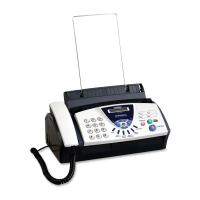
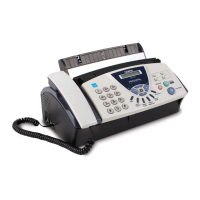
Why does my Brother 575 “hears” voice as fax tone?
- AAmanda RobbinsSep 23, 2025
If the fax machine is set to Easy Receive ON, it is more sensitive to sounds.

Why does my Brother 575 “hears” voice as fax tone?
If the fax machine is set to Easy Receive ON, it is more sensitive to sounds.
What to do if my Brother 575 Fax Machine is not sending faxes?
Ask the receiving party to verify that their machine has paper. Also, print the Transmission Verification Report on your machine and check for any error codes.
What to do if my Brother 575 Fax Machine says 'OUT OF MEMORY CLEAR MEMORY'?
This message indicates that the data is too large for the fax machine's memory. If you are sending a fax or copying, press Stop/Exit and wait for any other operations to finish before trying again. Alternatively, clear the faxes and scheduled jobs from the memory.
What to do if my Brother Fax Machine says 'MEMORY NEAR FULL CLEAR MEMORY'?
The 'MEMORY NEAR FULL' message means the fax machine is almost out of memory. To resolve this, clear the faxes and scheduled jobs from the memory, or print the faxes that are currently stored in the memory.
What to do if my Brother 575 Fax Machine says 'PAPER JAM PLS OPEN COVER REMOVE JAM'?
This message indicates a paper jam inside the fax machine. Consult the Paper Jam section for instructions on how to safely remove the jammed paper.
What does 'MEMORY DISABLED UNABLE TO INIT UNABLE TO PRINT UNABLE TO SCAN' mean on my Brother 575 Fax Machine?
This message indicates that the fax machine has a mechanical problem, or a foreign object (like a clip or ripped paper) is inside. Open the top cover and remove any foreign obstacles from inside the fax machine.
What to do if my Brother 575 Fax Machine says 'RECEIVE FAILED'?
The 'RECEIVE FAILED' message indicates a communication error due to poor phone line quality. If the problem continues, contact the telephone company and ask them to check your phone line.
What to do if my Brother 575 says 'RIBBON EMPTY RESET OR REPLACE'?
This message means your fax machine is out of ribbon, or the print cartridge is not properly installed. Install the print cartridge or change the ribbon again.
Why does my Brother 575 Fax Machine say 'COVER IS OPEN CLOSE COVER'?
This message indicates that the cover of the fax machine is not completely closed. Make sure to close the cover properly.
Why is my Brother 575 dialing not working?
Check all line cord connections to ensure they are secure. Also, make sure the curled handset cord is not plugged into the EXT jack.
Provides essential safety instructions for operating the fax machine.
Recommends suitable environments and placement for the fax machine.
Configure sender name and fax number for transmitted pages.
Configures the fax machine to forward received faxes to another number.
Allows accessing and retrieving fax messages remotely.
Details on using the remote access code for retrieving faxes.
Crucial safety guidelines to prevent hazards during operation.
Provides solutions for common operational issues and errors.
Instructions for clearing paper jams from the fax machine.
Lists and explains common error messages displayed by the machine.
Guide for cleaning the print head to maintain print quality.
Steps for replacing the ribbon cartridge in the fax machine.
 General
| Caller ID | Yes |
|---|---|
| Type | Plain Paper Fax |
| Broadcasting | Yes |
| Print Speed | Up to 10 ppm |
| Display | LCD |