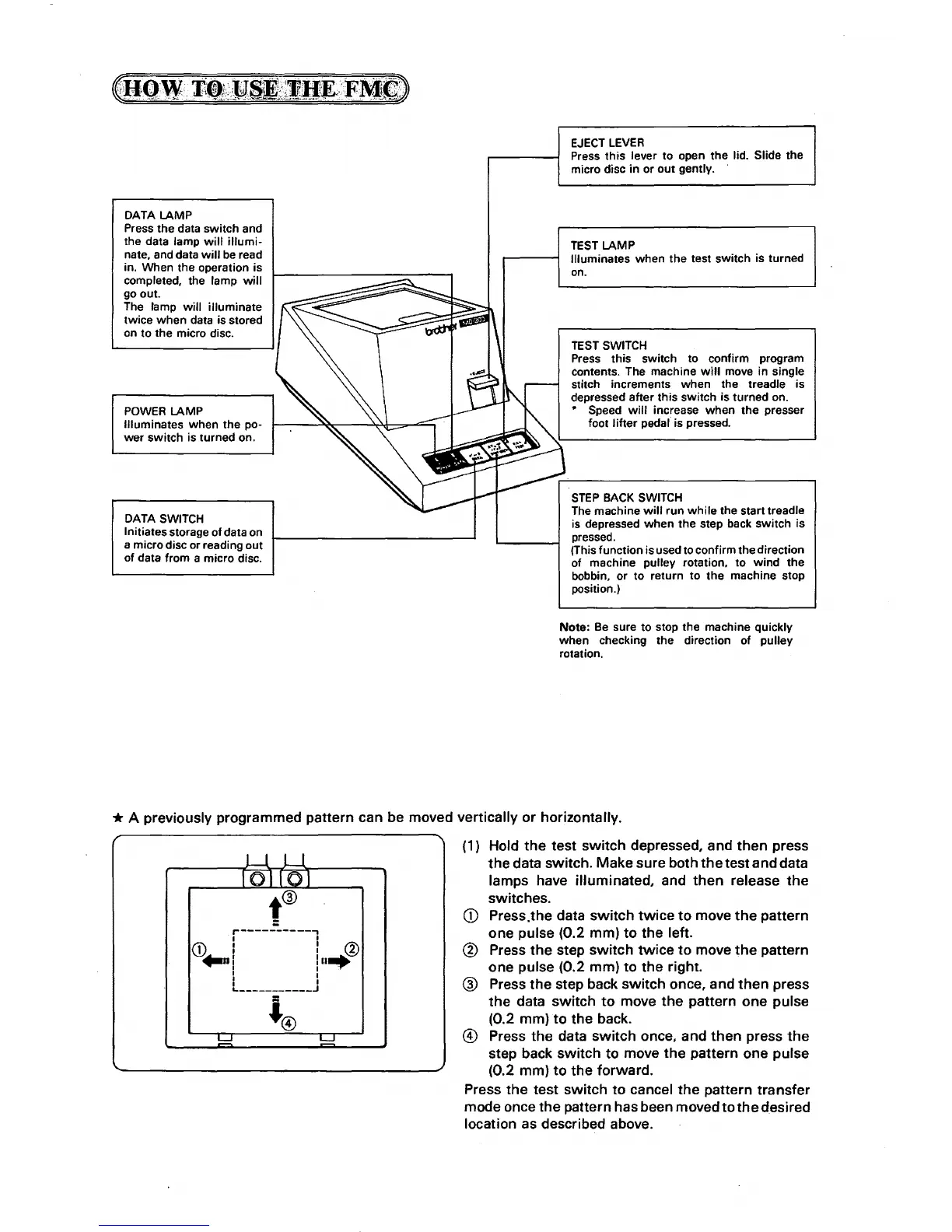
DATA LAMP
Press the data switch and
the data lamp
will
illumi-
nate, and data
will
be
read
in. When the operation is
completed, the lamp
will
go out.
The lamp
will
illuminate
twice
when
data is stored
on to the micro disc.
POWER
LAMP
Illuminates
when
the po-
wer
switch is turned on.
DATA
SWITCH
Initiates storage
of
data on
a micro disc or reading out
of data from a micro disc.
EJECT
LEVER
Press
this
lever
to
open the lid. Slide the
micro disc in or
out
gently. ·
TEST
LAMP
Illuminates when the test switch is turned
on.
TEST
SWITCH
Press this switch to confirm program
contents. The machine
will
move in single
stitch increments when the treadle is
depressed after this switch is turned on.
• Speed
will
increase when
the
presser
foot
lifter
pedal' is pressed.
STEP
BACK
SWITCH
The machine
will
run
while
the start treadle
is depressed when the step back switch is
pressed.
(This function is used to confirm the direction
of machine pulley rotation,
to
wind
the
bobbin, or
to
return
to
the machine stop
position.)
Note:
Be
sure to stop the machine quickly
when
checking the direction of pulley
rotation.
*A
previously programmed pattern can be moved vertically
or
horizontally.
r-----------,
I I
CD
I : ®
+-nl
ln....:
I I
""'"?""'
I I
I I
._
___________
J
(1) Hold
the
test
switch
depressed, and
then
press
the
data
switch.
Make
sure
both
the
test
and
data
lamps have
illuminated,
and
then
release
the
switches.
CD
Press.the data
switch
twice
to
move
the
pattern
one pulse (0.2
mm)
to
the
left.
@ Press
the
step
switch
twice
to
move
the
pattern
one
pulse (0.2
mm)
to
the
right.
® Press
the
step back
switch
once, and
then
press
the
data
switch
to
move
the
pattern
one
pulse
(0.2 mm)
to
the
back.
@)
Press
the
data
switch
once, and
then
press
the
step back
switch
to
move
the
pattern one pulse
(0.2 mm)
to
the
forward.
Press
the
test
switch
to
cancel
the
pattern
transfer
mode once
the
pattern has been moved to
the
desired
location as described above.



 To Next Page