6. USING THE OPERATION PANEL (ADVANCED OPERATIONS)
KE-430D, BE-438D 43
6
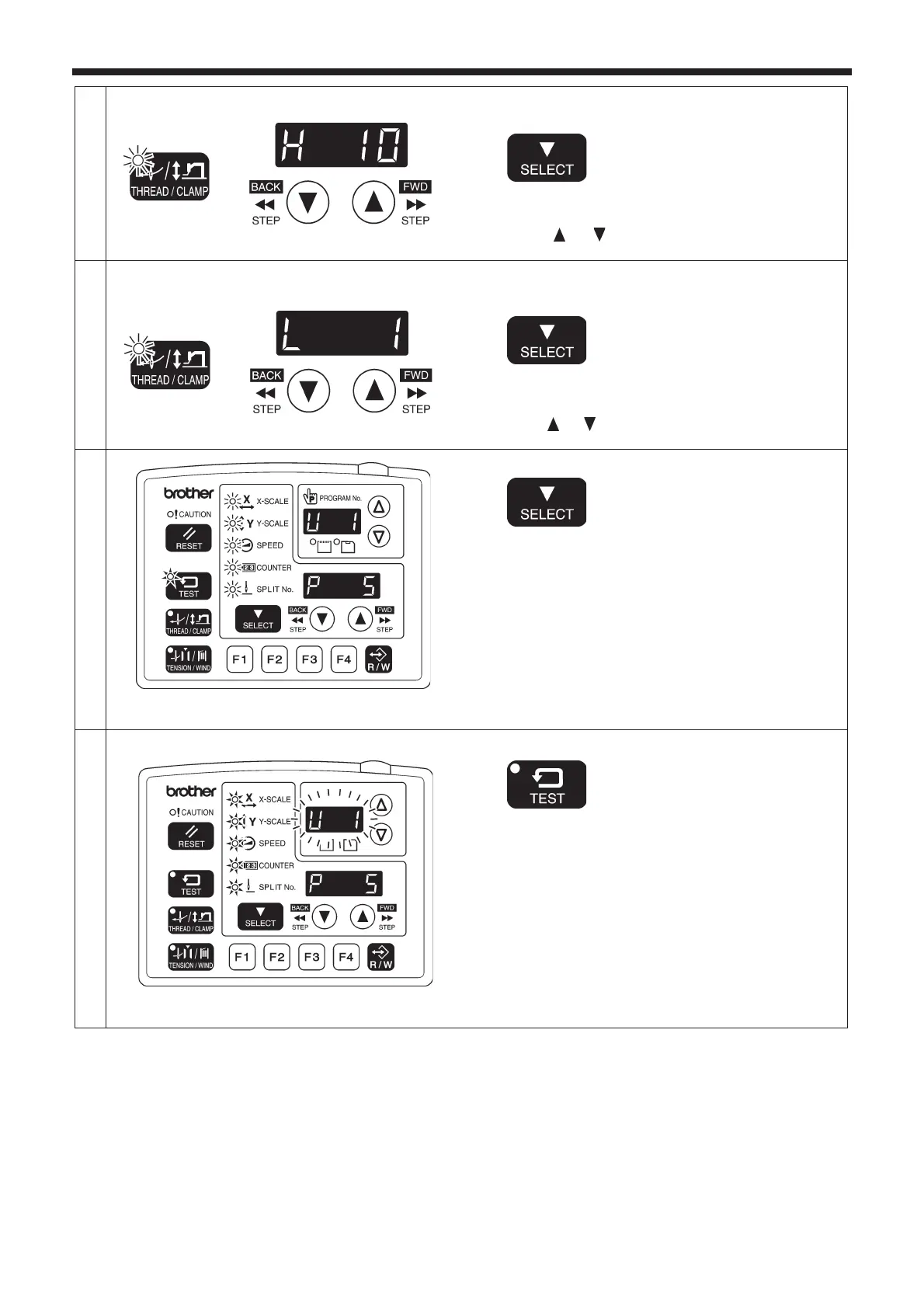
Next, set the work clamp height.
THREAD/CLAMP indicator flashes
Press the SELECT key.
Press the
or key to set the desired work clamp
height.
7
Next, set the intermediate work clamp height (only
when memory switch no. 003 is "ON").
THREAD/CLAMP indicator flashes
Press the SELECT key.
Press the
or key to set the desired intermediate work
clamp height.
8
TEST indicator lights
Menu indicators flash
Press the SELECT key.
• If setting further user programs, select the user program
number and then repeat steps 2 to 8.
9
End user program recording mode.
TEST indicator switches off
Menu indicators light
Press the TEST key.
This completes the recording of a user program.
• The user program number will flash in the PROGRAM
No. display, and the sewing machine will switch to home
position detection standby.
4476Q
4477Q
4478Q
4479Q



 To Next Page