Chapter 1
8
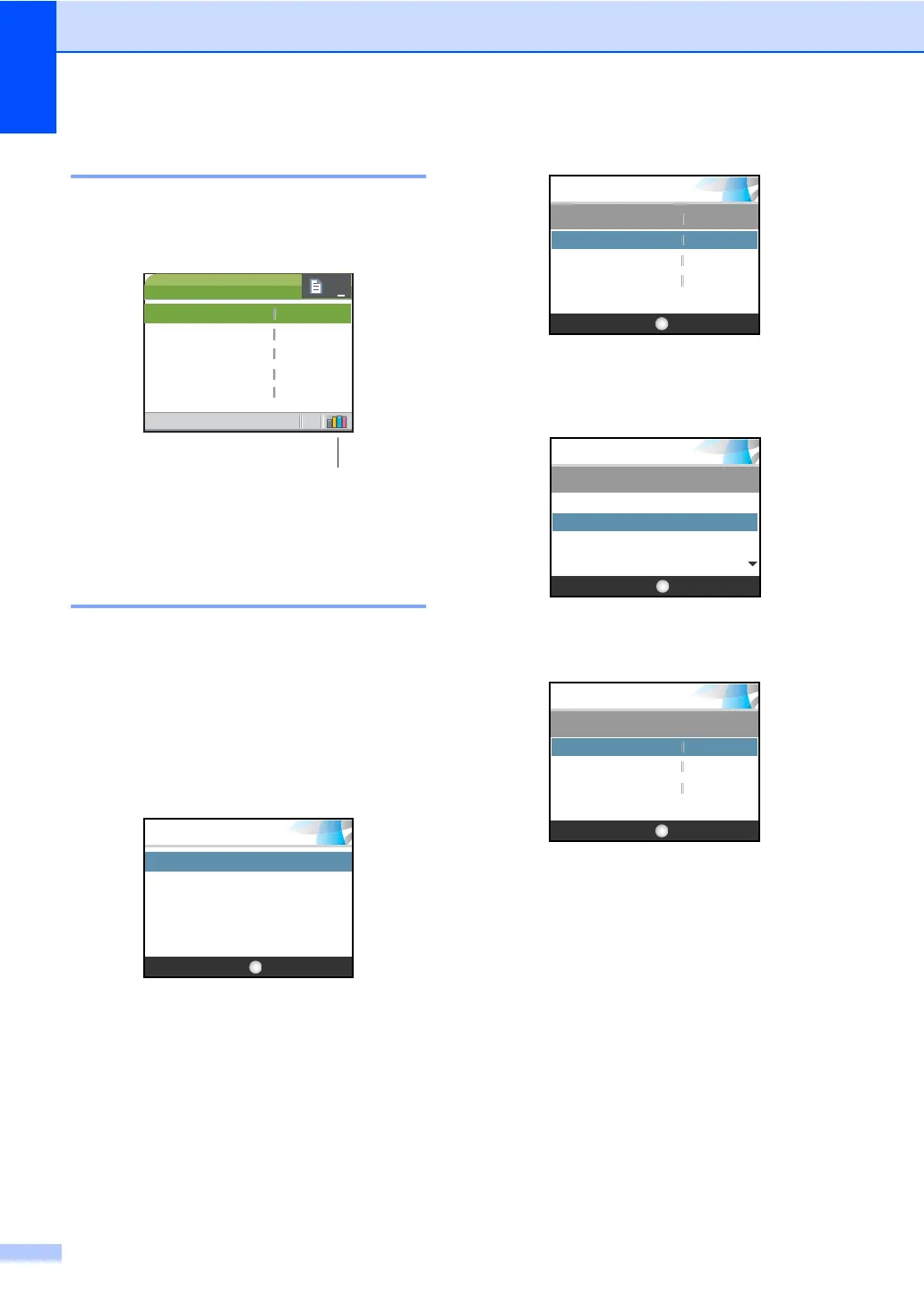
LCD display screen 1
The LCD display screen shows the mode the
machine is in, the current settings, and the
available ink volume.
1 Ink indicator
Lets you see the available ink volume.
Basic Operations 1
The following steps show how to change a
setting in the machine. In this example the
Paper Type setting is changed from
Plain Paper to Inkjet Paper.
a Press Menu.
b Press a or b to choose
General Setup.
Press OK.
c Press a or b to choose Paper Type.
Press OK.
d Press a or b to choose
Inkjet Paper.
Press OK.
You can see the current setting on the
LCD:
e Press Stop/Exit.
20:48
1
COPY
Quality
Enlarge/Reduce
Paper Type
Paper Size
Brightness
Normal
100%
Plain Pap
Letter
0
01
OKSelect & Press
MENU
Machine Info.
Print Reports
Initial Setup
General Setup
MENU
Paper Type
Paper Size
Plain Pa
General Setup
LCD Settings
OKSelect & Press
Letter
OKSelect & Press
MENU
Plain Paper
Inkjet Paper
Brother Photo
Other Photo
Paper Type
OKSelect & Press
MENU
Paper Type
Paper Size
LCD Settings
Inkjet Pa
General Setup
Letter











 To Next Page